
When people ask me about the best CMS for SEO, they expect a simple answer like “WordPress wins” or “Shopify for stores.” But after helping dozens of businesses select content management systems over the past few years, I’ve discovered something about search engine optimization that completely changed how I approach these decisions.
The platform itself rarely determines your SEO success. I’ve watched small blogs built on basic WordPress setups outrank enterprise websites using expensive, feature-rich CMS platforms. I’ve also seen technically perfect headless CMS implementations fail miserably while simple Squarespace sites climbed to page one.
What really matters is how well your specific team can use and maintain whatever system you choose. The most advanced SEO features become worthless if your content creators find the interface confusing or your team can’t handle basic maintenance tasks.
This revelation came from working with a marketing agency that built gorgeous, lightning-fast websites using cutting-edge headless CMS technology. Their clients loved the initial results, but six months later, many of these sites had dropped in rankings. The problem wasn’t technical. The client teams simply couldn’t figure out how to update content regularly or optimize new pages without calling the agency for help.
Meanwhile, their competitors using straightforward WordPress installations kept publishing fresh, optimized content and steadily gained ground in search results.
This experience taught me that choosing a CMS for SEO isn’t about finding the “best” platform. It’s about finding the right platform for your team’s capabilities and your business goals. A system that encourages consistent content creation and optimization will always outperform a technically superior platform that intimidates your users.
How to Test Which CMS is Best for Your SEO Goals
Before committing to any content management system, you need to verify it can actually handle your SEO requirements. Most people skip this testing phase and discover critical limitations only after investing weeks in setup and content creation.
I learned this lesson when a client chose a popular CMS based entirely on online reviews. Two months into the project, we realized the platform had serious issues with URL customization that prevented proper site structure optimization. We ended up rebuilding everything on a different system, wasting time and money that proper testing could have saved.
Now I always recommend running specific tests before making any final CMS decision. These tests take less than an hour but can prevent expensive mistakes and ranking problems down the road.
Start by creating a simple test site with a few sample pages. This doesn’t need to be your real content, just enough pages to evaluate the system’s basic functionality and SEO capabilities.
The Pre-Commitment Testing Checklist
The first thing I check is what I call “basic SEO control” – essentially testing the cms seo features. Log into the admin area and try to customize these meta tags management elements for individual pages: page titles, meta descriptions, and URL slugs. If you can’t easily change these fundamental SEO elements without digging through complex settings or writing code, that’s a major red flag.
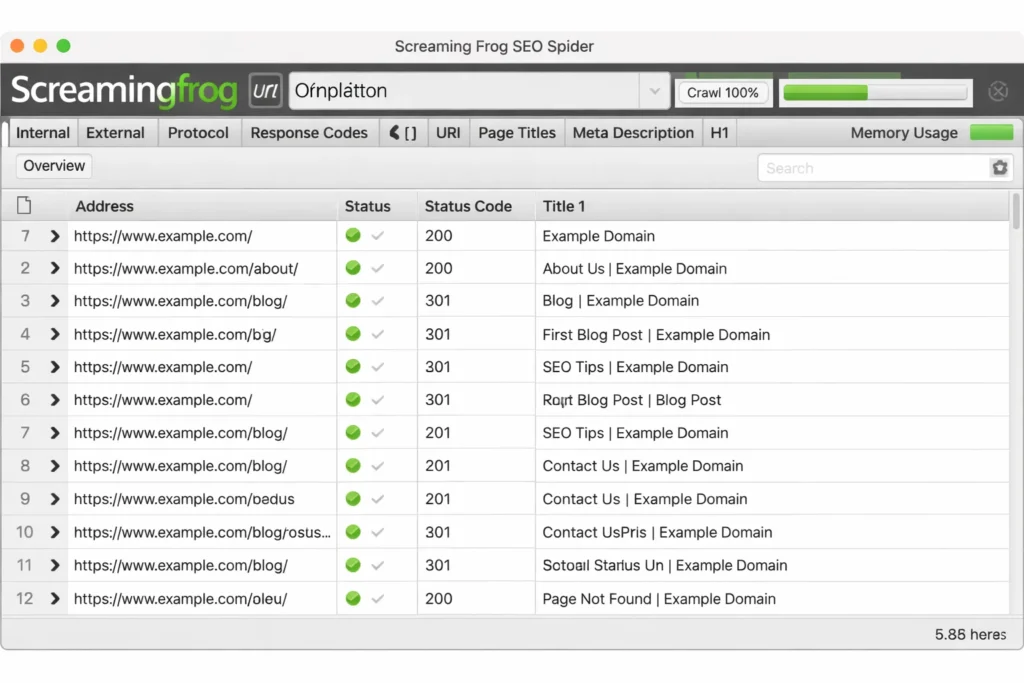
Next, run a crawling test using Screaming Frog, which offers free crawling for up to 500 pages. Point the crawler at your test site and see if it can easily find and read your content. If Screaming Frog encounters errors or has trouble accessing your pages, search engines will likely face the same problems.
Don’t forget to test site structure capabilities. Try creating a few pages in different folders like yoursite.com/services/web-design. Proper folder organization helps both users and search engines understand your content hierarchy, so your CMS should make this easy to set up and maintain.
Social media integration testing often gets overlooked but becomes crucial for modern SEO. Check if you can easily customize how your pages appear when shared on social platforms. This includes custom preview images, titles, and descriptions that encourage sharing and engagement.
Technical Health Indicators to Watch For
Beyond basic functionality, look for warning signs that could cause ranking problems later. This is where cms technical seo becomes crucial. Examine the xml sitemap generation feature to ensure it only includes pages you actually want indexed. Some CMS platforms create messy sitemaps with admin pages, duplicate content, and other junk that wastes your crawl budget.
Test loading speeds on different devices and network conditions, but don’t rely solely on automated speed scores. Actually load your test pages on a mobile phone using a slower internet connection. If the experience feels sluggish to you, it will definitely frustrate real users and hurt your search rankings.
Check how the platform handles URL changes and redirects. Try changing a page URL to see if the system automatically creates proper 301 redirects. Manual redirect management becomes a nightmare as your site grows, so automatic handling saves significant time and prevents broken links.
Look at the HTML source code to verify the platform generates clean, semantic markup. Excessive nested divs, inline styles, or bloated code can slow down your site and make it harder for search engines to understand your content structure.
Essential SEO-Friendly CMS Features You Actually Need
After testing numerous CMS platforms, I’ve identified which seo friendly cms features truly impact search rankings versus those that just sound impressive in marketing materials. Understanding this difference helps you focus on capabilities that actually matter for your SEO success.
The features that matter most fall into two clear categories: absolute requirements that every SEO-focused website needs, and advanced capabilities that can provide competitive advantages in specific situations.
Non-Negotiable Technical Requirements
Complete control over page-level SEO elements is absolutely essential. Your CMS must allow easy customization of page titles, meta descriptions, header tags, and URLs without requiring technical knowledge. If updating these basic elements feels complicated or confusing, your team won’t maintain proper optimization over time.
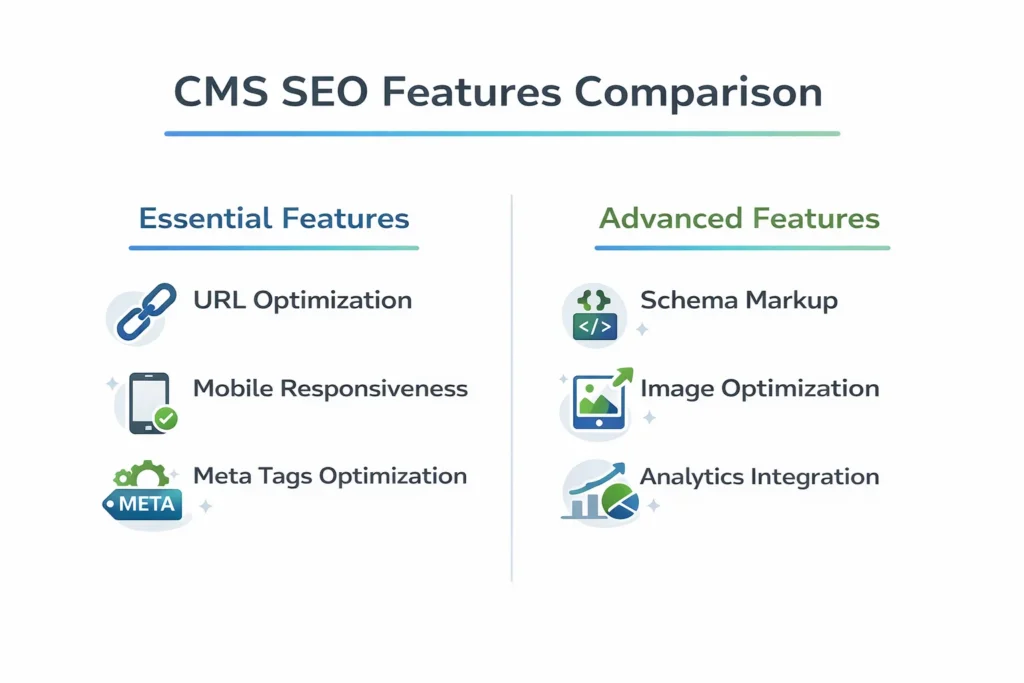
Clean URL generation should happen automatically with options for customization. URLs like yoursite.com/best-cms-for-seo perform much better than yoursite.com/post?id=123 in both search results and user trust. Your platform should create readable URLs by default while allowing you to optimize them further when needed.
Mobile responsive design isn’t optional in 2026. Your CMS should automatically generate mobile-friendly layouts and provide preview tools for different screen sizes. With Google’s mobile-first indexing, your mobile experience directly determines your search rankings regardless of how great your desktop version looks.
Built-in structured data support prevents common technical SEO mistakes. Look for platforms that automatically generate schema markup for articles, products, businesses, and other common content types. Manual schema implementation is error-prone and time-consuming, so automatic generation saves both time and ranking potential.
Image optimization capabilities prevent one of the biggest SEO mistakes I see. Your CMS should automatically compress uploaded images, provide alt text fields for every image, and support modern formats like WebP for faster loading. Poor image optimization can destroy your page speed scores and mobile performance.
Advanced Features That Give You an Edge
Content optimization tools that support topic clustering provide significant SEO advantages. Look for systems that make it easy to create related content groups, suggest internal linking opportunities, and help you plan comprehensive coverage of important topics.
Analytics integration beyond basic Google Analytics setup gives you better optimization insights. The best CMS platforms provide built-in performance monitoring, content gap analysis, and optimization suggestions based on your actual search performance data.
Plugin or extension ecosystems extend your optimization capabilities without custom development. While WordPress leads in this area, other platforms are developing strong app marketplaces that provide specialized SEO tools and integrations.
Multilingual capabilities become critical for businesses targeting global markets. Proper international SEO requires hreflang implementation, regional content management, and duplicate content prevention across different language versions of your site.
Content workflow features like scheduling, collaboration tools, and approval processes help teams consistently publish optimized content. The easier your CMS makes content creation and optimization, the more likely your team will maintain regular publishing schedules that search engines reward.
WordPress: Still the SEO King in 2026 (But With Important Warnings)
WordPress maintains its position as the most SEO-friendly CMS, powering over 40% of all websites according to W3Techs data in 2026, with wordpress seo capabilities that continue to evolve with wordpress seo capabilities that dominate the market, but this dominance comes with important caveats that can make or break your search performance. Understanding both the strengths and potential pitfalls helps you decide if WordPress fits your specific situation.
The ecosystem advantage WordPress provides extends far beyond just being popular. When you choose WordPress, you gain access to an enormous network of SEO specialists, developers, and learning resources that simply doesn’t exist for other platforms. Finding help, tutorials, or custom solutions becomes exponentially easier.
However, WordPress success requires active management, and I’ve seen too many WordPress sites fail because teams underestimated the ongoing maintenance requirements.
Why WordPress Dominates SEO Rankings
The seo plugins ecosystem for WordPress remains unmatched in depth and quality. SEO plugins like Yoast SEO, RankMath, and SEOPress provide sophisticated optimization features.
That would cost thousands to develop custom on other platforms. These tools handle everything from technical SEO to content optimization automatically.
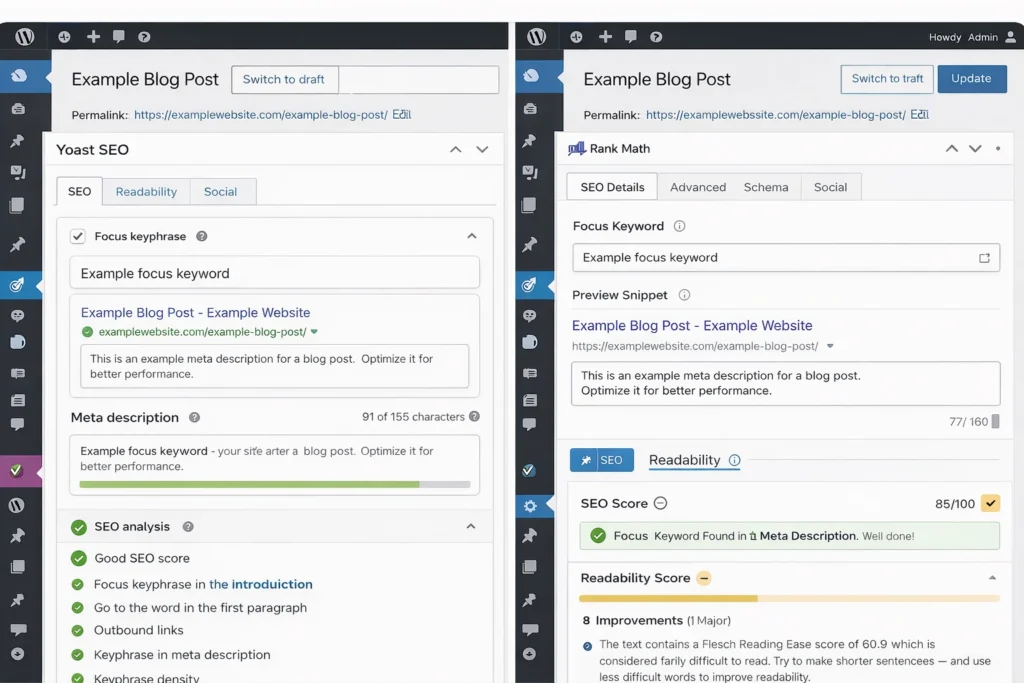
Customization flexibility allows complete control over every SEO element. Unlike closed platforms that limit your optimization options, WordPress gives you access to code, database, and server configuration. This control becomes crucial for advanced SEO strategies and technical requirements.
Theme variety means you can find optimized solutions for almost any industry or use case. Modern WordPress themes include mobile-first design, fast loading, and clean code structure by default, giving you excellent technical SEO performance without custom development.
Content management capabilities have evolved significantly with features like built-in revision tracking, collaborative editing, and content scheduling. These tools streamline the content creation process that drives long-term SEO success.
Community support provides solutions for almost any SEO challenge you might encounter. The massive WordPress community creates tutorials, troubleshooting guides, and optimization resources that help you solve problems quickly and cost-effectively.
The Plugin Trap That Kills WordPress SEO
The biggest WordPress SEO mistake I encounter is plugin overload. Teams install plugins for every minor need without considering the cumulative impact on site performance and security. Too many plugins can significantly slow your site, create conflicts, and actually hurt your search rankings.
I recommend a minimalist approach: limit WordPress installations to truly essential plugins only. A well-optimized WordPress site typically needs an SEO plugin, security solution, backup system, and caching tool. Beyond these core requirements, every additional plugin should solve a specific, measurable problem.
Plugin quality varies dramatically, and poorly coded plugins create security vulnerabilities, performance issues, and compatibility problems. Always research plugin developers, check recent reviews, and test performance impact before installing anything on your live site.
My recommended “power setup” consists of WordPress core, either Yoast SEO or Rank Math for optimization, and a quality page builder like Elementor Pro. This combination provides comprehensive SEO capabilities while maintaining site speed and stability.
Regular maintenance becomes critical for WordPress SEO success. Outdated plugins create security risks and compatibility issues that can crash your site or create crawling problems for search engines. Establish a monthly review process for plugin updates and performance monitoring.
Webflow vs Shopify vs Headless CMS: The Rising Challengers
While WordPress maintains its SEO leadership, several platforms including Drupal with its drupal seo capabilities have emerged as serious alternatives in this cms comparison that excel in specific situations. Understanding when these alternatives might outperform WordPress helps you make better decisions for your particular needs.
Each platform offers unique advantages but also comes with limitations that might hurt your SEO efforts if you choose incorrectly for your situation.
Webflow: When Design Flexibility Matters Most
Webflow combines visual design control with clean code output, making it excellent for teams that prioritize custom design while maintaining SEO performance. The platform generates semantic HTML and CSS that loads quickly and provides search engines with easily readable content.
The visual editor approach mirrors actual web development concepts, so design changes translate directly into optimized code. This eliminates the bloated markup that often results from other drag-and-drop builders while maintaining design flexibility.
However, Webflow’s pricing structure has become less favorable for small projects. The free plan now limits you to just two pages and 50 CMS items, making it impractical for testing or small websites. Paid plans start at higher price points than WordPress hosting alternatives.
Webflow works best for design-focused teams who understand web development concepts. If your team thinks in terms of responsive design and CSS structure, Webflow can deliver excellent SEO performance. If you just want to publish blog posts and basic pages, WordPress remains more practical.
Content management in Webflow is solid but less flexible than WordPress for complex content strategies. Creating advanced content relationships and custom taxonomies requires more technical knowledge compared to WordPress plugins that handle these features automatically.
Shopify: The E-commerce SEO Specialist
Shopify has become the strongest platform for e-commerce SEO, with shopify seo features built-in specifically designed for product-focused websites. The platform automatically handles technical requirements like product schema markup, inventory management, and mobile optimization that are essential for online store success.
Product SEO features include automatic structured data generation, inventory-based meta descriptions, and collection page optimization that helps category pages rank for competitive commercial keywords. These features require manual setup on other platforms but come standard with Shopify.
Performance advantages come from Shopify’s global hosting infrastructure and content delivery network. E-commerce sites on Shopify’s hosted infrastructure typically load faster than comparable self-hosted WordPress sites running WooCommerce, especially during high-traffic periods like sales events.
Technical SEO complexity gets handled automatically, including SSL certificates, mobile optimization, and core web vitals improvements.
In my experience working with online stores, this means teams can spend their time writing product descriptions and marketing copy instead of troubleshooting technical problems.
The main limitation for content-heavy SEO strategies is Shopify’s basic blog functionality. If content marketing forms a major part of your SEO approach, you might need separate systems for your blog and store, which complicates management and can dilute domain authority.
Headless CMS: For Technical Teams Seeking Maximum Performance
Headless CMS platforms like Contentful and Strapi offer the fastest possible website performance by separating content management from front-end presentation. This architecture allows developers to build extremely fast websites while providing content creators with user-friendly editing interfaces.
Performance benefits can be substantial for competitive SEO situations. Sites built with headless architecture often achieve excellent Core Web Vitals scores and load times under one second, which directly improves search rankings and user experience.
However, headless solutions require significant technical expertise. You need developers familiar with modern JavaScript frameworks and deployment workflows. This technical complexity makes headless impractical for most small businesses.
Content preview limitations can slow down content creation workflows. Unlike traditional CMS platforms where you see exactly how content appears on your website, headless systems often require switching between editing and preview environments, which can frustrate content creators.
The Hidden Costs That Destroy Your SEO Budget
Choosing a CMS based solely on initial setup costs leads to budget disasters that can derail your entire SEO strategy. The real expenses emerge from ongoing maintenance, scaling requirements, and unexpected fees that surface months after launch.
I’ve watched businesses exhaust their marketing budgets on surprise CMS costs, leaving nothing for content creation or optimization activities. Understanding these hidden expenses helps you choose a platform that supports sustainable long-term SEO growth.
Free Plan Limitations That Kill SEO Progress
Free CMS plans attract users with zero upfront costs but often include restrictions that severely limit SEO potential. These limitations typically force expensive upgrades at inconvenient times, usually when you’re starting to see organic traffic growth.
Content volume restrictions directly impact your ability to create comprehensive topic coverage that Google rewards. If your free plan limits you to 50 blog posts or 100 pages, you’ll struggle to compete in industries that require extensive content libraries to establish topical authority.
Bandwidth limitations create SEO disasters during traffic spikes. Nothing hurts search rankings faster than a website that becomes inaccessible when it starts receiving organic traffic from improved rankings. Plan for traffic growth in your platform selection.
Custom domain restrictions force you to use subdomains like yoursite.platform.com instead of your branded domain. This subdomain structure dilutes SEO authority and makes building brand recognition in search results much more difficult.
Storage limitations affect your ability to use images, videos, and other media that enhance user engagement and search performance. Rich content often performs better in search results, but storage restrictions can force you to compromise on content quality.
The True Cost of CMS Maintenance for SEO
WordPress maintenance costs include regular updates, security monitoring, performance optimization, and backup management. Budget at least $100-300 monthly for professional maintenance services, or invest significant time developing these skills internally.
Hosted platform fees like Webflow and Squarespace include maintenance but charge higher monthly costs to cover these services. Calculate these recurring expenses across multiple years when comparing platform options, especially as your traffic and content volume grow.
E-commerce platforms typically include hosting in monthly fees but add transaction costs that scale with sales volume. These percentage-based fees can become substantial for successful stores, affecting your overall marketing budget allocation.
Training costs for new team members vary significantly between platforms. WordPress has abundant free learning resources, while specialized platforms might require expensive training programs or consultant time to onboard users effectively.
Technical support quality differs dramatically between CMS options. WordPress relies on community support and third-party services, while proprietary platforms provide direct support but often charge premium prices for priority assistance.
Matching Your Team’s Skills to the Right CMS Platform
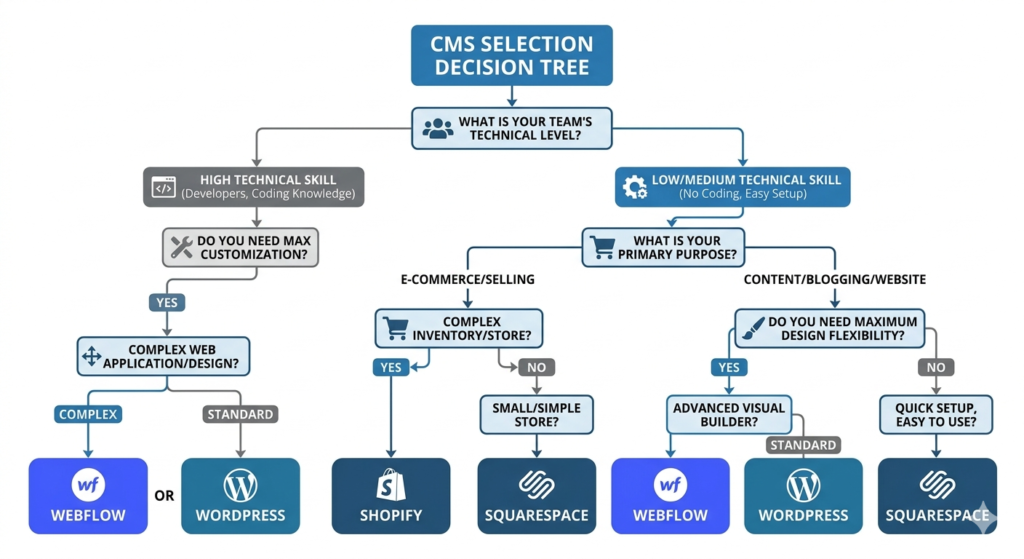
The most important factor in CMS selection for SEO success is honestly evaluating your team’s technical capabilities and choosing a platform they can confidently manage. A sophisticated CMS that overwhelms your content creators will deliver worse SEO results than a simple platform that encourages regular optimization.
Too many businesses choose CMS platforms based on feature comparisons or developer recommendations without considering who will actually use the system daily. The platform your team feels comfortable using will always outperform a technically superior option they avoid or use incorrectly.
Technical vs Non-Technical Team Requirements
Technical teams with development experience can effectively leverage advanced platforms like headless CMS systems or highly customized WordPress installations. These teams can handle complex implementations, troubleshoot technical issues, and optimize advanced features that these platforms offer.
Non-technical teams achieve better results with user-friendly platforms that prioritize ease of use over advanced functionality. WordPress with quality themes, Squarespace, or Wix provide sufficient SEO capabilities while remaining accessible to users without coding knowledge.
Content-focused teams need platforms that make writing, editing, and publishing feel natural and efficient. The CMS that encourages your team to consistently create and optimize content will deliver better SEO results than one with impressive features that slow down your workflow.
Mixed-skill teams benefit from platforms that offer simplicity for basic tasks while providing advanced options for technical users. WordPress excels here by offering simple content editing interfaces while allowing developers to customize everything behind the scenes.
Long-term sustainability depends more on team adoption than platform capabilities. Choose the system your team will confidently operate for years, not the platform with the most impressive feature list that intimidates your daily users.
When to Choose Simplicity Over Advanced Features
Simple platforms often deliver superior SEO results because they encourage consistent content creation and optimization. Teams that can easily publish optimized content weekly will outrank competitors using complex platforms that slow down their publishing schedule.
Feature complexity can overwhelm users and lead to optimization mistakes that hurt search performance. Incorrectly configured advanced features often cause more ranking damage than missing features would have caused.
Maintenance simplicity reduces the risk of technical problems that can destroy search rankings overnight. Platforms requiring minimal technical upkeep allow you to focus resources on content creation and optimization rather than troubleshooting.
User confidence determines real-world platform effectiveness. Advanced SEO features become worthless if team members avoid using them due to complexity or intimidation. Choose platforms that build user confidence rather than impressing with feature lists.
CMS Speed and Performance: What Really Affects Your Rankings
Website performance has become one of the most critical ranking factors, making site speed performance and page load speed optimization essential for competitive search positioning.
However, most people focus on automated speed scores while overlooking the performance factors that actually impact user experience and rankings.
Real-world loading performance varies significantly based on user location, device capabilities, and network conditions that automated testing tools can’t fully replicate.
Real-World Speed Testing Beyond Page Speed Scores
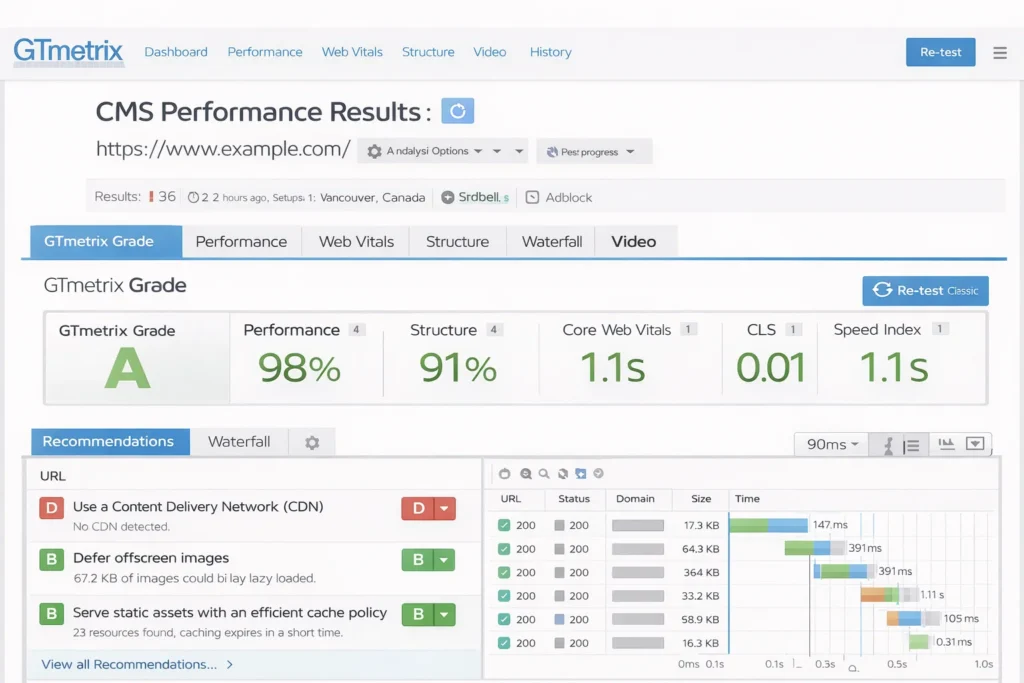
Automated speed scores provide useful baseline information but don’t reflect actual user experience across different conditions. Test your CMS performance manually on various devices and network speeds to understand real-world loading experience.
Geographic testing reveals performance differences that affect international SEO success. Use tools like GTmetrix from different server locations or ask contacts in other countries to test loading speeds from their locations.
Mobile device testing on older smartphones shows how your CMS handles resource-constrained environments. Many users worldwide browse on older devices with limited processing power, making mobile optimization crucial for broad SEO success.
Peak traffic simulation helps identify when CMS platforms struggle under increased load. A system that performs well during low-traffic testing might slow significantly when you actually start receiving organic search traffic.
Content delivery integration capabilities determine how effectively your CMS serves global audiences. Platforms that easily integrate with CDN services provide better international SEO performance than those requiring complex configuration.
Platform-Specific Performance Optimizations
WordPress performance optimization for cms seo performance requires careful attention to plugin selection, theme quality, and hosting configuration for optimal cms seo performance.
Improve WordPress speeds by choosing lightweight themes, limiting plugins to essentials, and implementing caching solutions through plugins like WP Rocket.
Webflow provides excellent baseline performance through automatic CSS and JavaScript optimization, but image optimization requires manual attention. Use Webflow’s responsive image features and compress images before uploading to maintain fast loading speeds.
Shopify handles most performance optimization automatically through their hosting infrastructure, but third-party app installation can slow stores significantly. Regularly audit installed apps and remove any that don’t provide clear business value.
Database optimization becomes crucial for content-heavy sites regardless of platform choice. Regular database cleanup, image optimization, and content archiving prevent performance degradation as your site grows and ages.
Hosting quality affects all CMS platforms but particularly impacts WordPress and other self-hosted solutions. Invest in quality hosting that includes features like SSD storage, CDN integration, and automatic backups to support your SEO performance goals.
Common CMS Migration Mistakes That Tank Your SEO
CMS migration represents one of the highest-risk SEO activities, with potential to eliminate years of ranking progress in just a few weeks. The technical complexity of preserving SEO value during platform changes creates numerous opportunities for devastating mistakes.
I’ve helped businesses recover from migration disasters that eliminated 70% or more of their organic search traffic. These catastrophes are completely preventable with proper planning, but the recovery process can take months or years to restore previous performance levels.
SEO Elements That Break During CMS Changes
URL structure preservation is the most critical element for maintaining SEO value during migration. Every important page URL must either remain identical or redirect properly to its new location using 301 redirects. Broken internal links or missing redirects immediately signal serious technical problems to search engines.
Metadata migration requires careful attention to preserve page titles and descriptions that already rank well. Many CMS migrations reset all metadata to default values, erasing months of optimization work and causing immediate ranking drops for established pages.
Internal linking patterns often change during migration, which can dramatically impact search performance. Google uses internal link structure to understand page importance and topic relationships, so maintaining existing link patterns preserves ranking signals that took time to develop.
Image optimization settings frequently reset during platform changes, affecting page loading speeds and mobile performance scores. Ensure your new CMS properly handles image compression, alt text preservation, and responsive image delivery to maintain performance-based ranking factors.
Schema markup implementation often breaks because different platforms handle structured data differently. Verify that all existing schema markup migrates correctly and continues validating in Google’s testing tools after the migration completes.
Migration Planning and Risk Management
Timeline planning should avoid peak traffic periods to minimize the impact of temporary technical issues on your most valuable visitors. Never attempt CMS migration during seasonal high-traffic periods when ranking drops could significantly damage business revenue.
Staging environment testing allows you to identify and resolve migration problems before they affect your live site rankings. Create complete staging versions of your new CMS and test all functionality, redirects, and SEO elements thoroughly before switching your domain.
Post-migration monitoring should include daily ranking checks, crawl error analysis, and traffic monitoring for at least 30 days after launch. Quick identification and correction of migration issues minimizes long-term SEO damage and accelerates recovery.
Rollback preparation provides insurance against catastrophic migration failures. Maintain complete backups of your original site and establish clear procedures for reverting to the previous CMS if migration problems can’t be resolved quickly.
2026 CMS Trends That Will Impact Your SEO Strategy
The content management landscape continues evolving rapidly, with emerging technologies and features that directly affect SEO performance and cms seo best practices. Understanding these trends helps you select platforms that will support your search marketing goals both now and in the future.
Artificial intelligence integration is transforming how CMS platforms handle content optimization, technical SEO maintenance, and user experience personalization. These AI-powered capabilities are becoming competitive necessities rather than optional enhancements.
AI Integration and Automated SEO Features
Content optimization tools powered by AI analyze your content against top-ranking competitors and provide specific improvement recommendations. These features help identify content gaps, suggest relevant keywords, and optimize content structure for better search performance without manual analysis.
Automated technical SEO monitoring built into modern CMS platforms identifies and fixes common issues like broken links, missing alt text, and crawl errors without manual intervention. This automation prevents small technical problems from accumulating into major ranking issues.
Personalization based on user behavior and search intent improves engagement metrics like session duration and pages per visit, which correlate with better search rankings. AI-driven personalization helps deliver more relevant experiences that keep users engaged.
Voice search optimization features automatically format content for conversational queries and featured snippet opportunities. As voice search continues growing, built-in optimization for natural language queries provides significant competitive advantages.
Performance prediction uses AI to forecast how new content might perform based on competition analysis and historical data. This helps prioritize content creation efforts for maximum SEO impact and resource allocation.
Emerging Platform Technologies
Headless architecture is becoming more accessible to non-technical teams through improved interfaces and deployment automation. These performance-focused approaches provide SEO benefits through faster loading and better mobile experiences.
Edge computing allows CMS platforms to serve content from locations closer to users worldwide, improving international SEO performance and Core Web Vitals scores across different geographic markets.
Progressive Web App capabilities enable app-like experiences that improve engagement and provide new optimization opportunities for local search and mobile SEO performance.
API-first design supports content distribution across multiple channels while maintaining consistent SEO optimization. The same content can power websites, mobile apps, and other platforms with unified optimization strategies.
Your CMS Decision Framework: Choose Based on Your Situation
After evaluating numerous CMS platforms and guiding businesses through these decisions, I’ve developed a practical framework that matches cms seo capabilities to specific needs and constraints.
The best CMS for SEO depends entirely on your unique situation rather than general feature comparisons.
This framework considers team capabilities, business requirements, technical constraints, and growth plans to identify the CMS option most likely to deliver sustainable SEO success for your circumstances.
Quick Decision Matrix: CMS by Business Type and Team
Small businesses with limited technical resources should focus on WordPress with quality themes or user-friendly platforms like Squarespace. These options provide adequate SEO capabilities while remaining manageable for teams without development experience.
E-commerce operations benefit from specialized platforms like Shopify or WooCommerce depending on complexity needs. Shopify excels for straightforward online stores, while WooCommerce provides more customization for unique business models.
Content-heavy businesses like publishers and information sites perform best with WordPress or specialized content platforms that excel at organization, internal linking, and editorial workflow management.
Technical teams with development resources can leverage headless CMS platforms or custom WordPress implementations to achieve maximum performance and customization for competitive advantages.
Agency operations need platforms supporting multiple client sites efficiently. WordPress multisite installations or agency-focused platforms provide scalability and management tools for handling numerous optimized websites.
Red Flags: When NOT to Choose Popular Platforms
Avoid WordPress if your team lacks technical comfort and you can’t budget for professional maintenance. WordPress flexibility requires ongoing management that can hurt SEO performance when handled incorrectly.
Skip Webflow if your primary focus is content publishing rather than custom design work. The platform’s design emphasis makes it less efficient for content-heavy SEO strategies compared to publishing-focused alternatives.
Don’t choose Shopify for businesses relying heavily on content marketing and blog-based SEO. While Shopify excels for product SEO, its blog functionality remains limited compared to dedicated content platforms.
Avoid headless CMS platforms without dedicated development resources and technical expertise. Performance benefits don’t justify implementation complexity for most small and medium businesses.
Steer clear of proprietary platforms with limited export options if you anticipate future changes. Platform lock-in creates expensive migration challenges that can disrupt SEO performance when needs evolve.
Frequently Asked Questions
Which CMS is best for SEO in 2026?
WordPress remains the most versatile and well-supported option for most situations, but “best” depends entirely on your team’s capabilities and specific requirements. WordPress offers the largest ecosystem of SEO tools, plugins, and expert knowledge, making optimization and maintenance easier over time. However, platforms like Webflow might better serve design-focused teams, while Shopify excels for e-commerce SEO. The key is matching the platform to your team’s skills and business needs rather than choosing based on general popularity.
How do I test if a CMS will work for SEO before building my site?
Start with basic functionality testing by checking if you can easily modify page titles, meta descriptions, and URL slugs for individual pages. Then run a crawling test using Screaming Frog to ensure the platform doesn’t have technical accessibility problems. Verify subfolder support for proper site organization and test social media integration for Open Graph functionality. Check automatically generated sitemaps and robots.txt files for cleanliness, and test page loading speeds across different devices and network conditions.
What’s the biggest mistake people make when choosing a CMS for SEO?
The biggest mistake is selecting platforms based on feature lists or popularity rather than team maintenance capabilities. I’ve witnessed technically superior CMS platforms fail because internal teams couldn’t effectively manage them after launch. This leads to declining content quality, security vulnerabilities, and technical problems that hurt search rankings over time. Always prioritize your team’s ability to confidently operate and optimize the platform long-term over impressive feature demonstrations.
Are free CMS plans good enough for SEO?
Free CMS plans work for basic testing and very small sites, but most include limitations that restrict serious SEO efforts. Content volume limits, bandwidth restrictions, and subdomain requirements can severely limit optimization potential. For example, Webflow’s free plan restricts you to just 2 pages and 50 items, while Wix Studio offers a more generous 10,000 rows. Evaluate your content strategy requirements against plan limitations, and budget for upgrades when you outgrow free tier restrictions.
How many WordPress plugins are too many for SEO?
Quality matters more than quantity when selecting WordPress plugins for SEO. Focus on essential tools like an SEO plugin (Yoast or Rank Math), security solution, backup system, and caching plugin. Beyond these core requirements, every additional plugin should address a specific, measurable need. I’ve seen sites with 30+ plugins perform excellently and sites with 10 plugins struggle due to poor plugin quality. Regularly audit plugin performance impact and remove any that aren’t providing clear value.
Should I choose Webflow or WordPress for better SEO?
Choose WordPress if you need maximum flexibility, extensive plugin options, and have team members comfortable with its learning curve. WordPress provides more SEO customization options and better content management for blog-heavy strategies. Choose Webflow if you have design-focused team members who think in terms of CSS and responsive design, and you prioritize visual control over content volume. Webflow generates cleaner code by default but offers less flexibility for complex content strategies and advanced SEO implementations.
The decision between these platforms ultimately depends on your team’s strengths, technical comfort level, and primary business objectives. Both can achieve excellent SEO results when properly implemented and maintained by the right team.