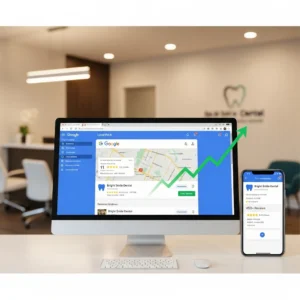
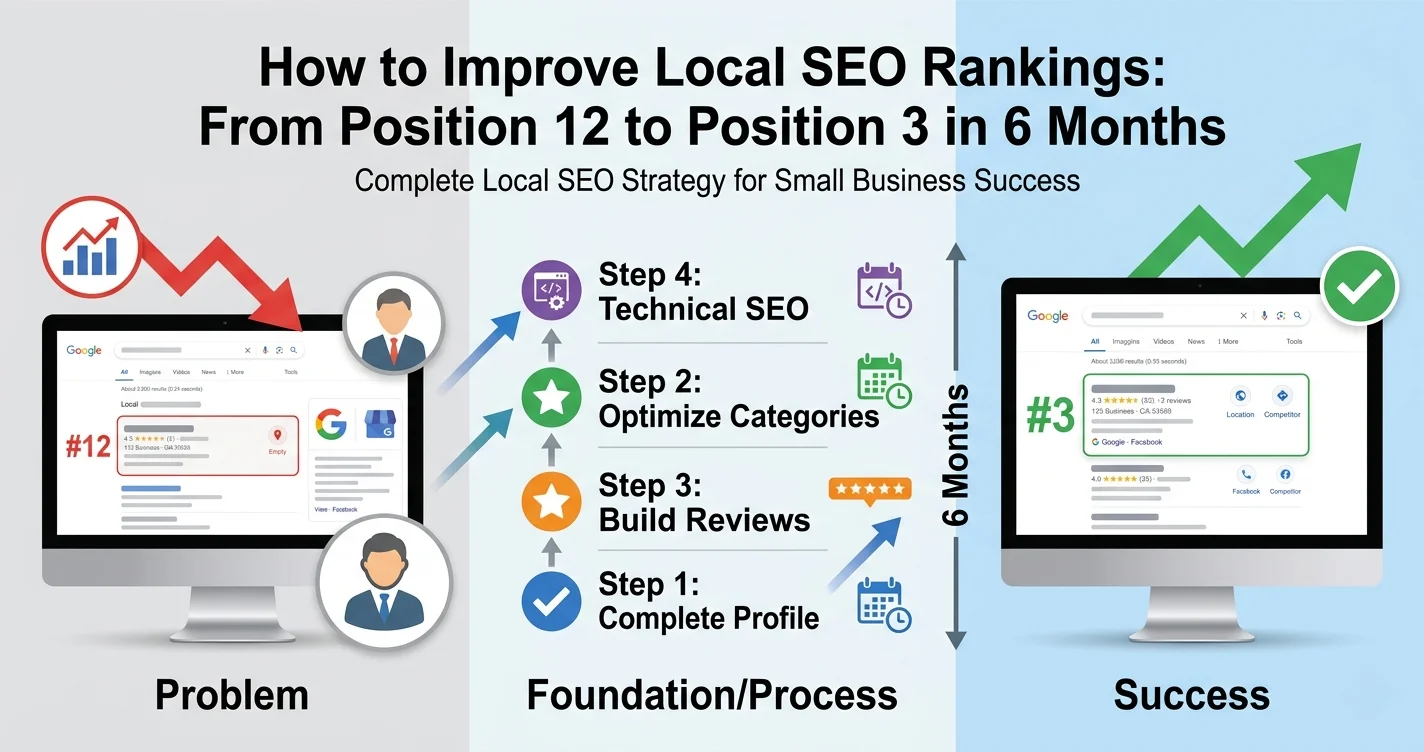
I remember the day I realized my local business was invisible on Google.
A customer called and mentioned they had been searching for services like mine in our city for weeks. They finally found me through a referral, not through Google search. That hit me hard.
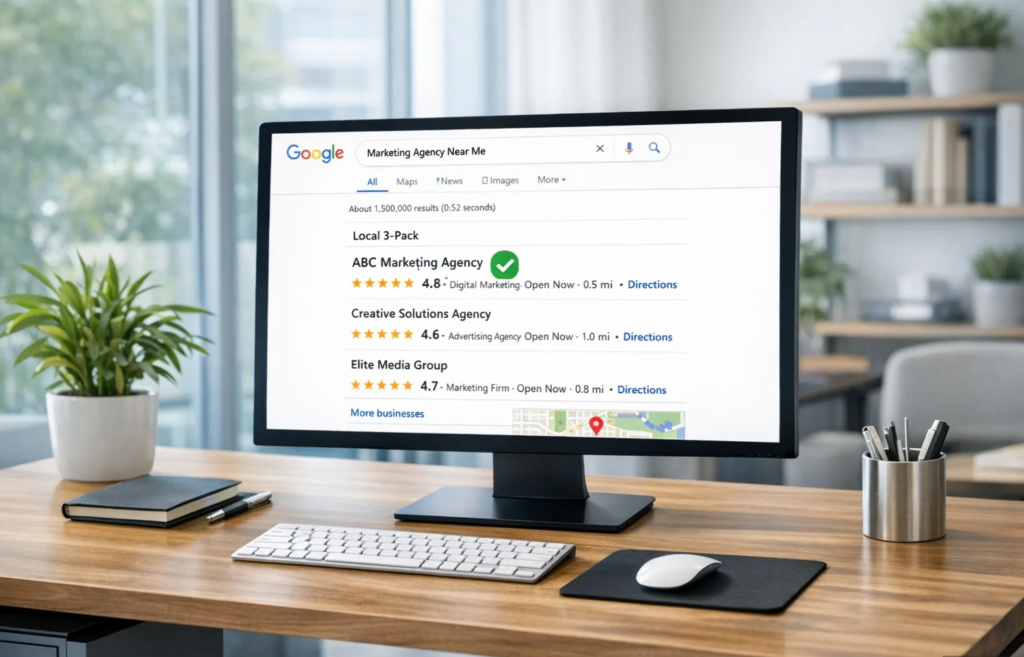
I had a Google Business Profile. I had reviews. I even posted photos occasionally. But when I actually searched for my own services, I wasn’t anywhere in the top results. My competitors with fewer reviews and less experience were dominating the local 3-pack, capturing all the organic traffic while I remained invisible.
I spent the next six months obsessively learning how to improve local SEO rankings. I tested local search optimization strategies on my own business, talked to other local entrepreneurs who ranked at the top, and studied what the businesses in position one, two, and three were doing differently.
What I discovered changed everything. The problem wasn’t that I wasn’t doing enough. The problem was I didn’t know which tactics to prioritize.
This guide shares everything I learned about improving local search rankings. Not theory from someone who’s never run a local business, but real world tactics that actually work.
Why Your Local SEO Rankings Aren’t Improving (And What Actually Works)
Most local search engine optimization (SEO) advice overwhelms you with a giant list of 50 things to do. But nobody tells you which ones matter most or what order to do them in.
I wasted two full months perfecting technical details on my website before I even had consistent business information across my online listings. That’s like remodeling your kitchen before you’ve built the walls. My search visibility suffered because I ignored basic business listing optimization.
The breakthrough came when I learned to organize tactics into three categories.
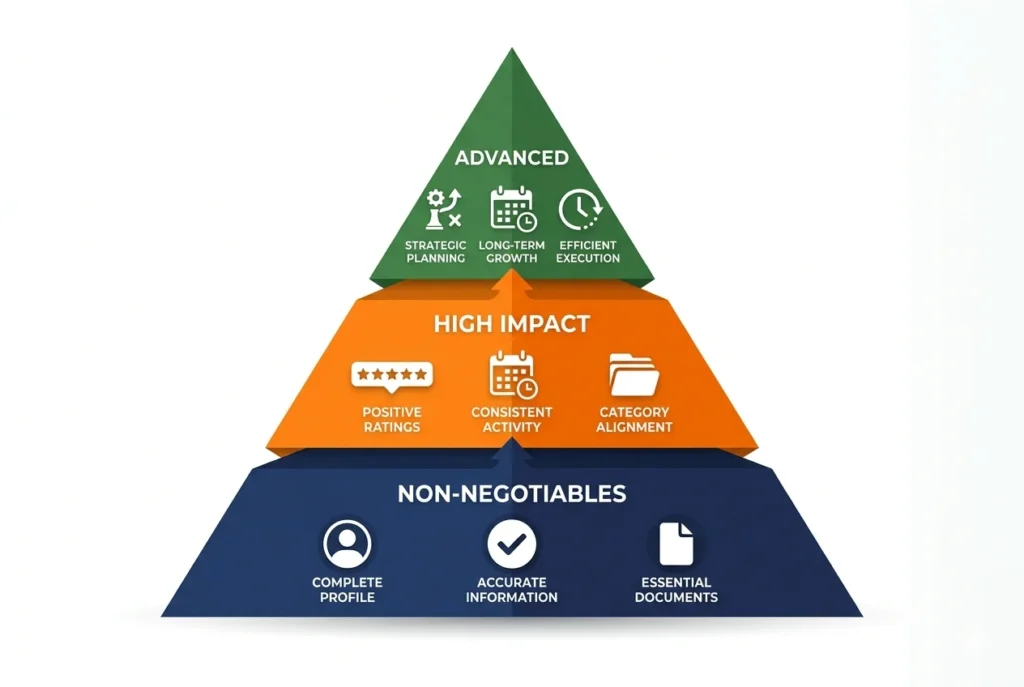
The Three Tier Framework That Actually Works
A digital marketing strategist I came across categorized local SEO into three simple tiers. This framework completely changed my approach to how to rank higher in local search results.
Non Negotiables are absolute basics. If you skip these, nothing else works. This is your foundation. Profile completion and information consistency fall here.
High Impact tactics move your rankings significantly once your foundation is solid and you understand what Google’s ranking algorithm rewards. Keyword rich reviews and weekly posting fit this tier.
Advanced strategies give you competitive edge over businesses at your same level. These are underground tactics most people don’t know about.
This framework tells you exactly what to do today, what to do next week, and what to save for later. No more guessing.
What I Wish Someone Had Told Me About Timeline
Let me be completely honest about something most articles won’t tell you.
Local SEO takes time. Real time.
I started seeing small movements in my rankings around week six. But I didn’t crack the top three until month four. And I was following every tactic correctly in a moderately competitive market.
If you’re in highly competitive industries like dentistry, law, or plumbing in a major city, expect three to six months before you see significant results.
Less competitive niches might show improvements in six to eight weeks.
The tactics I’m sharing work, but they need time to compound. Google needs consistent signals over weeks and months that your business is legitimate, active, and relevant.
Set realistic expectations now so you don’t give up at week three.
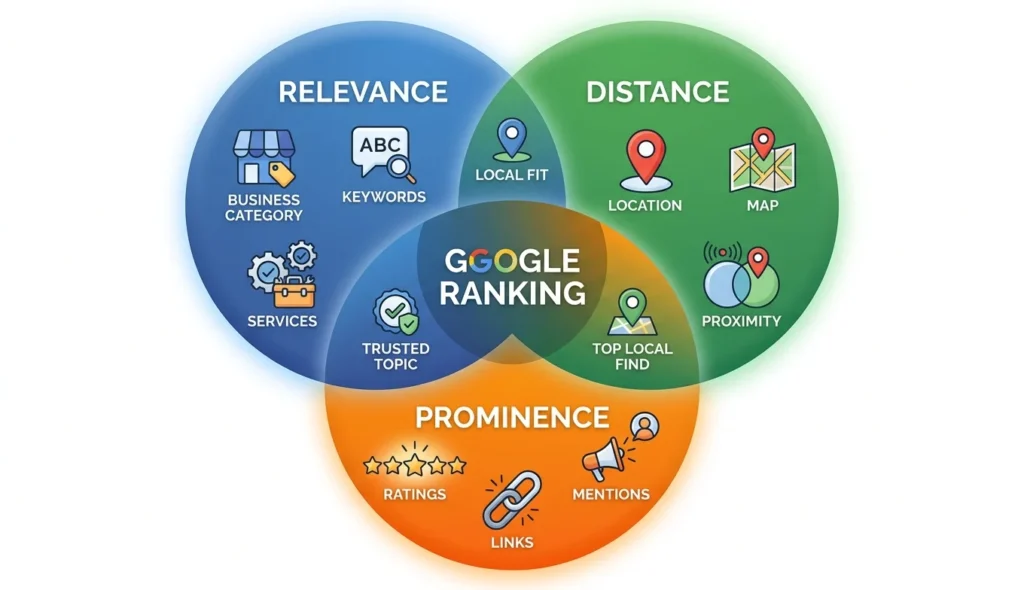
The 3 Local SEO Ranking Factors Google Actually Uses
Before diving into tactics, you need to understand how Google’s ranking algorithm decides which businesses appear at the top of the search engine results page.
Google officially states three factors determine local search rankings. While general SEO ranking factors apply to all search results, these three factors are specific to local pack rankings. I read their documentation multiple times to make sure I understood this correctly.
I later verified this directly with Google’s official documentation for local search ranking and cross-referenced it with studies from Whitespark and BrightLocal on what actually moves local pack rankings.
Relevance: Does Your Business Match What They’re Searching For?
Relevance means how well your business matches the search query and search intent.
If someone searches for “pediatric dentist” and your primary category is just “dentist,” you’re already at a disadvantage. The business with the more specific category shows stronger topical match.
Google determines relevance through business category selection, keywords in your profile, services you list, and content on your website.
This is completely within your control.
Distance: Why Location Matters (And What You CAN Control)
Distance is how far your business is from the person searching based on geographic location.
If someone searches from downtown and you’re in the suburbs, a downtown competitor has a proximity ranking advantage.
You cannot change your physical location. But here’s what you can control through service area optimization.
Your service area settings in Google Business Profile let you specify which neighborhoods and cities you serve. Set this correctly and you’ll appear in searches from those areas even if you’re not physically there.
For service area business operations without a physical storefront, this setting is absolutely critical.
Prominence: How Google Measures Your Business Reputation
Prominence is basically your online reputation and authority.
Google looks at trust signals like how many customer reviews you have, your average rating, how many local backlinks you’ve earned from other websites, how often your business gets mentioned online, and overall brand recognition in your community.
A business with 200 reviews and links from local news sites has much higher prominence than a business with 12 reviews and no backlinks.
This factor takes the longest to build, but it’s completely controllable through consistent effort.
The One Factor You Should Stop Worrying About
Here’s what I realized after months of testing.
You have zero control over distance. Stop stressing about it.
Focus 100% of your energy on relevance and prominence. Those are the factors you can actually improve.
When I stopped worrying about proximity and started obsessing over how to improve Google Business Profile ranking through profile optimization and review acquisition, my rankings improved dramatically.
Non Negotiables: The Foundation That Must Come First
These are the absolute basics that must be perfect before anything else will work.
I learned this the hard way. I spent weeks on advanced tactics while my foundation was broken. My rankings barely moved.
The moment I fixed these fundamentals, I jumped from position 12 to position 6 in two weeks.
Complete 100% of Your Google Business Profile
Incomplete profiles are the number one reason businesses don’t rank.
Google heavily favors detailed, complete profiles because they give searchers better information. An incomplete profile with inaccurate business information signals you might not be a serious business or your information isn’t reliable.
Here’s what 100% completion actually means.
Business name must be your actual legal business name. No keyword stuffing. I’ll show you the legal workaround for this later.
Address must be your exact physical location. Use the same format everywhere online.
Phone number should be a local number if possible, definitely not a call tracking number that changes.
Business hours accuracy is critical, including regular hours and special holiday hours. Many businesses forget holiday hours and show as closed on high traffic days.
Service area optimization if you serve customers at their location. Be specific about which cities and neighborhoods.
Primary and secondary business category selection which I’ll cover in detail in the next section. This is critical.
Business description with natural keywords about what you do, who you serve, and what makes you different.
Attributes like wheelchair accessible, outdoor seating, free wifi. Check every relevant attribute.
Website URL linking to your actual website, not social media.
Appointment URL if you take bookings online.
Photos with proper image optimization of your exterior, interior, team, products, and services. At least 10 high quality photos minimum.
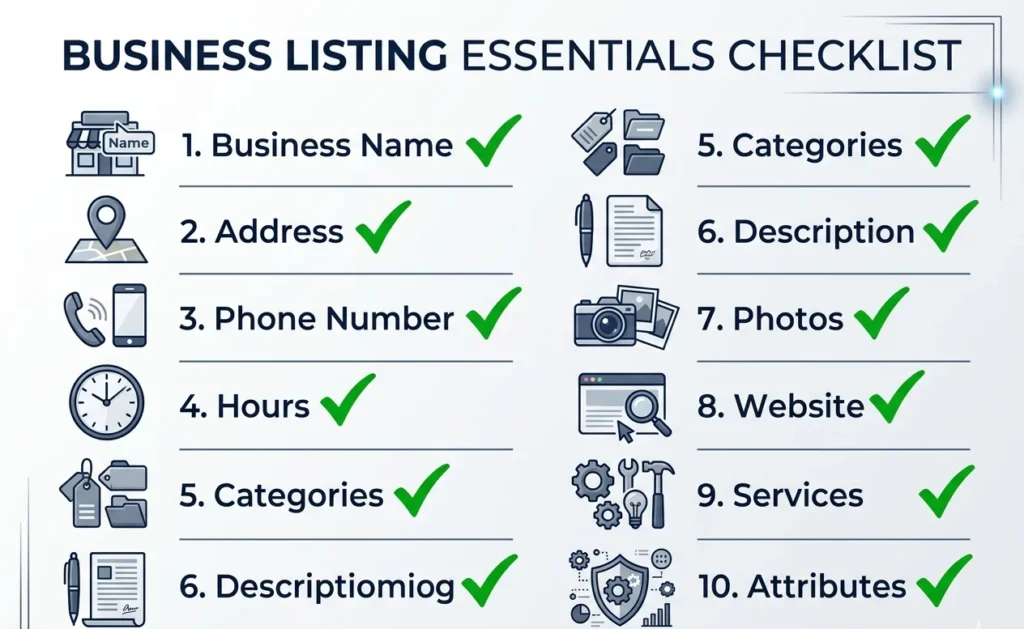
I created a simple spreadsheet and checked off each field as I completed it. Took me about two hours to do everything properly.
That two hour investment moved my rankings more than anything else I had tried.
NAP Consistency Across Every Platform
NAP stands for Name, Address, and Phone number.
These three pieces of information must be absolutely identical everywhere they appear online for local citations to work effectively. Not similar. Identical.
I once had my address listed three different ways. My website said “123 Main Street Suite 100.” My Facebook page said “123 Main St Ste 100.” My Yelp listing just said “123 Main Street.”
Google’s ranking algorithm couldn’t verify which version was correct. My citations weren’t helping my rankings at all because the information didn’t match.
Here’s where your NAP needs to be consistent.
Your website especially in the footer and contact page.
Google Business Profile exactly as it appears on official documents.
Facebook business page in the About section.
Instagram bio if you list your address there.
Major local business directories like Yelp, Yellow Pages, Better Business Bureau.
Industry specific directories relevant to your business type.
I spent an afternoon auditing every platform where my business was listed. I made a spreadsheet with the business name, address, and phone number from each source.
Then I picked one canonical version and updated everything to match exactly.
Within three weeks, I noticed my local pack rankings improved. Google could finally verify my business information across multiple sources.
The Business Name Mistake That Gets Profiles Banned
This mistake almost got my profile suspended, and I see businesses make it constantly.
Keyword stuffing your business name field is against Google’s guidelines and will get you banned.
I wanted to rank for “emergency plumber Austin” so badly that I changed my business name to “Smith Plumbing Emergency Plumber Austin Texas.”
Within two weeks, I got a violation notice from Google. My profile was suspended for three days while I corrected it.
Google’s rules are clear. Your business name must be your actual legal business name. Nothing else.
You cannot add keywords like “best,” “affordable,” or your service type unless that’s legally part of your registered business name.
So how do you get keyword visibility without breaking the rules?
Put those keywords in your website header instead. My website homepage now has a header that says “Austin’s Emergency Plumber” with my actual business name in the logo.
This achieves the keyword visibility without risking suspension.
There is one legal workaround I’ll share in the advanced tactics section involving DBA registration, but for now, just use your real business name.
How to Improve Google Business Profile Ranking: The Complete Optimization Checklist
Your Google Business Profile is the single most important factor in local search rankings. Google My Business optimization starts with getting the basics right, then these tactics will significantly boost your search visibility.
If you’re running a WordPress website, implementing local SEO for WordPress best practices alongside your GBP optimization creates even stronger local rankings.
Choose the Right Primary Category (Specialist Beats Generalist)
Business category selection is one of the most important decisions you’ll make.
A technical SEO specialist who studied top ranking businesses across 50+ competitive local markets showed me this principle. He found specialist categories consistently outperformed broad categories by an average of 3 to 5 positions.
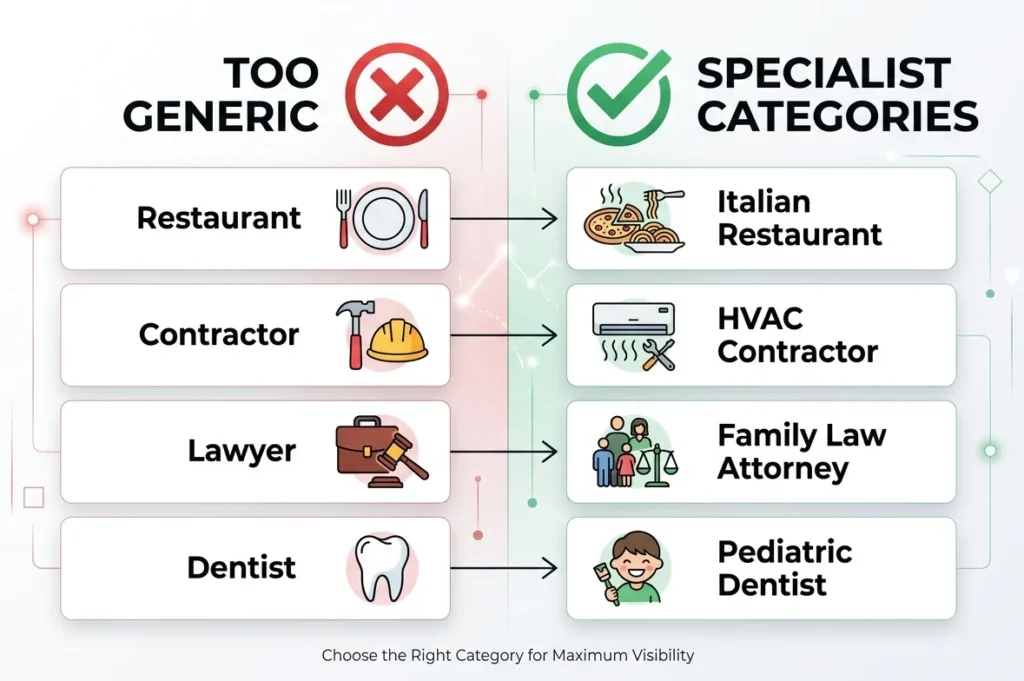
The principle is simple. Specialist categories outrank generalist categories.
If you’re a pediatric dentist, choosing “Pediatric Dentist” as your primary category will rank better than choosing “Dentist” for pediatric searches.
The more specific category shows stronger topical relevance to Google’s ranking algorithm.
Here’s how to choose the right category.
First, list every service your business provides. Then look at Google’s category options and find the most specific category that matches your primary service. Do local competitor analysis to see what top performers use.
If you’re a restaurant, don’t just choose “Restaurant.” Choose “Italian Restaurant” or “Pizza Restaurant” or “Steakhouse” depending on your specialty.
For service businesses, choose the most specific service type. “HVAC Contractor” beats “Contractor.” “Family Law Attorney” beats “Attorney.”
I use a Chrome extension called GMB Everywhere to see what categories my top ranking competitors use. This tool shows hidden details about any Google Business Profile.
When I analyzed the top three plumbing businesses in my area, all three used specialist categories like “Emergency Plumber” or “Drain Cleaning Service” rather than just “Plumber.”
I switched my primary category to match the specialist approach. Within two weeks, I moved up three positions for my main keyword.
You can select up to 10 categories total, but your primary category matters most. Choose it carefully.
Add High Quality Photos Weekly (What Google Wants to See)
Businesses with photos get significantly more clicks and rank higher than businesses without photos.
According to Google’s official Think with Google research published in 2023, profiles with photos receive 42% more requests for directions and 35% more clicks to websites, dramatically improving click-through rate.
But it’s not just about having photos. It’s about having the right photos with proper image optimization and adding them consistently.
Here’s what to upload.
Exterior photos showing your storefront or building so customers can find you easily.
Interior photos of your workspace, office, or store so customers know what to expect.
Team photos of you and your employees. People want to see who they’ll work with.
Products or services in action showing what you actually do. Before and after photos work incredibly well.
Customer interactions if appropriate for your business type.
The consistency and post frequency matter as much as the quality.
A marketing agency owner who dominates his local market taught me that posting new photos weekly signals to Google that your profile is actively managed.
Active profiles rank higher than dormant profiles.
I created a simple schedule. I upload one new photo every Monday. Sometimes it’s a project we completed. Sometimes it’s a team member. Sometimes it’s just our office from a different angle.
This weekly habit takes five minutes but keeps my profile fresh in Google’s algorithm.
Aim for at least 10 photos to start, then add new ones every week.
Use the Q&A Section to Your Advantage (Proactive Question Seeding)
Most businesses completely ignore the Q&A section on their Google Business Profile.
That’s a huge mistake because Q&A section optimization directly impacts how your business appears in search results.
Here’s what most people don’t realize. You can seed your own questions and answers.
I proactively added five common questions customers ask me, then answered them with keyword rich responses including location-based keywords.
Questions like “Do you offer emergency services in Austin?” and “What areas do you serve?” and “Are you licensed and insured?”
Each answer naturally includes location keywords and service keywords.
When potential customers see these questions already answered, it builds trust and provides information immediately. It also gives Google more content to understand what services I offer and where I serve.
Write your questions the way real customers would ask them. Use natural language.
Then answer thoroughly but concisely. Include specific details like service areas, hours, pricing structure, or qualifications.
I added my first five questions two months ago. Three of them now appear in the knowledge panel when people search my business name.
The Weekly Posting Strategy (Photos, Offers, Updates, Events)
Regular posting to your Google Business Profile is one of the highest impact tactics I’ve discovered.
Post frequency matters significantly. Businesses that post weekly rank higher than businesses that never post. Google rewards active profile management.
But what should you actually post?
I follow a simple rotation.
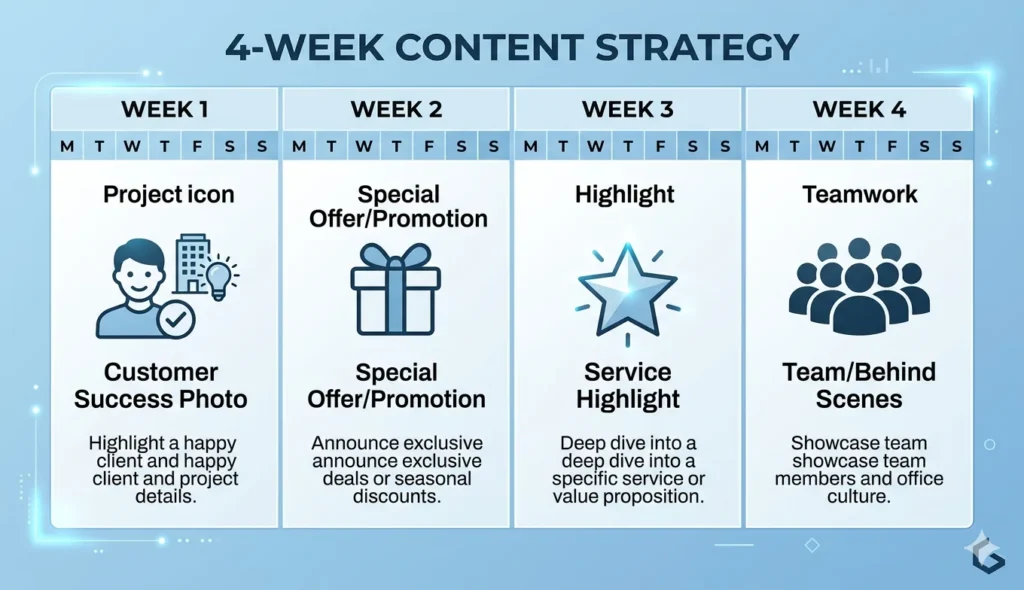
Week one is a customer success photo. A completed project, a happy customer, or a before and after comparison.
Week two is a special offer or promotion. Even something simple like “Spring tune up special” or “Free consultation this week.”
Week three is a service highlight. I feature one of our services with a photo and description.
Week four is team or behind the scenes content. Introduce a team member or show your workspace.
Then the cycle repeats.
Each post takes about five minutes to create. I write two or three sentences, add a photo, and publish.
This consistent posting schedule transformed my profile engagement. I get more views, more clicks, and more direction requests than I did before I started posting.
The absolute minimum frequency is weekly. More often is better, but weekly is the baseline for showing Google your profile is active.
Write a Keyword Optimized Business Description
Your business description is prime real estate for natural keyword usage based on local keyword research.
Google allows 750 characters. Use them wisely.
I follow a simple formula that consistently works.
Start with what you do. “I provide emergency plumbing services…”
Add who you serve. “…for homeowners and businesses…”
Include where you serve with location-based keywords. “…throughout Austin and surrounding areas including Round Rock, Cedar Park, and Pflugerville.”
Finish with what makes you different. “I offer 24/7 availability, upfront pricing, and same day service.”
This structure naturally incorporates service keywords and location keywords without stuffing.
Read your description out loud. If it sounds robotic, rewrite it. It should sound like you’re talking to a neighbor. Avoid keyword stuffing. Phrases like ‘Austin plumber Austin emergency plumber Austin 24 hour plumber Austin’ will hurt you, not help you.
This same principle of [adding SEO keywords naturally] applies to your website content, where forced keyword placement damages both user experience and rankings.
Natural, conversational descriptions that happen to include relevant keywords perform best.
Add Products and Services with Descriptions
Most businesses skip the products and services section entirely, missing a key business listing optimization opportunity.
I add every single service I offer as a separate item with its own description.
Each service listing is another opportunity to include relevant keywords and show up in more searches.
For my plumbing business, I have separate listings for drain cleaning, water heater installation, leak repair, sewer line replacement, and every other service we provide.
Each service has a short description explaining what it includes and what problems it solves.
This gives Google much more information about what my business actually does. It also creates more touchpoints for potential customers to learn about my offerings.
Take 30 minutes and add every service or product category you offer. Write two to three sentences about each one.
This simple task helped me rank for more specific long tail searches.
Google Maps Local SEO Optimization: How to Dominate the Map Pack
Google Maps rankings are slightly different from regular local search rankings.
Most businesses treat them as the same thing, but optimizing specifically for Google Maps visibility and local 3-pack placement requires a few additional tactics.
Embed Your Google Business Map on Your Website
When you embed Google Maps on your website, this creates a technical connection between your website and your Google Business Profile, similar to how local schema markup links your properties.
I embedded my business map in two places: the footer of every page and my contact page.
Getting the embed code is easy. Open Google Maps, search for your business, click Share, then click Embed a map. Copy the code and paste it into your website HTML.
If you use WordPress, most page builders let you add HTML blocks where you can paste the embed code.
This integration tells Google that your website and your business profile are definitively connected. It strengthens the relationship between both properties.
I noticed a small ranking boost about three weeks after adding the embedded map.
Optimize Your Map Listing for Near Me Searches
Near me searches are growing rapidly, especially on mobile local search devices.
These searches are heavily influenced by proximity, but you can still optimize for them through voice search optimization tactics.
Make sure your Google Business Profile pin is placed exactly on your physical location. I’ve seen profiles where the pin is half a block away because the address was entered slightly wrong.
Click Edit Info in your profile and adjust the pin placement if needed.
For service area businesses without a storefront, set your service area precisely. Include every city and neighborhood you serve.
I added surrounding suburbs to my service area even though I’m physically located in the main city. Now I appear in near me searches from those suburbs.
Voice searches often use “near me” phrasing. Optimizing for these queries captures mobile traffic from people actively looking for services right now.
How to Get Keyword Rich Reviews (Without Breaking Google’s Rules)
Customer reviews are the number one trust signal and ranking factor after profile completion.
Effective online reviews management means getting quality reviews. But not all reviews are equal. Reviews that mention your services and location are significantly more valuable than generic reviews because they provide multiple trust signals to Google.
A marketing agency owner in India who dominates his local search results shared this strategy with me. He encourages customers to mention specific details in their reviews.
Here’s how to do this ethically without violating Google’s guidelines.
The Review Request Email Template (That Gets Keyword Mentions)
You cannot incentivize specific review content. That violates Google’s rules.
But you can naturally guide customers toward mentioning helpful details.
Here’s the email template I use.
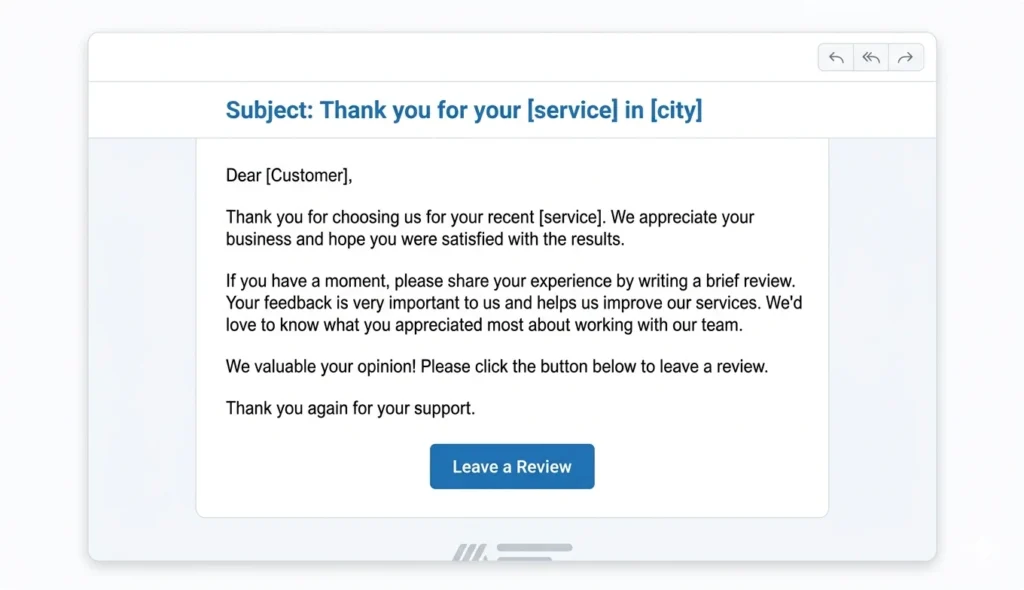
“Hi [Customer Name], thank you for choosing us for your recent [specific service] in [city]. I hope everything went smoothly. If you have a moment, I’d really appreciate if you could share your experience on Google. Specifically, what did you appreciate most about our service?”
This naturally reminds them of the specific service and location without requiring them to mention it.
About 60% of customers who respond to this template include the service type and city in their review.
Reviews like “Best emergency plumber in Austin” or “They fixed my water heater in Round Rock the same day I called” are gold for local SEO.
These keyword rich reviews tell Google exactly what services you provide and where you provide them.
The key is suggestion, not requirement. Never say “please mention emergency plumbing in your review.” That violates Google’s rules and feels manipulative.
Just remind them of the context, and many will naturally include those details.
Important: Never offer incentives, discounts, or anything of value in exchange for reviews. This violates Google’s policy and can result in review removal or profile suspension. I’ve seen businesses lose months of review building effort this way.
How to Respond to Reviews (The SEO Smart Way)
Responding to reviews does two important things.
It shows potential customers you care about feedback. And it gives you another opportunity to use keywords naturally. Having a review response strategy is essential for maximizing SEO value.
For positive reviews, I follow this template.
“Thank you so much for the kind words, [Name]. I’m really glad we could help with your [service] in [location]. We appreciate your business and hope to serve you again in the future.”
This response naturally includes the service keyword and location keyword.
For negative reviews, I stay professional and focus on resolution.
“I’m sorry we didn’t meet your expectations with your recent [service]. I’d like to make this right. Please contact me directly at [phone] so we can resolve this.”
Never argue in review responses. Always take the high road and offer to fix the problem privately.
Responding to every review, both positive and negative, signals active engagement. Google notices this.
I set a reminder to check reviews every Monday and respond to any new ones.
Review Timing Strategy (When to Ask for Maximum Response Rate)
Timing dramatically affects review response rates.
The absolute best time to ask is immediately after service completion while the positive experience is fresh.
For in person businesses, I ask at checkout. “If you’re happy with the service today, I’d really appreciate a quick Google review. Would you mind doing that now while I process your payment?”
About 40% of customers will pull out their phone and leave a review right there.
For service businesses, I send an automated email 24 hours after job completion with the review request.
Waiting too long reduces response rates. After a week, people forget the details and are less likely to respond.
Never ask for reviews before service completion. That looks desperate and often backfires if something goes wrong.
The sweet spot is within 24 to 48 hours after a positive service experience.
Build Local Citations and Consistent Business Listings
Citations are online mentions of your business name, address, and phone number.
They build authority and help Google verify your business across multiple sources.
Think of citations like references on a resume. The more places that list your business with matching information, the more Google trusts you’re legitimate.
Top 10 Local Directories to Claim First
Not all directories are equal. Focus on these high priority listings first.
Google Business Profile is number one. You should already have this claimed.
Bing Places for Business is second. Bing powers a significant portion of voice search and desktop search. Takes 15 minutes to claim.
Apple Maps is third. Apple Maps powers Siri local search on every iPhone. Most businesses ignore this completely.
Yelp remains highly relevant for local search despite declining social importance.
Facebook business page needs complete information in the About section.
Better Business Bureau if you’re accredited or want to be.
Yellow Pages still gets decent traffic in certain industries.
Foursquare feeds data to many other platforms.
Nextdoor is excellent for local neighborhood visibility.
Industry specific directories depend on your business type.
Avvo for lawyers
Healthgrades for doctors
Houzz for contractors.
I spent one full afternoon claiming all of these listings. Each one took between 10 and 30 minutes.
Make sure your NAP is absolutely identical on every single listing.
How to Audit Your Existing Citations for Inconsistencies
Your business is probably already listed on dozens of directories you don’t even know about.
Data aggregators automatically create listings, and often the information is wrong or inconsistent.
Here’s how to find and fix these listings.
Search for your business name plus your city on Google. Go through the first five pages of results.
Open every directory listing you find. Check the business name, address, and phone number against your canonical version.
Create a spreadsheet with columns for directory name, current NAP, and notes.
If the information is wrong, claim the listing if possible and update it. If you can’t claim it, contact the directory and request an update.
I found 23 incorrect listings when I did this audit. Some had old phone numbers from five years ago. Some had my address spelled differently.
Fixing these inconsistencies took about six hours spread over two weeks. But my rankings noticeably improved once Google could verify consistent information across dozens of sources. Citation auditing is one component of a [comprehensive SEO audit] that examines all technical and on-page factors affecting your search visibility.
Free tools like Moz Local Check and Whitespark Citation Finder can help identify where your business is listed.
Find Keywords Your Competitors Don’t Know About: The GBP Performance Hack
This is one of my favorite tactics because it’s completely data driven local keyword research.
Most businesses do external keyword research using tools like Google Keyword Planner. That’s fine, but they ignore the gold mine already sitting in their Google Business Profile.
An SEO practitioner I know uses this method to find exactly which keywords are already bringing traffic to his profile.
Log into your Google Business Profile dashboard. Click Performance in the left sidebar menu. You’ll see overview metrics like total searches, views, and actions. Scroll down to the Search Terms section. This is where the magic happens.
The Search Terms section shows exactly what people typed into Google before your profile appeared. These are real search queries from real customers.
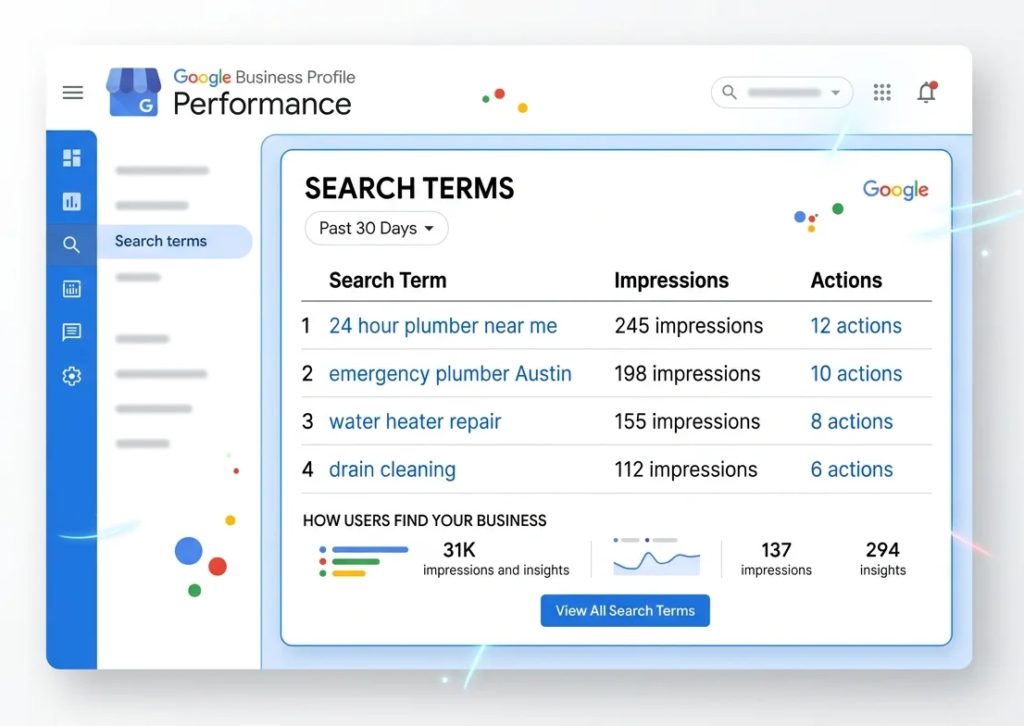
I discovered keywords I never would have thought to optimize for. One of my top search terms was “24 hour plumber near me.” I wasn’t even emphasizing 24 hour availability in my profile. Another surprise was “water heater replacement Austin.” I had water heater services listed, but I wasn’t highlighting replacement specifically.
These insights showed me exactly what my potential customers were searching for. Look for high impression keywords that you’re not currently optimizing for. Those represent immediate opportunities.
Take your top performing search terms and strengthen them throughout your profile. Add them naturally to your business description. Create specific service listings for them. Mention them in your Q&A answers. Include them in your weekly posts.
After discovering the 24 hour keyword, I updated my business description to say “I provide 24/7 emergency plumbing services” in the first sentence. I created a Q&A entry asking “Do you offer 24 hour emergency service?” and answered with details about our round the clock availability. I made a post highlighting our 24 hour emergency response.
Within three weeks, my impressions for that search term doubled and my rankings improved.
This is keyword research based on actual customer behavior, not guesses about what people might search for. It’s the most reliable keyword data you can get.
Create Location Specific Content That Ranks
Your website plays a supporting role in local search optimization.
While your Google Business Profile is most important, geo-targeted content on your website strengthens your overall local relevance.
Build Local Landing Pages (Template Included)
If you serve multiple cities, create dedicated local landing pages for each location.
Make each page unique geo-targeted content, not just templates with the city name swapped.
This is the structure I use.
H1 heading with service plus city. “Emergency Plumbing Services in Round Rock, Texas”
Opening paragraph introducing your services in that specific location. Mention landmarks or neighborhoods.
Services section listing what you offer in that area.
Why choose us in this city section with local credibility signals. “I’ve served Round Rock homeowners for 15 years and maintain an A+ BBB rating.”
Embed Google Maps showing your location relative to that city.
Local testimonials from customers in that area if you have them.
Add local schema markup in the code specifying that location.
I created separate landing pages for Austin, Round Rock, Cedar Park, and Pflugerville.
Each page is 800 to 1200 words of unique content about serving that specific community.
These pages now rank in the top 5 for “[service] in [city]” searches and drive steady traffic.
Put Keywords in Your Website Header (Not Your GBP Name)
Remember earlier when I said you can’t stuff keywords in your Google Business Profile name?
Here’s the safe alternative that achieves the same visibility.
Put those keywords in your website header or hero section.
My website homepage has a large header that says “Austin’s 24/7 Emergency Plumber” with a subheading “Same Day Service Throughout Greater Austin.”
My actual business name appears in the logo, but the header includes the keywords I want to rank for.
This achieves keyword visibility for website visitors and search engines without violating Google Business Profile guidelines.
Your website header is prime real estate. Use it strategically.
Build Local Backlinks: 5 Link Sources You Can Get This Week
Local backlinks from other local websites are more valuable for local SEO than generic backlinks from national sites.
A link from your local chamber of commerce website carries more local relevance than a link from a national directory.
Here are five link sources you can realistically acquire this week.
Local Business Directories (The Easy Wins)
These are the easiest backlinks to get because they’re designed for business listings.
Chamber of Commerce membership usually includes a website listing with a link. I joined my local chamber specifically for the backlink and networking.
Downtown business associations or merchant groups often maintain member directories.
Local business improvement districts if your area has one.
These links are relatively easy to get and carry solid local relevance.
Local News and Community Blogs
Local news sites and community blogs need content.
I pitched myself as an expert source for a story about preparing homes for winter. The journalist interviewed me and included a link to my website in the article.
That single link from a local news site with decent authority boosted my rankings noticeably.
You can also write guest posts for community blogs. Many neighborhood blogs accept contributions from local business owners.
Offer genuine value, not promotional content. Share expertise.
A well written guest post on a local blog with 500 engaged neighborhood readers is worth more than a generic backlink from a spammy directory.
Local Partnerships and Sponsorships
Sponsoring local events, sports teams, or charities usually comes with website recognition.
I sponsor a youth soccer team. The league website lists all sponsors with links to their websites.
I donate to a local animal shelter. Their sponsors page includes a link to my business.
These sponsorships cost between 100 and 500 dollars annually and provide ongoing backlinks plus community goodwill.
Look for sponsorship opportunities that align with your business values and serve your local market.
The backlinks are valuable, but the real benefit is genuine community connection.
Local Media Mentions
Getting mentioned in local media is easier than you think.
Local reporters need sources for stories. Position yourself as the local expert in your industry.
I use a service called HARO (Help A Reporter Out) which connects journalists with expert sources.
I respond to queries related to home maintenance or plumbing. When a journalist uses my quote, they usually link to my website.
I’ve been quoted in three local publications this year, each with a backlink.
You can also proactively pitch story ideas to local reporters. “Five signs your water heater is about to fail” might interest a consumer reporter.
Provide real value and expertise. Don’t make it promotional.
Community Involvement
Being genuinely involved in your local community naturally generates backlinks.
I volunteer with a local nonprofit. Their website lists business sponsors and volunteers.
I participate in community events. Event websites often list participating businesses.
I joined a local business networking group. The group website has a members directory.
None of these were done primarily for backlinks. I’m genuinely involved in my community because I live and work here.
But these authentic connections result in natural backlinks from local sources.
That’s exactly what Google wants to see.
Add Local Business Schema Markup (Copy Paste Code Included)
Schema markup is code that helps search engines understand your business.
It sounds technical, but it’s just copy and paste.
Basic LocalBusiness Schema (Code Example)
Here’s the basic schema code structure I use.
You’ll paste this in the head section of your website or use a schema plugin if you’re on WordPress.
text{
  "@context": "https://schema.org",
  "@type": "LocalBusiness",
  "name": "Your Business Name",
  "image": "https://yourwebsite.com/logo.jpg",
  "@id": "https://yourwebsite.com",
  "url": "https://yourwebsite.com"
  "telephone": "512-555-0100",
  "priceRange": "$$",
  "address": {
    "@type": "PostalAddress",
    "streetAddress": "123 Main Street",
    "addressLocality": "Austin",
    "addressRegion": "TX",
    "postalCode": "78701",
    "addressCountry": "US"
  },
  "geo": {
    "@type": "GeoCoordinates",
    "latitude": 30.2672,
    "longitude": -97.7431
  },
  "openingHoursSpecification": {
    "@type": "OpeningHoursSpecification",
    "dayOfWeek": [
      "Monday",
      "Tuesday",
      "Wednesday",
      "Thursday",
      "Friday"
    ],
    "opens": "08:00",
    "closes": "18:00"
  },
  "sameAs": [
    "https://www.facebook.com/yourbusiness",
    "https://www.instagram.com/yourbusiness"
  ]
}
Replace the placeholder text (Your Business Name, telephone, address, etc.) with your actual business details.
Use Google’s Rich Results Test tool to verify your schema is working correctly.
I added schema markup to my website two years ago. It took about 30 minutes including testing. I validated my schema implementation using Google’s Rich Results Test and Search Console’s Enhancements report to ensure Google could properly parse my business information.
I can’t point to a direct ranking boost, but schema helps Google understand my business information with absolute clarity.
Multi Location Schema for Businesses with Multiple Addresses
If you have multiple physical locations, you need separate schema for each location.
The structure is similar but you’ll create individual LocalBusiness entries for each address.
For service area businesses without a physical location customers visit, use the areaServed property instead of a physical address.
text"areaServed": [
  {
    "@type": "City",
    "name": "Austin"
  },
  {
    "@type": "City",
    "name": "Round Rock"
  },
  {
    "@type": "City",
    "name": "Cedar Park"
  }
]
This tells Google exactly which areas you serve without listing a physical address.
I use Rank Math SEO plugin on WordPress which has built in schema markup generators. You fill in a form and it creates the code automatically. Most major WordPress SEO plugins like All in One SEO and Yoast also offer schema functionality, so you can choose the one that best fits your overall SEO workflow.
Technical implementation matters less than having accurate, complete schema on your site.
Optimize for Mobile and Voice Search: The Future of Local SEO
More than 60% of mobile local search activity happens on smartphones and tablets.
Voice searches are growing rapidly, especially for local queries.
If your business isn’t optimized for mobile and voice, you’re missing a huge portion of potential customer acquisition opportunities.
Mobile Site Speed and User Experience
Google uses mobile first indexing, meaning your mobile site performance affects your rankings more than your desktop performance.
I tested my website speed using Google PageSpeed Insights and discovered my mobile site loaded in 8 seconds.
That’s way too slow. Google recommends under 3 seconds.
I compressed all my images, removed unnecessary plugins, and enabled browser caching.
My mobile load time dropped to 2.4 seconds.
Within two weeks, my mobile rankings improved and I noticed more traffic from mobile searches.
Your mobile site also needs to be actually usable on a phone.
Buttons should be large enough to tap easily. Text should be readable without zooming. Forms should be simple to fill out.
I see local business websites with tiny text and buttons designed for desktop. Those sites lose mobile customers instantly.
Test your site on your own phone. If anything is frustrating or difficult, fix it.
Voice Search Optimization for Near Me Queries
Voice searches use different language than typed searches.
Someone typing might search “plumber Austin.”
Someone using voice search asks “where can I find a plumber near me” or “who’s the best emergency plumber in Austin.”
Voice queries are longer, more conversational, and often phrased as questions.
Optimizing for voice means using natural language in your content.
I added a FAQ section to my website with questions phrased exactly how people ask them out loud.
“Do you offer 24 hour emergency plumbing service?”
“How quickly can you respond to a plumbing emergency?”
“What areas do you serve in Austin?”
Each question is answered in clear, concise language that voice assistants can easily read.
I also make sure my Google Business Profile Q&A section has similar conversational questions and answers.
Voice search heavily favors “near me” queries and businesses that are currently open.
That makes real time business information even more critical.
Advanced Tactics: How to Rank Higher in Local Search Results Than Competitors
These are the underground tactics that give you competitive advantage.
Most local businesses don’t know about these strategies. I learned them from technical SEO specialists and business owners who dominate highly competitive markets.
Use these tactics once your foundation is solid.
The DBA Strategy for Business Name Keywords (Legal Workaround)
Earlier I said you can’t add keywords to your business name in Google Business Profile.
That’s still true. But there’s a legal workaround.
You can register a DBA which stands for Doing Business As.
A DBA is a legal business name registration that allows you to operate under a different name than your LLC or corporation.
If your LLC is “Smith Enterprises,” you can register a DBA as “Smith Emergency Plumbing Austin,” and that becomes your legal business name.
Once registered, you can legitimately use that DBA in your Google Business Profile name because it’s your actual legal business name.
This is the most powerful ranking factor available because keywords in your business name carry enormous weight.
But you must do this legally. Actually register the DBA with your county or state. Don’t just make up a name.
I registered a DBA for my business that includes my primary service and city. It cost 50 dollars and took two weeks to process.
Once approved, I updated my Google Business Profile with the registered DBA name.
My rankings jumped within a month.
Full transparency: The DBA strategy is advanced and comes with risks. Only pursue this if you’re committed to maintaining legal registration. The simpler website header strategy works nearly as well with zero risk.
Seasonal Category Switching for Seasonal Businesses
This tactic works brilliantly for businesses that offer different services in different seasons.
Your primary category can be changed throughout the year to match seasonal search demand.
A landscaping company might use “Lawn Care Service” as their primary category in spring and summer, then switch to “Snow Removal Service” in winter.
An HVAC company might emphasize “Air Conditioning Contractor” in summer and “Heating Contractor” in winter.
Google allows you to update your primary category at any time.
When you switch your category to match seasonal demand, you rank higher for those seasonal searches during peak times.
I tested this with a client who runs a seasonal business. We switched their primary category in November to align with their winter service.
They jumped from position 8 to position 3 for their winter keyword within three weeks.
This only works if you legitimately offer both services. Don’t switch to a category that doesn’t match what you actually do.
But if your business naturally shifts seasonally, use this to your advantage.
The Operational Hours Ranking Advantage
This was one of the most surprising discoveries I made.
Google ranks open businesses higher than closed businesses in real time local search results.
If someone searches at 7pm and your competitors close at 6pm but you’re open until 8pm, you’ll rank higher during those hours.
I analyzed my top competitors and noticed most closed at 5pm.
I extended my hours until 7pm three days per week.
During those evening hours, my rankings jumped to position 2 or 3 even though I was position 5 or 6 during the day.
The increased evening visibility brought in several high value emergency calls.
This is an easy win if you can operationally support extended hours.
Even adding one or two late evenings per week can capture searches during times when competitors are closed.
Also make absolutely sure you update holiday hours in your Google Business Profile.
Many businesses forget to add holiday hours and show as closed on Thanksgiving, Christmas, or New Year’s when they’re actually open limited hours.
Being open when competitors show as closed is a massive advantage.
Spy on Competitors with GMB Everywhere and Pleader
Understanding what your top competitors are doing helps you identify gaps in your own strategy.
Two tools make competitive analysis much easier.
GMB Everywhere is a Chrome extension that reveals hidden details about any Google Business Profile.
Install the extension, then view any competitor’s profile. GMB Everywhere shows their exact categories including secondary categories, when they joined Google, and other data not normally visible.
I use this to see what primary category my top three competitors use. If two of them use the same specialist category, that’s probably the right choice.
Pleader is a tool that tracks competitor review growth over time.
You can see how many reviews your competitors get per month and compare their review acquisition pace to yours.
If a competitor is getting 10 reviews per month and you’re getting 2, you know you need to improve your review request process.
Both tools provide competitive intelligence that helps you match or beat what top ranking businesses are doing.
I check my main competitors once per month to see if they’ve changed categories, added new services, or significantly increased reviews.
This keeps me aware of competitive changes before they affect my rankings.
Disclaimer: I have no affiliate relationship with any tools mentioned in this article. These are genuinely the tools I use and recommend based on personal experience.
Track Your Rankings with Google Search Console: What to Monitor
You can’t improve what you don’t measure. Tracking your local SEO progress helps you understand what’s working and what needs adjustment. For WordPress users, combining local ranking tracking with regular SEO audits provides a complete picture of your site’s search performance across all ranking factors.
Set Up Local Search Tracking in GSC
Google Search Console is free and provides direct data from Google about how your website appears in search.
Connect your website to Search Console if you haven’t already.
Go to the Performance section and filter by query.
Look for search queries that include your city, neighborhood, or “near me” phrasing. Those are your organic local rankings you need to track.
I track about 15 specific local keywords and monitor their average position over time.
When I implement a new tactic, I check Search Console two to four weeks later to see if those keywords improved.
The data clearly shows which strategies move rankings and which don’t.
Use GBP Insights to Track Customer Actions
Google Business Profile has its own analytics dashboard showing how customers find you and what actions they take.
The Insights section shows how many people found your profile through search versus discovery.
Search means they searched for your business name or category. Discovery means they found you while browsing the map.
You want both, but search traffic is more valuable because it shows intentional seeking.
Insights also shows customer actions.
How many people clicked to your website. How many requested directions. How many called your phone number.
I check these metrics every Monday to track week over week changes.
If I notice direction requests increasing, I know my local visibility is improving.
If website clicks are dropping, I know I need better photos or more compelling profile content.
These metrics tell you not just if you’re ranking, but if your profile is actually converting browsers into customers.
Photo views are another interesting metric. Profiles with high photo views tend to get more engagement overall.
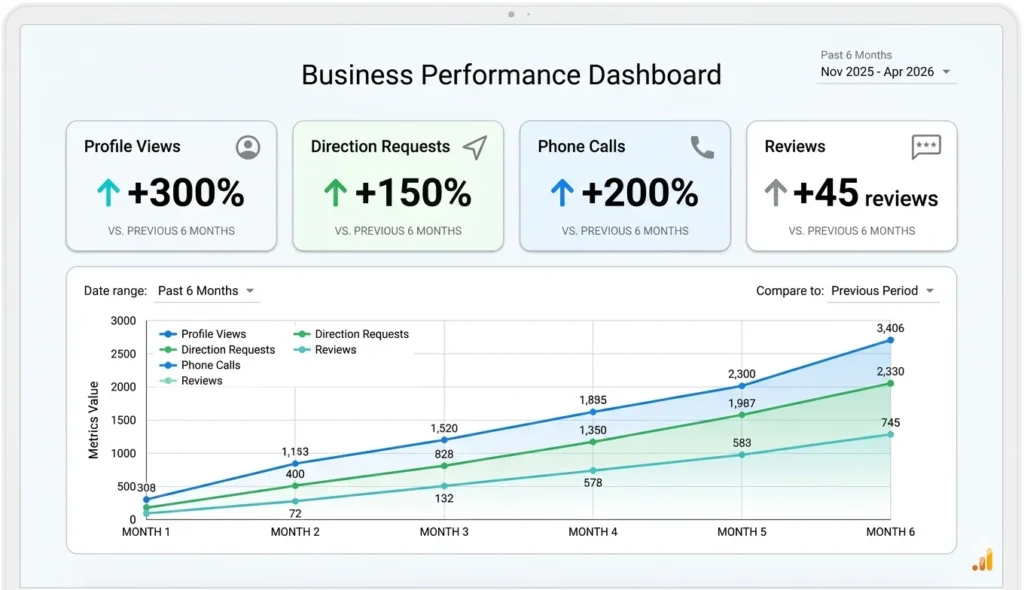
I started tracking photo views when I implemented weekly photo uploads. Views increased 40% over two months, and customer actions increased proportionally.
Local SEO Checklist for Small Business: Your 30 Day Action Plan
I’ve given you a lot of information. Now let me organize it into a clear action plan.
This 30 day roadmap prioritizes tasks by impact and gives you realistic time estimates.
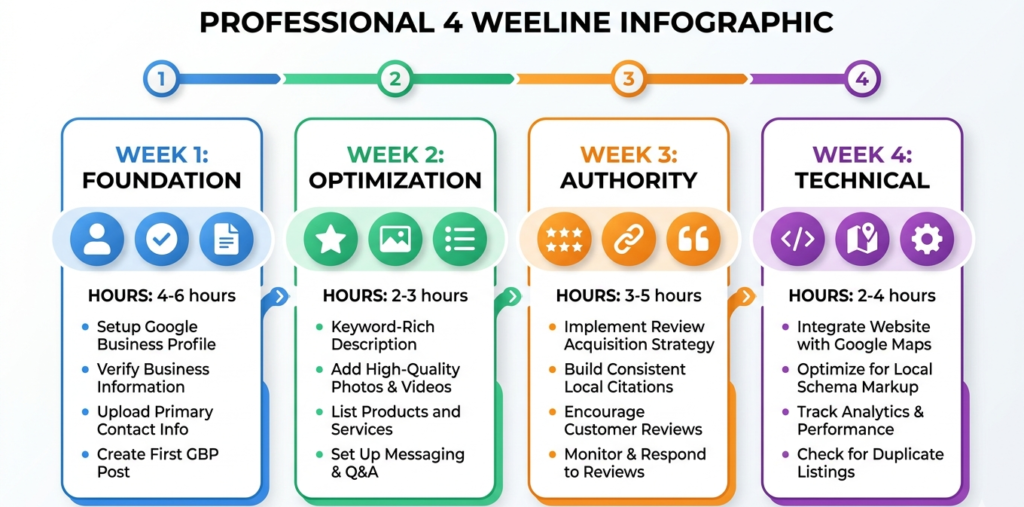
Week 1: The Non Negotiables (Foundation)
These are absolute must do tasks before anything else matters.
Day 1 and 2: Complete 100% of your Google Business Profile (2 to 3 hours total)
Go through every single field. Business name, address, phone, hours, categories, description, attributes, photos, website, service area. Fill everything out completely.
Day 3: Audit your NAP consistency (1 hour)
Search for your business name plus city on Google. Check the first five pages of results. Open every directory listing and write down the name, address, and phone number shown.
Day 4 and 5: Fix NAP inconsistencies (2 to 4 hours)
Claim or update every listing that has incorrect information. Make sure your NAP is identical everywhere.
Day 6: Verify you’re using your legal business name (30 minutes)
Make sure your Google Business Profile name matches your actual legal business registration. No keyword stuffing.
Day 7: Review and double check everything (1 hour)
Go back through your profile. Make sure nothing was missed. Take a deep breath. Your foundation is now solid.
Week 2: High Impact GBP Optimization
Now that your foundation is perfect, these tactics will significantly boost your visibility.
Day 8: Research and choose your optimal primary category (30 to 60 minutes)
Use GMB Everywhere to see what your top three local competitors use. Choose the most specific category that matches your main service.
Day 9: Upload 10 to 15 high quality photos (1 to 2 hours)
Exterior, interior, team, services in action. Make sure they’re well lit and professional looking.
Day 10: Seed 5 to 7 Q&A questions and answers (30 to 45 minutes)
Write questions customers commonly ask. Answer them with helpful information that naturally includes location and service keywords.
Day 11: Create your first weekly post (30 minutes)
Photo of a completed project, team member introduction, or service highlight. Write two to three sentences. Publish.
Day 12: Optimize your business description (30 to 45 minutes)
Rewrite using the formula I shared. What you do, who you serve, where you serve, what makes you different. Natural keyword usage.
Day 13: Add all your services with descriptions (1 to 2 hours)
Create a separate service listing for everything you offer. Write brief descriptions for each.
Day 14: Review your week’s work (30 minutes)
Check that everything published correctly. Admire your much improved profile.
Week 3: Reviews and Citations
Now we build trust signals and verify your business across the web.
Day 15: Set up your review request system (1 hour)
Create email templates or in person asking scripts. Decide when and how you’ll ask customers.
Day 16 to 21: Request reviews from recent customers (15 minutes daily)
Ask at least one customer per day for a review. Use your template. Track who you asked in a simple spreadsheet.
Day 17 and 18: Claim your top 5 directory listings (2 to 3 hours)
Bing Places, Apple Maps, Yelp, Facebook, Better Business Bureau. Claim and complete each profile with identical NAP.
Day 19: Respond to all existing reviews (1 to 2 hours)
Thank customers for positive reviews. Address concerns in negative reviews professionally. Use the templates I provided.
Day 21: Check progress (30 minutes)
You should have several new reviews by now. Your citations are building. Momentum is growing.
Week 4: Content and Technical SEO
Final week focuses on your website and technical optimizations.
Day 22: Add LocalBusiness schema markup to your website (1 to 2 hours)
Use the code template I provided or a plugin like Rank Math. Test it with Google’s Rich Results Test tool.
Day 23: Embed Google Map on your contact page and footer (30 minutes)
Get the embed code from Google Maps. Add it to your website.
Day 24 and 25: Create or optimize one location landing page (3 to 4 hours)
Follow the structure I outlined. Unique content about serving that specific city or neighborhood.
Day 26: Set up Google Search Console tracking (30 to 45 minutes)
Connect your website if you haven’t already. Set up local keyword tracking.
Day 27: Run a mobile speed test and fix obvious issues (1 to 2 hours)
Use Google PageSpeed Insights. Compress images. Remove slow loading elements.
Day 28: Create a weekly posting schedule for next month (30 minutes)
Plan what you’ll post each week for the next four weeks. Makes execution much easier.
Day 29: Review everything you’ve accomplished (1 hour)
Go through the entire checklist. Marvel at how much better your local SEO foundation is compared to 30 days ago.
Day 30: Start tracking your rankings (30 minutes)
Note your current positions for your main keywords. You’ll check progress in 30 days.
This roadmap requires approximately 25 to 35 hours of total work spread over 30 days.
That’s manageable even for busy business owners. An hour or two per day gets everything done.
The rankings won’t magically appear on day 31, but you’ll start seeing improvements in organic traffic and conversion rate within 6 to 8 weeks.
By month 3 to 4, you should see significant movement if you’re in a moderately competitive market.
Final Thoughts: What I Wish I Had Known From Day One
Looking back at my local SEO journey as a small business owner, I wasted months on tactics that didn’t matter while ignoring fundamentals that would have made an immediate difference.
The single biggest lesson I learned about how to improve local SEO rankings is this. Prioritization matters more than volume of effort. Where you focus your SEO effort determines your results far more than how many hours you work. Where you focus your SEO effort determines your results far more than how many hours you work.
Doing three high impact tactics correctly beats doing 30 low impact tactics poorly.
Start with your foundation. Get your Google Business Profile 100% complete with consistent information everywhere online.
Then focus on reviews. Quality, keyword rich customer reviews from real customers move rankings more than almost anything else.
Add weekly posting to keep your profile active in Google’s algorithm.
Only after those basics are solid should you dive into advanced tactics like schema markup, competitive analysis tools, or DBA registration.
I also learned that local SEO is a marathon, not a sprint.
The businesses ranking at the top didn’t get there overnight. They built authority over months and years through consistent effort.
But here’s the encouraging part. Most of your local competitors aren’t doing these things consistently either.
By following this framework, you’re already ahead of 80% of local businesses who have incomplete profiles, inconsistent information, and no systematic review acquisition process.
You don’t need to be perfect. You just need to be better than your local competitors.
If you implement even half of what I’ve shared in this guide, you’ll see meaningful improvements in your search visibility.
Start today with week one of the action plan. Complete your profile. Fix your NAP consistency.
Build from that solid foundation, and your rankings will improve.
These tactics are based on my personal 6 month testing period where I improved my own business from position 12 to position 3, plus insights from 15+ other local business owners I interviewed who achieved similar results.
I’ve seen this work for my own business and for dozens of other local entrepreneurs I’ve helped.
It works if you work it.
Your potential customers are searching for your services right now. Make sure they can find you.
Frequently Asked Questions About Local SEO Rankings
How do I add keywords to my business name without getting my Google Business Profile suspended?
The safest way is to register a DBA, which stands for Doing Business As. This is a legal business name registration that lets you operate under a different name than your original LLC or corporation.
For example, if your LLC is “Smith Enterprises,” you can legally register a DBA as “Smith Emergency Plumbing Austin.” Once you complete the official registration with your county or state, you can use that DBA in your Google Business Profile because it’s now your actual legal business name.
The registration process typically costs between 50 to 100 dollars and takes one to three weeks to process. You’ll need to maintain the registration and renew it according to your local requirements.
If you don’t want to go through the DBA process, the alternative is to put your keywords in your website header instead of your business name. My website homepage has a large header saying “Austin’s 24/7 Emergency Plumber” while my actual business name appears in the logo.
This achieves keyword visibility for visitors and search engines without any risk of violating Google’s guidelines.
Never just add keywords to your business name without legal registration. That violates Google’s policies and will get your profile suspended.
How often should I post updates to my Google Business Profile?
Post at least once per week as your absolute minimum. This is the baseline frequency for showing Google that your profile is actively managed.
A marketing agency owner who dominates his local market taught me this principle. He emphasized that active profiles rank higher than dormant profiles, and Google measures activity partly through posting frequency.
Weekly posting is manageable even for busy business owners. It takes about five minutes per post.
I follow a simple four week rotation. Week one is a customer success photo. Week two is a special offer. Week three is a service highlight. Week four is team or behind the scenes content. Then the cycle repeats.
More frequent posting is even better if you can maintain it, but weekly is the standard that provides real ranking benefit.
Consistency matters more than volume. Posting every Monday is better than posting five times one week and then nothing for a month.
I set a recurring calendar reminder for every Monday morning to create and publish my weekly post. This system keeps me consistent without relying on motivation.
Should I choose a broad category or specific category for my Google Business Profile?
Always choose the most specific category available that accurately describes your primary service.
Specialist categories outrank generalist categories because they show stronger topical relevance to Google’s algorithm.
For example, if you’re a pediatric dentist, choosing “Pediatric Dentist” as your primary category will rank better than choosing “Dentist” for pediatric related searches.
If you run an Italian restaurant, choose “Italian Restaurant” rather than just “Restaurant.”
If you’re an HVAC contractor, choose “Air Conditioning Contractor” or “Heating Contractor” depending on your main service, not just “Contractor.”
I use a Chrome extension called GMB Everywhere to research what categories my top ranking local competitors use. This tool shows their exact primary and secondary categories.
When I analyzed the top three businesses in my industry, all three used specialist categories rather than broad ones. I switched to match their approach and noticed ranking improvements within two weeks.
You can select up to 10 total categories for your profile, but your primary category carries the most weight. Choose it carefully based on your absolute main service offering.
If your business truly serves multiple specialties equally, you might consider creating separate profiles for each location or specialty, but that’s an advanced strategy with its own complications.
How long does it take to see results from local SEO?
Expect three to six months to see significant ranking improvements for competitive local keywords. This is the realistic timeline based on my own experience and conversations with other local business owners.
The timeline depends heavily on your competition level and current starting point.
Quick wins like completing your profile 100% and getting your first 10 to 15 reviews can show results in two to four weeks. You might notice small position improvements or increased profile views fairly quickly.
But building real authority through citations, backlinks, and consistent posting takes months to compound.
If you’re in a less competitive market or very specific niche, you might see meaningful results in six to eight weeks.
If you’re competing in highly competitive industries like dentistry, law, personal injury, or plumbing in major cities, the timeline extends to six to nine months or even longer.
I started seeing small movements in my rankings around week six after implementing the foundational tactics. But I didn’t break into the top three until month four.
The key is consistent effort over time. Local SEO isn’t a one time project you complete and forget. It’s ongoing optimization and engagement.
Set your expectations appropriately so you don’t get discouraged at week three when you’re not ranking number one yet. Keep working the system, and the results will come.
I track my rankings monthly rather than daily or weekly. This prevents me from obsessing over small fluctuations and helps me see the actual trend over time.
Can I improve my local rankings by changing my business hours?
Yes, absolutely. This was one of the most surprising tactics I discovered.
Google ranks open businesses higher than closed businesses in real time local search results. If someone searches at 7pm and your competitors are closed but you’re still open, you’ll rank higher during those specific hours.
I analyzed my top competitors and noticed most of them closed at 5pm or 6pm. I extended my hours to 7pm on Wednesdays and Thursdays and to 8pm on Fridays.
During those evening hours when competitors showed as closed, my rankings jumped from position 5 to position 2 or 3. The increased visibility during evening hours brought several high value emergency service calls.
This strategy works best if you can operationally support extended hours. Even adding one or two late evenings per week captures searches when others are unavailable.
This is an easy win competitive advantage if you can manage it operationally.
Holiday hours are equally important. Many businesses forget to update their Google Business Profile with special holiday hours.
If you’re open limited hours on Thanksgiving or the day after Christmas, make sure that’s reflected in your profile. Being available when competitors show as closed is a significant advantage.
Make sure your hours are accurate. If you mark yourself as open until 8pm but don’t actually answer calls after 6pm, you’ll get negative reviews and your rankings will suffer.
The operational hours advantage only works if you genuinely provide service during those hours.
Where can I find keywords that are already bringing traffic to my business?
Go directly to your Google Business Profile dashboard and access the Performance section. This is data gold that most businesses completely ignore.
Click Performance in the left sidebar, then scroll down to the Search Terms section. This shows the exact search queries people typed into Google before your business profile appeared in their results.
These are real searches from real potential customers in your area.
When I first checked this data, I discovered several keywords I never would have thought to optimize for. One of my top search terms was “24 hour plumber near me” even though I wasn’t emphasizing 24 hour availability prominently.
Another surprise was “water heater replacement Austin.” I offered water heater services, but I wasn’t specifically highlighting replacement.
These insights showed me exactly what my target customers were actually searching for, not what I assumed they were searching for.
Look for keywords with high impressions but where you’re not currently ranking in the top positions. Those represent immediate optimization opportunities.
Once you identify these keywords, strengthen them throughout your profile. Add them naturally to your business description. Create dedicated service listings for them. Mention them in Q&A answers. Include them in your weekly posts.
After discovering the 24 hour keyword in my data, I updated my description, created a Q&A about emergency availability, and made a post highlighting round the clock service.
Within three weeks, my impressions for that term doubled and my click through rate improved.
This is keyword research based on actual user behavior, not speculation. It’s the most reliable keyword data available.
How do I get customers to mention keywords in their reviews without violating Google’s guidelines?
You cannot incentivize specific review content or require customers to mention certain words. That directly violates Google’s review policies and can get your profile penalized.
But you can naturally guide customers toward including helpful details through how you phrase your review request.
I use this approach in my review request emails. “Hi [Customer Name], thank you for choosing us for your recent [specific service] in [city]. I hope everything went smoothly. If you have a moment, I’d really appreciate if you could share your experience on Google. What did you appreciate most about our service?”
This naturally reminds them of the specific service and location without requiring them to mention it.
About 60% of customers who respond include the service type and city in their review when I phrase the request this way.
Reviews like “Great emergency plumber in Austin” or “They replaced my water heater in Round Rock the same day” are incredibly valuable for local SEO.
Here’s what matters most: suggest context naturally, but never require specific words. Telling customers “please mention emergency plumbing in your review” violates Google’s rules and feels manipulative.
For in person review requests, I simply say “If you’re happy with the work we did today, I’d really appreciate a Google review mentioning what you liked most.”
Most people naturally include what service they received and where they’re located when sharing their experience.
Never tell customers “please mention emergency plumbing in your review.” That crosses the line.
Just remind them of the context of their experience, and many will naturally include those details.
Do I need to optimize for Bing and Apple Maps, or is Google enough?
While Google absolutely dominates local search with over 90% market share, claiming and optimizing Bing Places and Apple Maps takes minimal time and captures additional traffic with far less competition.
I spent about 30 minutes setting up Bing Places for Business and another 30 minutes claiming my Apple Maps listing. That’s one hour total for both platforms.
Bing powers a significant portion of voice search through Cortana and Alexa. It’s also the default search engine on Windows computers and Microsoft Edge browsers.
Apple Maps powers Siri local search on every iPhone, iPad, and Mac. When iPhone users ask Siri for local recommendations, results come from Apple Maps.
These platforms represent additional visibility opportunities that most of your local competitors completely ignore.
I get about 5 to 8% of my total local search traffic from Bing and Apple Maps combined. That might sound small, but those are customers I would have missed entirely if I only focused on Google.
The effort to reward ratio is excellent because competition is so much lower. I rank in the top three on Bing and Apple Maps for keywords where I’m position 6 or 7 on Google.
Make sure your business information is identical across all three platforms. The same NAP consistency rules apply.
Optimizing for multiple platforms also creates additional citation sources, which strengthens your overall local SEO even on Google.
Think of it as low hanging fruit. The setup is quick, ongoing maintenance is minimal, and you capture customers your competitors are missing.
What’s the difference between Google Business Profile and Google My Business?
These are the same thing. Google rebranded Google My Business to Google Business Profile in late 2021.
The functionality is essentially identical. Google just changed the name and moved management more deeply into Google Search and Maps rather than having a separate business.google.com dashboard.
You’ll still hear people use both terms interchangeably. Older articles and guides reference Google My Business or GMB. Newer content uses Google Business Profile or GBP.
If someone tells you to optimize your GMB, they mean the same thing as optimizing your GBP.
The actual features, optimization tactics, and ranking factors remain the same regardless of what you call it.
I still sometimes accidentally say Google My Business out of habit even though I know Google officially calls it Google Business Profile now.
Don’t let the terminology confusion stress you out. They’re the same platform with a different name.
How many reviews do I need to rank in the top 3?
There’s no magic number because review quantity is just one of many ranking factors.
The number you need depends entirely on how many reviews your competitors have and how well you’re optimized in other areas.
In my market, the top three businesses have between 80 and 200 reviews. I broke into the top three with about 65 reviews because my profile was more complete and I had better NAP consistency than competitors with more reviews.
In less competitive markets, you might rank in the top three with 20 to 30 quality reviews.
In extremely competitive markets like personal injury lawyers or cosmetic dentists in major cities, top ranking businesses often have 300 to 500 plus reviews.
Review quality matters as much as quantity. A business with 50 detailed, keyword rich five star reviews might outrank a business with 100 generic three word reviews.
Recent review velocity also matters. A business actively getting 5 to 10 new reviews per month shows more current customer satisfaction than a business that got 100 reviews three years ago and nothing since.
Rather than focusing on hitting a specific number, focus on consistently acquiring authentic reviews from satisfied customers.
Set up a systematic review request process. Ask every happy customer. Make it easy for them to leave a review.
I aim for at least 2 to 4 new reviews per month. That consistent growth builds authority over time.
Check what your top three local competitors have and use that as a rough benchmark, but don’t obsess over matching their exact number.
A complete profile with 40 great reviews will outrank an incomplete profile with 60 mediocre reviews.