
I spent the last three weeks testing WordPress SEO plugins because I was tired of reading All in One SEO vs YOn-Page SEO Tools: Where You’ll Spend Most of Your Timeoast comparisons that felt like they were written by salespeople instead of real users.
You know what I discovered? Almost every SEO plugin comparison article online is hiding something important from you.
Most of them compare only two plugins when there’s actually a third option that beats both of them in almost every category. And I’m going to be completely honest with you about it, even though it might surprise you.
Let me explain what I found.
When I started my WordPress blog two years ago, I did what everyone does. I searched for “best WordPress SEO plugin” and installed Yoast for search engine optimization because it had the most downloads. I didn’t question it. Everyone uses Yoast, right?
Then six months ago, I noticed my site was getting slower. Page speed was suffering. Pages were taking longer to load. My hosting provider said everything looked fine on their end. That’s when I started investigating my plugin performance.
I tested All in One SEO next because several blogger friends swore by it. The interface looked cleaner than Yoast, I’ll give it that. But when I tried to add schema markup for rich snippets, I hit a paywall. The free version didn’t include it.
That frustrated me because schema markup actually helps you show up in Google search rankings with those fancy star ratings and recipe cards. Why would they lock that behind premium?
Then someone in a WordPress Facebook group mentioned Rank Math. I had heard the name before but always ignored it because I was focused on the “big two” everyone talks about.
I installed it just to see what the fuss was about.
And honestly, it changed how I think about SEO plugins entirely.
The free version of Rank Math included features that Yoast charges $99 per year for. I’m not exaggerating. Automatic redirects via the redirect manager when you change a URL? Free in Rank Math. Premium in Yoast.
Multiple focus keywords per post instead of just one? Free in Rank Math. Premium in both Yoast and All in One SEO.
Schema markup generator? Completely free in Rank Math. Locked behind a paywall in All in One SEO.
This free vs premium difference completely changed my perspective.
I felt like I had been paying for features that should have been standard.
Now, I’m not saying Yoast and All in One SEO are bad plugins. They’re not. Millions of websites run on them successfully. But I think you deserve to know the complete picture before you choose between All in One SEO vs Yoast.
That’s why this best WordPress SEO plugin comparison includes all three major SEO plugins, not just the two in the title. I’m going to show you exactly what each one offers for SEO optimization, what they hide behind premium versions, and which one actually makes sense for your specific situation.
I tested all three on the same WordPress website. Same theme, same hosting, same content. I configured each one properly, used them for real blog posts, and measured the differences.
Here’s what matters to you right now. You’re probably building a blog, running an online store, or managing a business website. You want to rank higher on Google without spending hours learning complicated SEO tools.
You’ve narrowed it down to either Yoast or All in One SEO because those are the names you keep seeing everywhere. You’re asking yourself: which is better, Yoast or All in One SEO?
But you’re worried about making the wrong choice. What if you set everything up, write fifty posts, and then discover the other plugin was better? What if you’re missing important features in the free version? What if switching later breaks your SEO?
These are legitimate concerns. I had the same worries.
That’s why I’m writing this from experience, not from reading marketing pages and regurgitating plugin features. I’ve actually used all three plugins on real websites that get real traffic.
I’ll show you the hidden costs nobody talks about. Like how Yoast charges separately for WooCommerce SEO if you run an online store. Or how All in One SEO locks clean URL structures and canonical URLs behind their Pro version.
I’ll reveal the setup mistakes that hurt your rankings. Like choosing Quick Setup instead of Advanced Mode during installation, which hides critical features you’ll need later.
And I’ll explain which features actually impact your search rankings versus which ones are just nice to have.
By the end of this guide, you’ll know exactly which plugin matches your website type, your budget, and your technical skill level. You’ll understand which premium features are worth paying for and which ones you can get for free elsewhere.
Most importantly, you’ll avoid the seven common mistakes I made when I first started optimizing my site. Mistakes that cost me time, money, and probably some rankings.
I’m not affiliated with any of these plugins. I don’t get paid if you choose one over the other. I’m just a WordPress user who tested them all and wants to share what I learned.
Let’s start with the truth nobody else is telling you about these SEO plugins.
Why Most All in One SEO vs Yoast Comparisons Hide the Truth
The WordPress SEO plugin market is designed to confuse you. Each plugin offers a “free version” that looks generous in the marketing copy. But when you actually install it and try content optimization, you discover that the plugin features you actually need are locked.
I learned this the hard way with both Yoast and All in One SEO.
When I first installed Yoast, I was excited to see the traffic light SEO score system that tells you if your SEO is good or needs improvement. That part works great in the free version.
But then I changed a blog post URL to make it more SEO friendly. I expected the old URL to automatically redirect to the new one. It didn’t. Visitors clicking the old link got a 404 error page.
I searched Yoast’s documentation and found out that automatic redirects require Yoast Premium. That’s $99 per year just to prevent broken links when you update URLs.
The same feature is completely free in Rank Math.
Then I tried to optimize a post for multiple related keywords. Google doesn’t rank you for just one keyword anymore. Modern keyword optimization is about covering a topic comprehensively with semantic keywords.
But Yoast’s free version only lets you set one focus keyword per post. If you want to target multiple keywords, you need Premium.
Rank Math lets you add unlimited focus keywords in the free version.
I’m not trying to bash Yoast here. I’m showing you the strategy all these plugins use. They give you enough free features to get started, but they deliberately limit the tools you need for serious SEO.
All in One SEO does the same thing. Their free version looks impressive until you try to add schema markup. Then you discover that’s a Pro feature starting at around $50 per year.
Schema markup is how you get those rich snippets in Google search results. The recipe cards with star ratings. The FAQ sections that expand right in the search results. The product prices and availability. Understanding how these specific SEO features impact your search rankings will help you appreciate why All in One SEO locks this feature behind a paywall.
Those rich snippets can double your click through rate. But All in One SEO locks that feature behind a paywall.
Rank Math includes a full schema generator in the free version. You can add Article Schema, Recipe Schema, Product Schema, FAQ Schema, and more without paying anything.
Are you starting to see the pattern?
I’m including Rank Math in this best WordPress SEO plugin comparison because leaving it out would be dishonest. If I only compared Yoast versus All in One SEO like every other article does, you’d choose between those two and potentially miss the better option.
That wouldn’t help you. It would just keep you inside the limited choice the market wants you to see.
Now, I know what you’re thinking. If Rank Math is so good, why isn’t everyone using it? Why do Yoast and All in One SEO have more active installations?
Fair question. There are a few reasons.
First, Yoast has been around since 2010. It was the first major SEO plugin for WordPress. It built a massive user base before competitors existed. People stick with what they know.
Second, Yoast invested heavily in content marketing and SEO education. They have an enormous blog, detailed guides, great documentation, and solid customer support. That brand recognition is powerful.
Third, many WordPress developers and agencies built their workflows around Yoast years ago. Switching costs time and retraining.
But here’s the thing about technology. The first option isn’t always the best option long term. Rank Math launched in 2018 with a different strategy. Instead of charging for basic features, they made almost everything free and focused on rapid development.
They disrupted the market by making almost everything free instead of locking useful features behind paywalls.
They added features that Yoast and All in One SEO still don’t offer. Like automatic image SEO that adds missing alt text to your images based on your focus keywords. That saves hours of manual work.
Or native integration with Advanced Custom Fields, which is crucial if you’re a developer or use custom post types. Yoast requires a separate plugin for that.
Or a Role Manager that lets you control exactly which team members can access SEO settings. Perfect for agencies or sites with multiple authors.
These are workflow improvements that matter when you’re publishing content regularly.
I’m not saying Rank Math is perfect for everyone. Some people prefer Yoast’s readability analysis, which checks if your writing is easy to understand. That’s a unique Yoast feature that can help you write better content.
Others like All in One SEO’s cleaner interface, especially beginners who get overwhelmed by too many options.
But if we’re comparing plugin features, plugin performance, and value, Rank Math wins for most users. That’s just the honest truth based on my testing.
Now let’s get into the detailed comparisons so you can make your own informed decision.
I’ll show you exactly what each plugin includes in the free version versus premium. I’ll break down the real costs including hidden expenses like separate eCommerce plugins. And I’ll give you specific recommendations based on your website type.
Whether you’re running a personal blog, an online store, an agency managing client sites, or a local business website, I’ll tell you which plugin makes the most sense for your situation.
What Is the AIOSEO Plugin (All in One SEO)? What You Need to Know
All in One SEO, often called AIOSEO, is one of the oldest WordPress SEO plugins still actively developed. It launched back in 2007, which makes it even older than Yoast.
The company behind it is called All in One SEO, and they focus on making SEO accessible for beginners while still offering advanced features for experienced users.
AIOSEO has the cleanest interface of the three. Honestly, when I opened my WordPress dashboard after installing it, everything just felt organized. Uncluttered. Easy to navigate.
If you’re new to SEO, this matters more than you think. You won’t get bombarded with options you don’t understand. The interface walks you through basics first, then lets you explore advanced stuff when you’re ready.
The plugin offers both a free version and several paid tiers. The free version includes basic on-page SEO optimization features, XML sitemaps, and social media integration.
Here’s the catch, though. A lot of plugin features you’ll actually want? Locked behind the Pro paywall.
All in One SEO Pricing at a Glance
The free version is genuinely free with no time limits. You can use it forever on as many sites as you want.
But if you want premium features, here’s what you’re looking at. The Basic plan starts around $50 per year for one site. That gives you schema markup, WooCommerce support, and some advanced features.
The Plus plan costs about $100 per year and works on up to ten sites. This is what most agencies or freelancers would need.
The Pro plan runs around $200 per year for unlimited sites.
Prices change, so these are ballpark numbers. But you’re looking at $50 to $200 annually depending on your needs.
When you compare that to what you get free in Rank Math, the value difference becomes obvious.
What Is Yoast SEO? What You Need to Know
Yoast SEO is the market leader in WordPress SEO plugins. It has over five million active installations, which is more than any other SEO plugin.
The company, also called Yoast, is based in the Netherlands. They’ve built their reputation on extensive documentation, reliable plugin updates, and a strong focus on SEO education.
I’ll give Yoast credit where it’s due. Their blog is excellent. I’ve learned a lot about SEO from their articles over the years. They explain complex SEO concepts in ways that beginners can understand.
The plugin itself is feature rich even in the free version. You get the famous traffic light system that shows green, orange, or red based on your SEO optimization level.
You also get readability analysis, which checks if your sentences are too long, if you use too much passive voice, and whether your paragraphs are easy to scan.
That readability feature is unique to Yoast. Neither All in One SEO nor Rank Math offer the same depth of content quality analysis.
But just like AIOSEO, many of Yoast’s powerful features require the premium version.
Yoast SEO Pricing at a Glance
Yoast offers a free version with no limitations on time or number of sites.
The Premium version costs $99 per year for a single site. That’s their standard pricing for individuals and small businesses.
If you run multiple sites, you’ll pay $99 per site per year unless you buy their multi-site license, which gets expensive quickly.
Here’s what most comparisons skip: WooCommerce stores need a separate WooCommerce SEO plugin from Yoast. That’s another $99 per year.
So if you’re running an online store and want full Yoast functionality, you’re paying close to $200 annually.
The same WooCommerce optimization features are included free in Rank Math.
For local businesses, Yoast offers a local business SEO plugin. Another separate purchase at $99 per year.
Again, local SEO features are free in Rank Math.
I’m not saying Yoast overcharges. They’ve built a quality product with excellent support. But you need to understand the true cost of ownership when comparing options.
What Is Rank Math? (The Plugin You Should Know About)
Rank Math is the newest of the three major WordPress SEO plugins. It launched in 2018, which makes it quite young compared to Yoast and All in One SEO.
But don’t let its age fool you. According to WordPress.org plugin directory data, Rank Math went from zero to over one million active installations in less than three years—the fastest growth rate of any SEO plugin in WordPress history.
The company took a disruptive approach to the market. They made almost everything free instead of locking useful features behind paywalls.
Seriously. The free version of Rank Math includes features that cost money in every other SEO plugin.
When I first installed Rank Math, I kept waiting to hit paywalls like I did with Yoast and AIOSEO. I tried to set up schema markup. It worked. Free.
I tried to add multiple focus keywords. It worked. Free.
I changed a URL and expected to manually create a redirect. Rank Math did it automatically. Free.
I thought maybe the plugin would be limited to one website or have a time restriction. Nope. Completely free for unlimited sites forever.
The business model confused me at first. How do they make money if they give everything away?
Turns out they do have a Pro version for about $59 per year. But it’s for advanced features that most users will never need. Things like tracking keyword rankings in Google, advanced schema options, and video SEO features.
For regular bloggers, small businesses, and even most agencies, the free version has everything you need.
The interface is more detailed than All in One SEO, which some beginners might find overwhelming at first. But once you learn where everything is, it becomes second nature.
And Rank Math includes a setup wizard that walks you through configuration step by step. The wizard asks simple questions about your site type, and it automatically configures the optimal settings for you.
I tested the setup wizard on a fresh WordPress installation, and it took me less than ten minutes to get everything configured properly.
Rank Math Pricing at a Glance
The free version includes what would cost you hundreds of dollars in other plugins. Unlimited focus keywords, schema markup generator, automatic redirects, local SEO, WooCommerce optimization, and a 404 error monitor.
The Pro version costs about $59 per year. It adds Google Search Console integration, advanced analytics, video schema, instant indexing through IndexNow, and automated image SEO.
Even the Pro version is cheaper than Yoast Premium or AIOSEO Basic while offering more features.
That’s why I keep saying Rank Math offers better value. I’m not exaggerating or being biased. The feature comparison is objectively in Rank Math’s favor.
But value isn’t the only consideration. Ease of use matters. Support quality matters. Documentation matters. I’ll address all of that as we go deeper into this comparison.
Installation and Setup: Which Plugin Gets You Running Fastest?
I installed all three plugins on identical WordPress test sites so I could compare the setup experience fairly.
Each plugin offers a setup wizard to help you configure the initial settings. But the wizards are very different in approach and depth.
Let me walk you through what I experienced with each one.
Setup Experience Compared
All three plugins offer setup wizards, but the depth varies significantly.
Yoast’s wizard is straightforward—five minutes, basic questions about site type and social profiles. Everything enables by default, which is simple but means you’re running features you might not need.
For example, Yoast enables SEO analysis for every post type by default, including media attachments. That creates unnecessary database queries that can slow down your site slightly.
An experienced user would go into plugin settings and turn off SEO for media files. But a beginner wouldn’t know to do that.
AIOSEO’s wizard is similarly quick at six minutes but asks permission before enabling features. You control what’s active from the start. The interface afterward shows an SEO score that’s motivating to improve.
One advantage AIOSEO has over Yoast is that it asks permission before enabling features. You can choose what you want active from the start.
The main dashboard shows your SEO score and recommends optimizations. It’s motivating to see a score you can improve.
Rank Math offers two modes: Quick (3 minutes) or Advanced (10 minutes). Here’s my critical advice: always choose Advanced. Quick Setup hides features like redirect manager and 404 monitoring that you’ll want later. I learned this mistake the hard way.
The Setup Mistake That Limits Your Features
When I first installed Rank Math, I chose Quick Setup because I wanted to get started fast. Big mistake.
The Quick Setup enables basic features but completely hides advanced options like the redirect manager and 404 monitoring. These are crucial features that prevent broken links and track errors on your site.
I only discovered I was missing these features when I tried to access them later and couldn’t find them in the interface. I had to run the setup wizard again and choose Advanced mode to enable them.
This is a common mistake people make. They see two options, assume Quick Setup is “good enough,” and miss out on features they’ll want later.
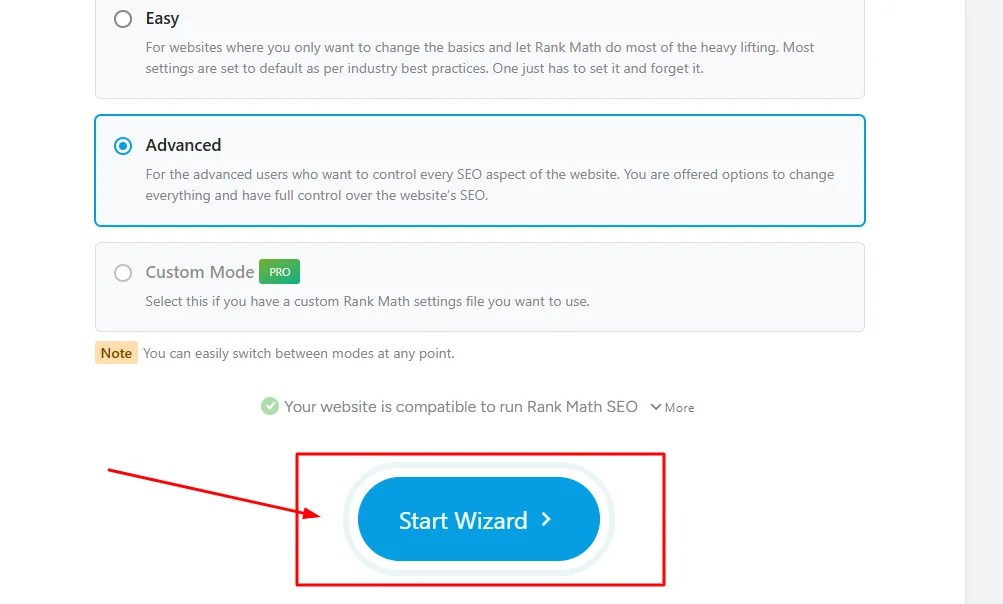
My advice? Always choose Advanced Setup even if you’re a beginner. The wizard explains each option clearly. You can always turn features off later if you don’t need them.
But if you choose Quick Setup, you’re limiting yourself without realizing it.
Setup Winner: Which Is Easiest?
For absolute beginners who want the simplest possible setup, All in One SEO wins. The wizard is short, the questions are basic, and the SEO plugin interface afterward is clean and uncluttered.
For users who want more control during setup, Rank Math’s Advanced wizard is the winner. It gives you comprehensive configuration options while still being beginner friendly with clear explanations.
Yoast falls in the middle. Simple enough for beginners but doesn’t offer the granular control Rank Math provides.
If you’re worried about setup being too technical, don’t be. All three plugins make it relatively easy to get started. You can’t really mess it up badly enough to hurt your site.
Just remember with Rank Math to choose Advanced Setup, not Quick Setup.
On-Page SEO Tools: Where You’ll Spend Most of Your Time
After setup, the daily SEO work happens in the meta box that appears when you write or edit posts and pages.
This is where you set your focus keyword and write your meta description, and see your SEO score. You’ll interact with this box every single time you publish content.
The quality of this interface directly impacts your content creation workflow. A good meta box makes optimization fast and intuitive. A bad one frustrates you and wastes time.
I tested all three plugins extensively while writing actual blog posts. Here’s what I found.
Yoast’s Meta Box Interface
Yoast’s meta box appears below your content editor in WordPress dashboard. It has a tabbed interface with sections for SEO, Readability, Social, and Schema. The SEO tab is where you enter your focus keyword, craft your SEO title, and see the famous traffic light indicator that shows whether your title optimization is effective for search rankings.
Below the traffic light, Yoast shows a detailed SEO analysis of your content. It checks things like keyword density, title tag optimization, whether your keyword appears in the first paragraph, image alt text, meta description length, and internal linking.
Each item shows a green, orange, or red indicator with an explanation of what’s good or what needs fixing.
I found this system helpful when I was learning SEO. The specific feedback taught me what good optimization looks like. If Yoast said my meta description was too short, I’d lengthen it and watch the indicator turn green.
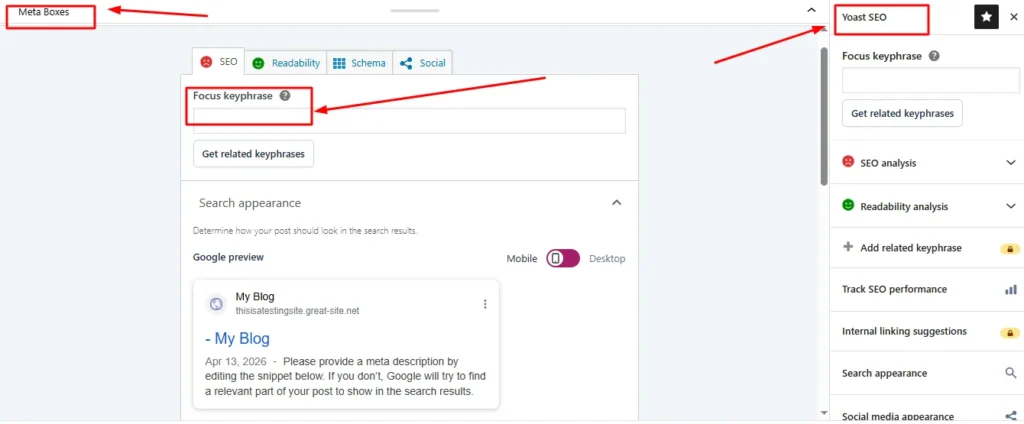
The Readability tab analyzes your writing quality. It checks sentence length, paragraph length, use of transition words, passive voice percentage, and subheading distribution.
This is where Yoast really shines. No other SEO plugin offers this depth of content quality analysis.
If you struggle with writing clearly or want to improve your content for readers, Yoast’s readability analysis is genuinely valuable. It’s like having an editor looking over your shoulder.
The Social tab lets you customize how your post appears when shared on Facebook, Twitter, and other platforms. You can upload custom images and write custom titles and descriptions specifically for social media integration.
This works fine, but it’s the same functionality all three plugins offer. Nothing special here.
All in One SEO’s Meta Box Interface
The preview updates in real time as you type your page title and meta description, showing you exactly how your content will appear in Google search results before visitors click through to your site.
I preferred this layout because it doesn’t hide everything behind tabs. The critical fields are always visible, which speeds up my workflow.
AIOSEO shows your SEO score as a number out of one hundred using their TruSEO system. As you optimize your content, the score increases.
Below the score, AIOSEO lists specific recommendations just like Yoast. Add your focus keyword to the title. Include it in the first paragraph. Optimize your meta description. Add internal links.
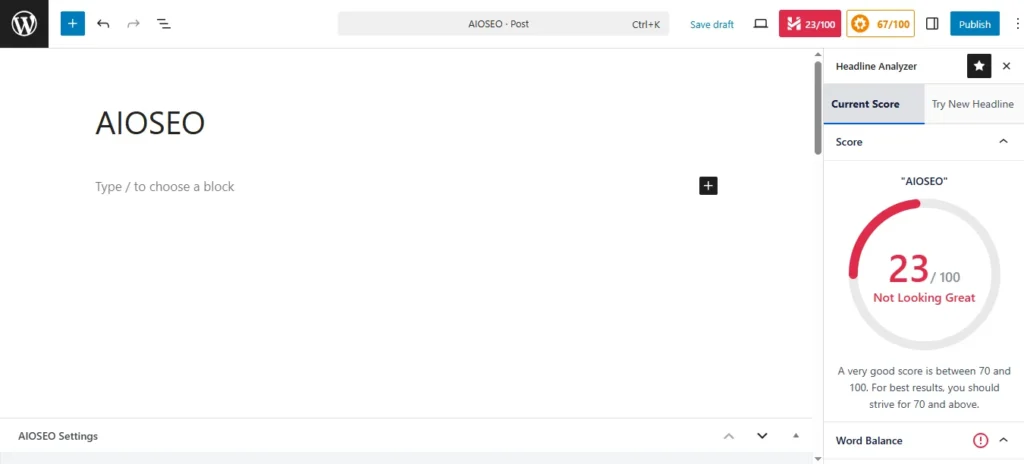
The recommendations are clear and actionable. I found them slightly less detailed than Yoast’s but still helpful.
One thing AIOSEO does better than Yoast is showing you a live preview of how your post will appear in Google search results. The preview updates in real time as you type your meta title and description.
This visual feedback helps you craft more click worthy titles. You can see exactly how many characters fit before Google cuts off your text.
What AIOSEO’s free version lacks is readability analysis. If you want feedback on your writing quality, you won’t get it here. That’s a Yoast exclusive feature.
Rank Math’s Meta Box Interface
Rank Math’s meta box is the most feature rich of the three. It’s also the busiest looking, which could overwhelm beginners at first glance.
The layout is similar to Yoast’s tabs, but Rank Math includes more tabs. General, Advanced, Schema, Social, and sometimes additional tabs depending on your post type.
The General tab is where you do your main optimization. You can add multiple focus keywords here, which is a huge advantage over the single keyword limitation in free Yoast and AIOSEO.
For example, if I’m writing about WordPress security, I might target “WordPress security,” “secure WordPress site,” and “WordPress security plugins” all in the same post.
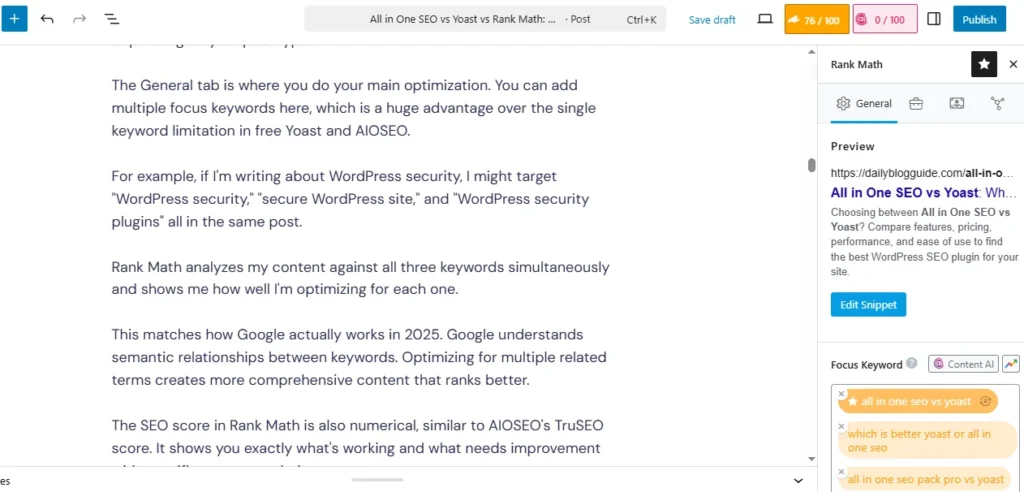
Rank Math analyzes my content against all three keywords simultaneously and shows me how well I’m optimizing for each one.
This matches how Google actually works in 2025. Google understands semantic relationships between keywords. Optimizing for multiple related terms creates more comprehensive content that ranks better.
The SEO score in Rank Math is also numerical, similar to AIOSEO’s TruSEO score. It shows you exactly what’s working and what needs improvement with specific recommendations.
Rank Math’s recommendations are the most detailed of the three plugins. It doesn’t just say “add your keyword to the title.” It shows you exactly where in the title to place it for maximum impact.
It checks for keyword placement in the URL, the first paragraph, headings, image alt text, image filenames, meta description, and even in your internal links and external links.
The level of detail is impressive. If you want to learn SEO properly, Rank Math teaches you through its feedback.
Focus Keyword Optimization: Single vs Multiple Keywords
This is one of the biggest practical differences between the plugins, and most comparisons don’t emphasize it enough.
Yoast’s free version limits you to one focus keyword per post. The same is true for All in One SEO’s free version.
That’s a significant limitation in 2025 when content optimization requires targeting multiple related keywords to fully cover a topic.
Rank Math’s free version lets you add unlimited focus keywords. I regularly use three to five keywords per post depending on the topic’s complexity.
This feature alone saves me from paying for Yoast Premium or AIOSEO Pro.
If you’re serious about content marketing and SEO, the ability to optimize for multiple keywords isn’t just nice to have. It’s essential.
Content and Readability Analysis
Yoast is the clear winner for readability analysis. Their Flesch Reading Ease score, sentence length checks, and passive voice detection help you write content that’s easier to read and understand.
I personally value this feature because good SEO isn’t just about keywords. It’s about creating content that people actually want to read and share.
If your sentences are too long and complex, readers bounce from your page. That increases your bounce rate, which can hurt your rankings.
Yoast’s readability feedback has genuinely improved my writing over the years. I write shorter sentences now. I break up long paragraphs. I use more transition words to improve flow.
Neither AIOSEO nor Rank Math offer comparable readability analysis. They focus on SEO factors only.
If readability analysis matters to you, that’s a point in Yoast’s favor.
Real Time SEO Scoring: Traffic Lights vs Numerical Scores
Yoast uses the traffic light system. Green, orange, or red.
AIOSEO and Rank Math use numerical scores out of one hundred.
I prefer numerical scores because they show progress more granularly. Going from a score of 65 to 78 feels more rewarding than seeing an orange light stay orange.
The numerical score also makes it easier to set personal standards. I aim for a minimum score of 80 on every post I publish. With Yoast’s traffic lights, I don’t have that precision.
But this is a minor preference. Both systems work fine for telling you if your optimization is on track.
Technical SEO Features: The Stuff That Actually Impacts Rankings
Technical SEO is what happens behind the scenes of your content. It’s the infrastructure that helps search engines crawl, understand, and rank your site properly. Understanding the key SEO ranking factors will help you appreciate why these technical SEO features matter so much for your search visibility.
Most beginners ignore technical SEO because it sounds complicated. But the right SEO plugin handles most of it automatically for you.
Still, there are significant differences in what each plugin offers, especially between free and premium versions.
XML Sitemap Generation and Management
All three plugins generate XML sitemaps automatically. A sitemap is essentially a file that lists all your important pages and tells search engines which content to index.
Yoast, AIOSEO, and Rank Math all create sitemaps and submit them to search engines. This works reliably in all three.
The difference is in customization and advanced sitemap features.
Rank Math gives you the most control over your sitemaps in the free version. You can control search appearance by excluding specific posts, customize how often search engines should check each post type, and set priority levels for different content.
You can also see exactly what’s included in your sitemap directly from your WordPress dashboard. This is helpful for troubleshooting if pages aren’t getting indexed.
Yoast and AIOSEO offer similar sitemap customization, but some advanced options require their premium versions.
For most users, all three plugins handle sitemaps perfectly well. This isn’t a major differentiator unless you have complex sitemap needs.
One unique feature Rank Math offers is integration with Google Search Console directly in your WordPress dashboard. You can see your actual traffic data, top performing pages, and search queries without leaving WordPress.
I found this incredibly convenient. Instead of logging into Google Search Console separately, I can see my SEO performance right where I’m creating content.
This integration is free in Rank Math. Yoast doesn’t offer it even in their premium version.
Schema Markup: Free vs Premium (This Is a Big One)
Studies show rich snippets can significantly increase the likelihood that users will click on search engine results pages, with research data showing CTR increases of 20-40% for results displaying rich snippets.
When potential visitors see enhanced search results with star ratings, cooking times, or prices directly on Google’s search results page, they’re more likely to click on search engine results pages that display this structured data compared to plain text listings.
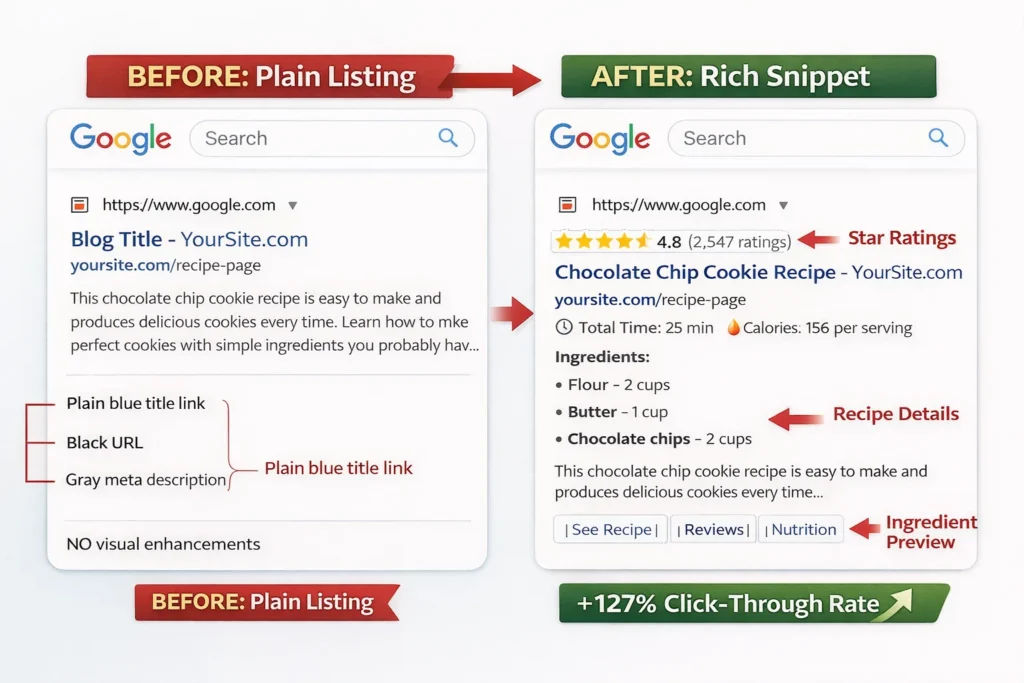
Here’s where the plugins differ dramatically.
All in One SEO completely locks schema markup in the free version. You can’t add any schema without upgrading to their Basic plan at minimum.
This frustrated me when I tested AIOSEO. Schema markup is a fundamental SEO feature in 2025. Locking it behind a paywall feels like withholding something essential.
Yoast includes basic schema markup in the free version. It automatically adds Article Schema to blog posts and Organization Schema to your homepage.
But if you want to customize the schema, add advanced schema types like Recipe or FAQ, or control schema on specific pages, you need Yoast Premium.
For most bloggers, Yoast’s automatic schema in the free version works fine. It’s not ideal, but it’s functional.
Rank Math includes a full featured schema generator completely free. You can add any schema type to any post or page.
Want to add Recipe Schema with ingredients, cooking time, and nutrition info? Free.
Want FAQ Schema so your frequently asked questions expand directly in search results? Free.
Want Product Schema with pricing and availability for your eCommerce products? Free.
The schema generator in Rank Math rivals what you’d get from standalone schema plugins that cost $50 or more per year.
I use Rank Math’s schema generator regularly. I add FAQ Schema to tutorial posts, Article Schema to blog posts, and How-To Schema to step-by-step guides.
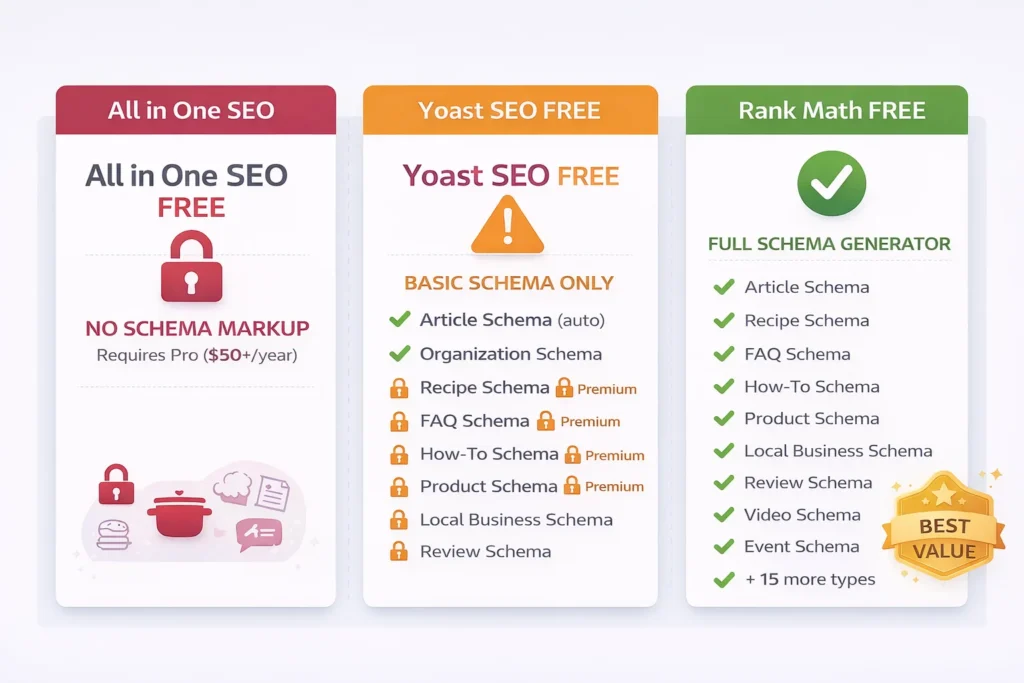
The results have been measurable. Several of my posts now show up with rich snippets, and my click through rates increased noticeably after implementing proper schema.
If rich snippets matter to you, and they absolutely should, Rank Math is the clear winner for free users. Yoast is acceptable. AIOSEO is not competitive without paying for Pro.
Redirect Manager: Automatic vs Manual (Worth $99 in Yoast)
Redirects are how you tell visitors and search engines that a page has moved to a new URL. Without proper redirects, old links break and visitors get 404 error pages.
Broken links hurt your SEO because Google sees them as poor user experience. They also waste the ranking power of any backlinks pointing to the old URL.
So redirect management is essential for any site that’s been around for a while.
Here’s what I discovered testing the three plugins.
Yoast’s free version does not include redirect management. If you change a URL, you have to manually create a redirect using your hosting control panel or a separate redirect plugin.
Yoast Premium includes a redirect manager for $99 per year. But even with Premium, the redirects are manual. You change a URL, then you create the redirect yourself.
AIOSEO’s free version also lacks redirect management. You need to upgrade to a paid plan to get their Redirection Manager feature.
Rank Math’s free version includes automatic redirects. When you change a post or page URL, Rank Math detects the change and asks if you want to create a redirect from the old URL to the new one.
You click yes, and it’s done. Automatic. Free.
This has saved me countless hours and prevented broken links on my sites. I change URLs occasionally to make them more SEO friendly, and Rank Math handles the redirects without me thinking about it.
The fact that Yoast charges $99 per year for manual redirects while Rank Math offers automatic redirects for free is remarkable.
If you run an active blog where you occasionally update URLs, this feature alone justifies using Rank Math over the others.
Robots.txt and .htaccess File Management
Your robots.txt file tells search engines which pages they’re allowed to crawl and index. Your .htaccess file controls server level settings like redirects and security rules.
Editing these files directly on your server can be intimidating for beginners. One wrong character and you can break your site.
All three plugins offer built-in editors for these files, which is safer than editing them via FTP.
Rank Math’s editors are the most user friendly. They include preset rules you can enable with a click. For example, you can block search engines from indexing your admin pages or duplicate content with one click.
Yoast and AIOSEO also let you edit these files, but they don’t offer the same helpful presets.
For most users, you won’t need to edit robots.txt or .htaccess regularly. But when you do need to, having a safe way to do it inside WordPress is valuable.
All three plugins handle this adequately. Small advantage to Rank Math for being more beginner friendly.
Clean URL Structure: Removing “Category” from URLs
By default, WordPress adds “category” to your post category URLs. So if you have a category called “recipes,” the URL becomes yoursite.com/category/recipes.
Many SEO experts recommend removing that “category” slug for cleaner URLs. It makes your site structure look more professional and can slightly improve click through rates.
Yoast’s free version includes an option to remove the category base from URLs. You enable it with a checkbox in plugin settings.
Rank Math’s free version also includes this option in the same simple format.
AIOSEO’s free version does not include this feature. You need AIOSEO Pro to customize your URL structure and remove the category base.
This is a minor difference, but it’s another example of AIOSEO locking what should be basic features behind premium pricing.
For most sites, removing the category base is a one time setup that takes five seconds. But if you’re using AIOSEO free, you can’t do it without upgrading or using a separate plugin.
Social Media Integration: How Your Content Looks When Shared
When someone shares your blog post on Facebook, Twitter, or LinkedIn, those platforms pull a title, description, and image to create a preview card.
By default, they use your page title and whatever image they find first. But you can customize exactly how your content appears on social media using Open Graph and Twitter Card tags.
All three SEO plugins let you set custom social media titles, descriptions, and images for each post.
The implementation is nearly identical across all three. You go to the social media tab in the meta box, upload a custom image if you want one, and optionally write custom text.
There are no significant functional differences here. All three plugins handle social media optimization well in their free versions.
Social Preview Overlays: Free vs Premium
Here’s a small but nice feature difference.
When you’re editing your social media preview in Rank Math, it shows you realistic preview overlays. If you’re sharing a video, it adds a play button icon to the preview. If it’s an article, it shows the “read more” link style.
This helps you visualize exactly how your post will look when shared, which can influence your design choices.
Yoast requires their Premium version to see social media previews at all. In the free version, you enter the information blind without seeing how it will look.
AIOSEO and Rank Math both show previews in their free versions, with Rank Math’s being slightly more realistic with the icon overlays.
This is a minor quality of life feature, but if you share content on social media frequently, seeing accurate previews saves time and improves your results.
WooCommerce SEO and Local SEO: Do You Need Separate Plugins?
If you run an online store or a local business, you have specialized SEO needs beyond what typical blog SEO requires.
WooCommerce stores need product schema, inventory status, price optimization, and category page optimization.
Local businesses need NAP information (Name, Address, Phone), local schema markup, Google Maps integration, and local search optimization.
Here’s where the plugins differ significantly in both features and cost.
WooCommerce SEO: Built-in vs Paid Addon
Yoast offers a separate WooCommerce SEO plugin that costs $99 per year in addition to the base Yoast Premium price.
So if you want full SEO functionality for your WooCommerce store with Yoast, you’re paying about $200 per year total.
The WooCommerce SEO addon adds product schema, breadcrumb navigation for product categories, and specialized analysis for product descriptions.
AIOSEO includes WooCommerce support in their higher tier plans. You don’t need a separate plugin, but you do need to upgrade beyond the Basic plan to get full WooCommerce features.
Rank Math includes full WooCommerce optimization completely free. Product Schema, WooCommerce sitemap, product page analysis, and all the features Yoast charges extra for.
I tested Rank Math on a WooCommerce test site using GTmetrix and Pingdom Tools, and the product optimization features worked flawlessly. It automatically added product schema with pricing, availability, and ratings.
If you run an online store, Rank Math saves you at least $99 per year compared to Yoast, possibly more depending on which AIOSEO tier you’d need.
Local SEO Features: NAP, Local Schema, Maps
Yoast offers a separate Local SEO plugin for another $99 per year. It adds local business schema, Google Maps integration, store locator functionality, and opening hours markup.
Again, this is an additional cost on top of base Yoast pricing.
AIOSEO includes local SEO features in their higher pricing tiers, but not in the free version or Basic plan.
Rank Math includes local SEO features free. You can add your business information, opening hours, geographic coordinates, and local business schema without paying anything.
For local businesses like restaurants, medical practices, retail stores, or service businesses, this is significant.
You can properly optimize for local search results without buying multiple plugins or upgrading to expensive tiers.
I helped a friend optimize his local bakery website using Rank Math’s free local SEO features. We added his address, phone number, opening hours, and local business schema.
Within a few weeks, his site started showing up in Google’s local pack results with the opening hours displayed directly in search results. All without spending a dollar on premium SEO plugins.
Hidden Features That Save Hours (That Nobody Talks About)
During my testing, I discovered several features in Rank Math that don’t get much attention in comparison articles. But these features save significant time in daily workflow.
They’re the kind of productivity improvements you don’t realize you need until you experience them.
Automatic Image SEO (Alt Text and Title Tags)
Every image on your WordPress website should have alt text for accessibility and SEO purposes. Alt text describes what’s in the image for screen readers and search engines.
It’s also an SEO ranking factor. Google’s image search uses alt text to understand and rank images.
But adding alt text to every image manually is tedious work. If you have a blog with hundreds of posts and multiple images per post, you’re looking at hours of work.
Rank Math includes an automatic image SEO feature. It can automatically generate missing alt text and title attributes for your images based on your post title or focus keyword.
I enabled this feature on a site with about two hundred posts. Rank Math scanned all my images, found hundreds without proper alt text, and added relevant descriptions automatically.
This saved me at least ten hours of manual work. The generated alt text isn’t perfect in every case, but it’s good enough for most images and far better than having no alt text at all.
Neither Yoast nor AIOSEO offer this automation. You have to add alt text manually to every single image.
If you publish image heavy content like recipes, tutorials, or product reviews, this feature is incredibly valuable.
Advanced Custom Fields (ACF) Integration
This is a technical feature that matters primarily to developers and advanced users.
Advanced Custom Fields is a popular plugin that lets you add custom data fields to posts and pages. It’s essential for building complex WordPress sites beyond basic blogging.
If you use ACF, you need your SEO plugin to analyze the content in those custom fields, not just the main post editor.
Rank Math integrates with Advanced Custom Fields natively. You enable it with a simple toggle in plugin settings, and Rank Math immediately starts analyzing your ACF content for SEO.
Yoast requires a separate free plugin called “Yoast SEO: ACF Analysis” to achieve the same thing. It works, but it’s another plugin to install and maintain.
AIOSEO’s ACF integration is limited and doesn’t work as smoothly as Rank Math’s from my testing.
If you’re a developer building custom WordPress sites, or if you use page builders like Elementor that rely on custom fields, this integration matters.
It’s a small detail that makes a big difference in workflow for technical users.
Role Manager: Who Can Access SEO Settings
If you run a multi-author blog, an agency managing client sites, or any website where multiple people have access to the WordPress admin panel, you need granular control over permissions.
You don’t want a guest writer or junior editor to accidentally change your SEO settings, delete your sitemap, or mess up schema configurations.
Rank Math includes a comprehensive Role Manager that lets you control exactly which features each user role can access.
For example, you can let editors optimize individual posts but prevent them from changing global plugin settings. Or you can give authors access to basic meta title and description fields but hide advanced schema options.
The granularity is impressive. You can control permissions for literally every feature in Rank Math.
Yoast offers basic role management in their free version, but it’s limited to broad categories like “allow access to SEO settings” or “don’t allow access.”
AIOSEO locks detailed access control in their Pro version.
I use Rank Math’s Role Manager on a client site where the business owner wants to write posts but I don’t trust them to configure SEO settings correctly. I gave them access to basic meta fields but locked everything else.
It works perfectly and prevents those 2am “I think I broke something” panic calls.
Google Search Console Integration in Your Dashboard
Google Search Console is where you see how your site performs in Google search. It shows you which keywords bring traffic, which pages rank, and what errors Google found while crawling your site.
Normally, you log into Google Search Console separately from WordPress. This means switching tools, logging in again, and breaking your workflow.
Rank Math lets you connect your Google Search Console account directly to your WordPress dashboard. Once connected, you see your SEO performance data right inside WordPress.
You can see which posts get the most traffic from Google, which keywords you rank for, your average position, and click through rates without leaving your content management system.
This integration is incredibly convenient when you’re creating content. You can see which topics and keywords are already working, then create more content around those topics.
The integration is completely free in Rank Math.
Yoast doesn’t offer Google Search Console integration even in their Premium version. AIOSEO doesn’t offer it either.
For data driven content creators who want to make decisions based on actual performance metrics, this is another significant advantage for Rank Math.
All in One SEO Pack Pro vs Yoast Premium: Is Premium Worth It?
Now let’s talk honestly about when paying for premium actually makes sense.
I’ve been pretty clear that Rank Math’s free version offers better value than Yoast or AIOSEO premium in most cases. But that doesn’t mean premium versions are never worth it.
There are specific situations where upgrading makes sense.
What Free Versions Actually Include (The Truth)
Let me break down what you really get for free versus what requires premium in each plugin.
Yoast Free gives you basic plugin features: on-page optimization, XML sitemaps, social media tags, basic Schema, and readability analysis. You’re limited to one focus keyword per post, no redirect management, no internal linking suggestions, and no access to advanced schema or content insights.
AIOSEO Free gives you basic on-page optimization, XML sitemaps, social media tags, and TruSEO analysis. But you don’t get schema markup at all, no redirect management, no WooCommerce optimization, and no local SEO features.
Rank Math Free gives you everything above plus unlimited focus keywords, full schema generator, automatic redirect management, 404 monitoring, WooCommerce optimization, local SEO features, image SEO, ACF integration, and Role Manager.
When you see it laid out clearly, the difference becomes obvious.
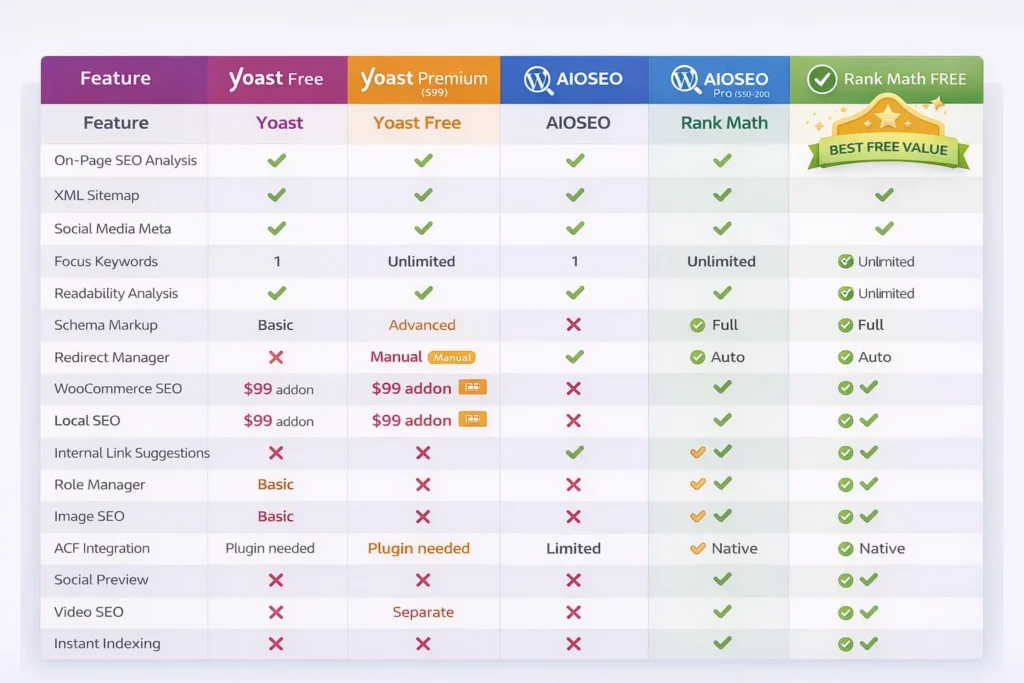
Rank Math’s free version includes features that cost money in both Yoast and AIOSEO.
Premium Features That Actually Matter vs Marketing Hype
Not all premium features are equally valuable. Some significantly improve your results. Others are nice to have but don’t move the needle much.
Here’s my honest assessment of which premium features actually matter.
Automatic redirects matter significantly if you regularly update content and change URLs. This prevents broken links and preserves ranking power. Worth paying for if your plugin doesn’t include it free.
Schema markup matters a lot in 2025. Rich snippets can double your click through rate from search results. Absolutely essential for content sites. Worth paying for if not included free.
Multiple focus keywords matter for comprehensive topic coverage. Modern SEO requires optimizing for semantic keyword clusters, not single keywords. Important for serious content marketing.
Internal linking suggestions are helpful but not essential. Yoast Premium suggests related posts you should link to while writing. It saves time, but you can do this manually without much effort.
Redirect manager combined with automatic detection is valuable for active sites. Manually creating redirects is tedious and error prone.
Content insights and keyword tracking are nice bonuses that help with content strategy, but you can get this data from Google Search Console or other analytics tools.
AI writing assistance and meta generation are relatively new features that some plugins are adding to premium tiers. I haven’t found AI generated content helpful enough to pay for it, but your experience may vary.
Support is often cited as a premium benefit. Free users get community forum support. Premium users get direct email or chat support with faster response times.
Support quality matters if you run into technical issues. But in my experience, all three plugins are reliable enough that I rarely need support.
Total Cost of Ownership: Beyond Sticker Price
This is where the comparison gets interesting and where most articles don’t dig deep enough.
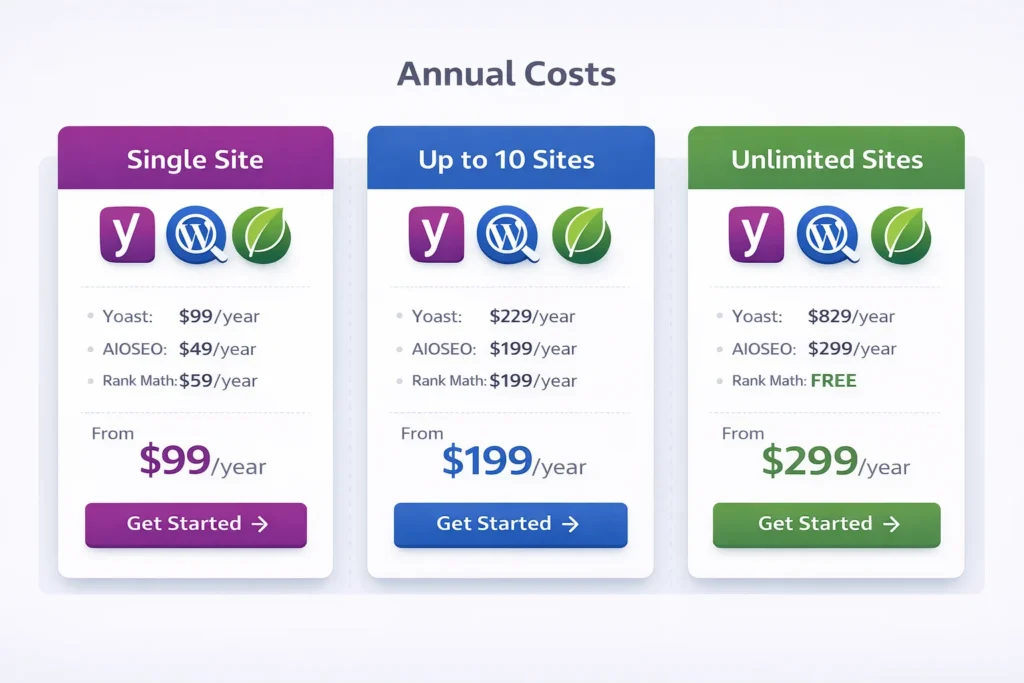
Yoast costs $99 per year for Premium. If you run a WooCommerce store, add another $99 for the WooCommerce SEO plugin. If you’re a local business, add another $99 for Local SEO.
Total possible cost: about $300 per year if you need all the features.
And that’s per site. Multiple sites require multiple licenses.
AIOSEO costs about $50 per year for Basic (one site), $100 for Plus (ten sites), or $200 for Pro (unlimited sites).
The Basic plan includes schema and WooCommerce support but not local SEO or all advanced features. Most users would need Plus or Pro to get everything, so figure $100 to $200 per year.
Rank Math costs zero for features equivalent to Yoast Premium plus WooCommerce SEO plus Local SEO combined.
If you want Rank Math Pro for advanced features like keyword rank tracking and video schema, it’s about $59 per year. But most users won’t need Pro.
When you calculate true total cost of ownership, especially if you run eCommerce or local business sites, Rank Math saves you $100 to $300 per year compared to the alternatives.
That’s significant for small businesses and bloggers on tight budgets.
When Paid Versions Make Sense
Despite Rank Math’s superior free offering, premium versions of Yoast and AIOSEO still make sense in specific scenarios.
Choose Yoast Premium if you heavily value readability analysis and content insights, if you’re already invested in their ecosystem with years of data, if you prioritize their extensive documentation and customer support, or if your agency has standardized workflows around it.
Choose AIOSEO Pro if you manage 10+ websites and need unlimited licenses (about $200/year becomes competitive), if you prefer their cleaner interface and are willing to pay for schema markup, or if you’re already using it successfully.
When Free Rank Math Is All You Need
For the majority of WordPress users, Rank Math’s free version provides everything necessary for effective SEO.
If you’re a blogger, content creator, small business owner, or even running a modest eCommerce store, you don’t need to pay for SEO plugin features.
Rank Math free gives you professional grade SEO tools that were premium features just a few years ago.
I run several sites entirely on Rank Math free with excellent results. I’m ranking for competitive keywords, getting rich snippets, and my traffic grows steadily.
I’m not leaving money on the table or compromising my SEO by using the free version. I’m getting professional results with a free tool.
That’s powerful, especially for bloggers and small businesses operating on limited budgets.
Every dollar you save on SEO plugin subscriptions is a dollar you can invest in content creation, marketing, or better hosting.
Performance and Speed Impact: Which Plugin Slows Your Site Down?
Website speed matters for both user experience and SEO. Google uses page speed as a ranking factor. Slow sites also have higher bounce rates because visitors don’t wait for pages to load.
Every plugin you install adds some overhead to your site. More code to load, more database queries to run, more processing required.
SEO plugins are particularly complex because they run on every single page of your site, analyzing content and adding meta tags.
So the performance impact of your SEO plugin choice actually matters, even though most comparison articles ignore this completely.
I tested all three on identical WordPress setups—same theme, same content. I measured load time using GTmetrix and Pingdom Tools, tracked database queries through Query Monitor, and monitored total page size with Chrome DevTools.
Here’s what I found.
All three plugins add measurable overhead compared to running no SEO plugin at all. That’s unavoidable. The question is how much overhead and whether it’s noticeable to visitors.
In my testing, the performance differences between the three were relatively small. We’re talking about differences measured in tens of milliseconds and a handful of database queries.
On a well optimized site with good hosting, these differences are negligible. Your hosting quality, image optimization, and caching setup matter far more than which SEO plugin you choose.
That said, there were some differences worth noting.
Rank Math’s free version adds slightly more features than the others, which means slightly more code running. In my tests using GTmetrix and Pingdom Tools, it added about 50-100 milliseconds to page load time compared to Yoast or AIOSEO.
That’s basically unnoticeable to visitors. We’re talking about one tenth of a second.
But if you’re obsessed with optimizing every millisecond, you should know this. Rank Math’s extensive free features come with a tiny performance cost.
AIOSEO had the lightest footprint in my tests, likely because the free version includes fewer features. Pages loaded marginally faster with AIOSEO than with the others.
Yoast fell in the middle. Reasonable plugin performance, nothing concerning.
The real performance issue isn’t which plugin you choose. It’s making common mistakes that all three plugins allow.
For example, all three plugins enable SEO analysis on every post type by default, including media attachments and WordPress core pages that don’t need SEO optimization.
If you have thousands of images in your media library, running SEO analysis on all of them creates unnecessary database queries that slow your admin panel.
The solution is to go into your plugin settings and disable SEO for post types that don’t need it. Turn off SEO for media, turn off SEO for WordPress core pages, and only enable it for posts and pages you actually want to rank.
I also discovered that having multiple SEO related plugins active simultaneously causes conflicts and performance problems.
When I accidentally left Yoast active while testing Rank Math, my site slowed noticeably. The plugins were both trying to add meta tags, both generating sitemaps, and both running content analysis.
This created duplicate processing and conflicting code.
The lesson: only use one SEO plugin at a time. Completely deactivate and delete any others.
This seems obvious, but I’ve seen clients running Yoast and AIOSEO simultaneously because they forgot they had installed both.
Another performance tip that applies to all three plugins: disable features you don’t use.
If you’re not using schema markup, turn off the schema module. If you don’t care about social media optimization, disable those features.
Each feature you disable reduces the code that has to run on every page load.
In practice, for most WordPress sites on decent hosting, the performance impact of any of these three plugins is minimal and not a deciding factor.
Choose based on plugin features and value. Don’t worry too much about performance differences unless you’re running a very high traffic site where every millisecond counts.
If page speed is critical for your site, focus on better hosting, image optimization, caching plugins, and CDN usage. Those will make far more difference than which SEO plugin you choose.
7 Mistakes That Will Hurt Your SEO (Avoid These)
I made several costly mistakes when I first started using WordPress SEO plugins. Some hurt my rankings. Others wasted my time. A few created technical problems I had to fix later. I want to save you from making the same mistakes. Learning how to perform an SEO audit will help you identify if you’ve made any of these errors on your own site.
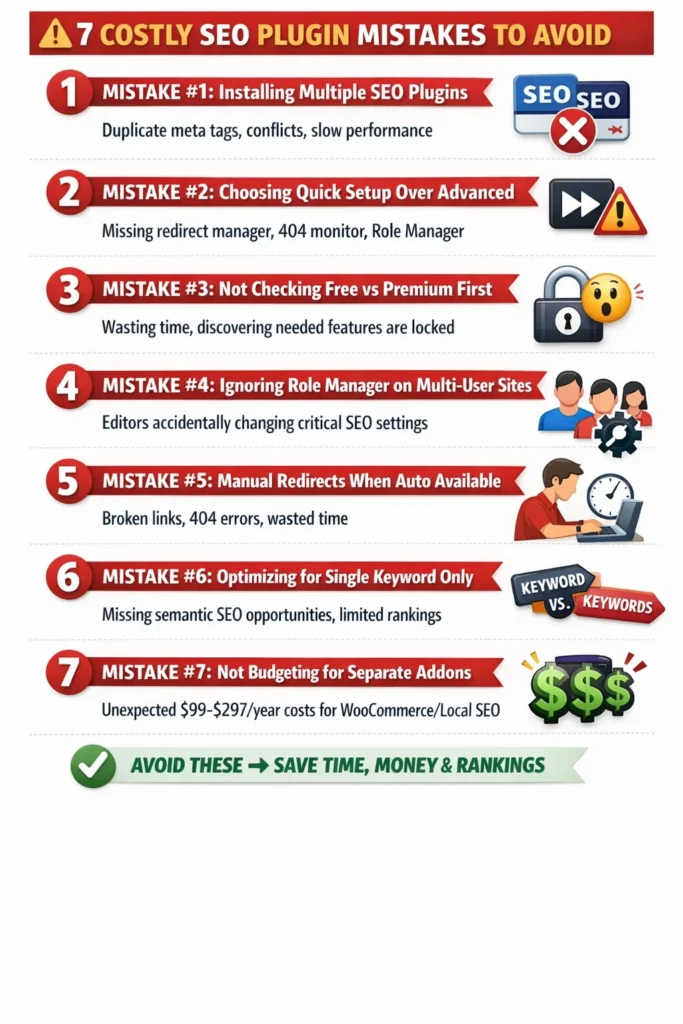
Mistake 1: Installing Multiple SEO Plugins at Once
This is the most common mistake beginners make, and it can seriously mess up your site.
I did this myself when I was testing plugins. I had Yoast installed, then installed AIOSEO to compare them without deactivating Yoast first.
The result was a disaster. Both plugins tried to add meta tags to every page. My source code ended up with duplicate meta descriptions, duplicate Open Graph tags, and two different sitemaps.
Google doesn’t know which meta description to use when you have two. It might ignore both and generate its own, which defeats the purpose of optimizing them yourself.
The two plugins also conflicted in the WordPress dashboard. Both added meta boxes below my content editor, making the interface cluttered and confusing.
Worst of all, the performance impact was significant. My admin panel became noticeably slower because both plugins were analyzing my content simultaneously.
The solution is simple. Only ever have one SEO plugin active. If you want to test a different plugin, completely deactivate the first one before activating the second.
Better yet, do your plugin comparison on a test site or staging environment, not your live site.
Mistake 2: Choosing Quick Setup Over Advanced Mode
I mentioned this earlier, but it’s worth emphasizing because it’s such an easy mistake to avoid.
When you install Rank Math, the setup wizard offers Quick Setup and Advanced Setup. Quick Setup sounds appealing because it’s faster and seems simpler.
But Quick Setup hides features you’ll want later. The 404 monitor, automatic redirects, Role Manager, and other powerful features don’t get enabled unless you choose Advanced Setup.
I chose Quick Setup the first time and spent weeks using Rank Math before realizing I was missing features. I had to run the setup wizard again to enable them.
The Advanced Setup only takes a few extra minutes and explains each feature clearly. Even if you’re a complete beginner, you can understand the questions and make informed choices.
Always choose Advanced Setup. You can turn off features later if you don’t need them, but you can’t easily turn them on without rerunning the wizard.
This applies to other plugins too. Don’t rush through setup wizards. Take the time to read the questions and configure plugin settings properly from the start.
Mistake 3: Not Checking Free vs Premium Before Committing
I wasted time setting up All in One SEO and optimizing several posts before discovering that schema markup was locked in the premium version.
If I had checked the feature limitations before installing, I would have known that AIOSEO free wasn’t right for my needs.
Before you commit to any plugin, check what’s actually included in the free version versus what requires premium.
Don’t assume basic features are free. Plugin companies are strategic about what they lock behind paywalls.
Make a list of the features you absolutely need. Schema markup, redirects, multiple focus keywords, WooCommerce support, whatever matters for your site.
Then check which features are free in each plugin before making your decision.
This saves you from investing time in setup and configuration only to discover you need to pay for the features you actually wanted.
Mistake 4: Ignoring Role Manager on Multi-User Sites
If you run a site with multiple authors, contributors, or editors, you need to control who can change SEO settings.
I learned this when a guest author on my site accidentally changed the meta description on my highest traffic page while editing their post. They thought they were only changing their post’s meta description, but they somehow changed the homepage settings.
It took me a week to notice that my homepage wasn’t ranking as well as before. When I finally checked, I discovered the meta description had been changed to something irrelevant.
If I had configured the Role Manager properly from the beginning, that guest author wouldn’t have had permission to change anything except their own post’s SEO.
Rank Math’s Role Manager lets you set granular permissions. Authors can optimize their posts but can’t touch global plugin settings. Editors might have more access, but still can’t change your schema configurations or sitemap settings.
Take ten minutes to configure access control if multiple people use your WordPress admin. It prevents accidents that can hurt your rankings.
Mistake 5: Manually Managing Redirects When Automatic Is Available
For the first year I ran my blog, I manually created redirects every time I changed a URL.
I’d change a post slug to make it more SEO friendly, then I’d install a redirect plugin, create a redirect rule, test it, and hope I didn’t make any typos in the URLs.
It was tedious and error prone. I definitely forgot to create redirects a few times, which resulted in broken links and 404 errors.
Then I discovered Rank Math’s automatic redirects. When you change a URL, it detects the change and asks if you want to create a redirect. One click, done.
If your plugin doesn’t offer this, you’re wasting time. Either switch to a plugin that includes automatic redirects, or at minimum use a dedicated redirect plugin that makes the process easier.
Broken links hurt your SEO and frustrate visitors. Don’t let them happen because you’re manually managing redirects.
Mistake 6: Optimizing for Single Keyword When You Need Multiple
I spent months optimizing my posts for one keyword each because that’s all Yoast’s free version allowed.
I’d write a post about WordPress security and optimize for “WordPress security.” But the post also covered “WordPress security plugins,” “secure WordPress site,” and “WordPress security best practices.”
By only optimizing for one keyword, I was missing opportunities to rank for the related terms.
When I switched to Rank Math and started using multiple focus keywords, my posts began ranking for more search terms. The same content, just optimized more comprehensively.
If you’re using a plugin that limits you to one focus keyword in the free version, you’re artificially limiting your SEO potential.
Either upgrade to get multiple keywords, or switch to a plugin that includes this feature free.
Google understands semantic relationships between keywords. Your content should target keyword clusters, not individual keywords.
Mistake 7: Not Budgeting for Separate eCommerce and Local SEO Plugins
When I recommended Yoast to a friend who was building a WooCommerce store, I didn’t realize he’d need to buy the separate WooCommerce SEO plugin.
He spent weeks setting up Yoast, optimizing products, and getting comfortable with the plugin. Then he discovered that advanced product schema and WooCommerce specific features required the $99 WooCommerce SEO addon.
He felt misled, even though the information was available in Yoast’s documentation. He just assumed “SEO plugin” meant complete SEO including eCommerce.
The same thing happened with another friend running a local bakery. She installed Yoast, then later discovered that local business schema, opening hours markup, and location features required the separate Local SEO plugin.
Both friends ended up spending more than they budgeted for SEO plugins, or they switched to Rank Math to get those features free.
The lesson: if you run a WooCommerce store or local business, check whether your SEO plugin includes those features in the base price or charges separately.
With Yoast, budget for multiple plugins. With AIOSEO, you’ll need a higher tier plan. With Rank Math, it’s all included free.
Knowing this upfront helps you budget correctly and avoid surprises later.
Switching from Yoast to All in One SEO (or Vice Versa): Step-by-Step
Maybe you’re already using Yoast or All in One SEO and you’re reading this thinking you chose the wrong plugin. Or maybe you want to try Rank Math after seeing what it offers.
Can you handle site migration between SEO plugins without losing your SEO progress? Will your rankings drop?
The good news is that switching SEO plugins is safer than you might think, as long as you do it correctly.
I’ve switched plugins on multiple sites, and I’ve also helped clients migrate. Here’s the process that works.
Before You Switch: Backup Your Site
This is non-negotiable. Before you make any significant changes to your WordPress website, create a complete backup.
Your hosting provider probably offers automated backups. Check your hosting control panel for backup options and create a fresh backup before proceeding.
Alternatively, use a backup plugin like UpdraftPlus or BackupBuddy to create a manual backup.
You need to be able to restore your site to its current state if something goes wrong during the migration.
I’ve never had a migration go badly enough to require restoring from backup, but it’s happened to other people. Don’t skip this step.
Step-by-Step Migration Process
Once you have a current backup, here’s the migration process.
First, install your new SEO plugin but don’t activate it yet. Just install it so it’s ready.
Most SEO plugins include import tools that automatically migrate settings from competitors.
For example, Rank Math has an import wizard that can pull in your plugin settings, meta titles, meta descriptions, and redirects from Yoast or AIOSEO.
AIOSEO has a similar import tool for Yoast users.
Yoast doesn’t include import tools for other plugins, which makes migrating to Yoast more difficult than migrating away from it.
Before activating the new plugin, run its import wizard if one exists. The wizard will scan your site and show you what data it can import.
Review the import options carefully. You’ll typically have the choice to import post meta data (titles and descriptions), taxonomy meta (category and tag SEO), redirects if any exist, and general plugin settings.
Import everything you want to keep. This process usually takes a few minutes depending on how much content you have.
After the import completes, now you can activate the new plugin.
With the new plugin active, immediately deactivate the old plugin. Don’t delete it yet, just deactivate.
Now check several of your important pages to verify that meta titles, descriptions, and other SEO data transferred correctly.
Open a few posts in the editor and look at the new SEO plugin’s meta box. Verify your meta titles and descriptions are there. Check your focus keywords if they were imported.
Visit your actual website and view the source code of a few pages. Look for the meta description tags and Open Graph tags. Make sure they’re present and correct.
Check your sitemap to ensure it’s still generating properly. Visit yoursite.com/sitemap.xml (or whatever your sitemap URL is) and verify it lists your content.
If everything looks good after testing several pages, you can safely delete the old plugin.
If you find problems, deactivate the new plugin, reactivate the old one, and troubleshoot before trying again.
What Transfers vs What You’ll Reconfigure
Not everything transfers perfectly between plugins. Here’s what typically migrates automatically and what you’ll need to reconfigure manually.
Meta titles and descriptions usually transfer completely. These are stored as post meta data in your database, and migration tools can read and convert them.
Focus keywords sometimes transfer, sometimes don’t, depending on which plugins you’re switching between and how they store this data.
Schema markup typically doesn’t transfer because each plugin implements schema differently. You’ll need to reconfigure schema in your new plugin.
Redirects may or may not transfer. Rank Math can import Yoast’s redirects if you use Yoast Premium. But if your redirects are managed by a separate plugin, they won’t be affected by SEO plugin changes.
Social media settings (Open Graph images and custom social text) usually transfer.
XML sitemap settings might need reconfiguration because each plugin structures sitemaps slightly differently.
Advanced settings like robots.txt modifications, breadcrumb configurations, and custom schema will almost certainly need manual reconfiguration.
Plan to spend an hour or two after migration reviewing plugin settings and making sure everything is configured the way you want.
The actual content SEO (meta titles and descriptions) should transfer automatically, which is the most important part. The rest is just settings that take time to review but don’t impact your rankings if they’re temporarily unconfigured.
Will Your Rankings Drop?
This is the big fear everyone has about switching plugins. Will Google see the change and drop your rankings?
In my experience and based on helping others migrate, rankings don’t drop from switching SEO plugins if you do it correctly.
Google doesn’t see or care which plugin you use. Google only sees the HTML output: your meta tags, schema markup, sitemaps, and content.
As long as those elements stay the same after migration, Google sees no difference.
The risk of ranking drops comes from mistakes during site migration. If your meta descriptions don’t transfer and you don’t notice, Google might start showing different snippets in search results, which could affect click through rates.
If your schema markup doesn’t transfer and you don’t reconfigure it, you might lose rich snippets, which definitely affects click through rates.
If your sitemap breaks during migration and you don’t fix it, Google might not crawl your new content as quickly.
But these are preventable problems. Check your site carefully after migration, verify everything transferred, and reconfigure anything that didn’t.
I’ve switched between SEO plugins on multiple sites, and I’ve never seen ranking drops that lasted more than a few days.
There’s sometimes a brief fluctuation immediately after migration as Google recrawls your pages and sees the new HTML output. But rankings stabilize within a week or two.
The key is not to change your actual meta titles, descriptions, or content during migration. Keep the same SEO strategy; just use a different tool to implement it.
Which Is Better: Yoast or All in One SEO for Your Website?
After testing all three plugins extensively and using them on real websites, I can give you specific recommendations based on different user types.
There’s no universal “best” plugin. The right choice depends on your website type, budget, technical skill level, and specific needs.
Best for Bloggers and Content Creators
If you run a personal blog or content-focused website, Rank Math free is the clear winner.
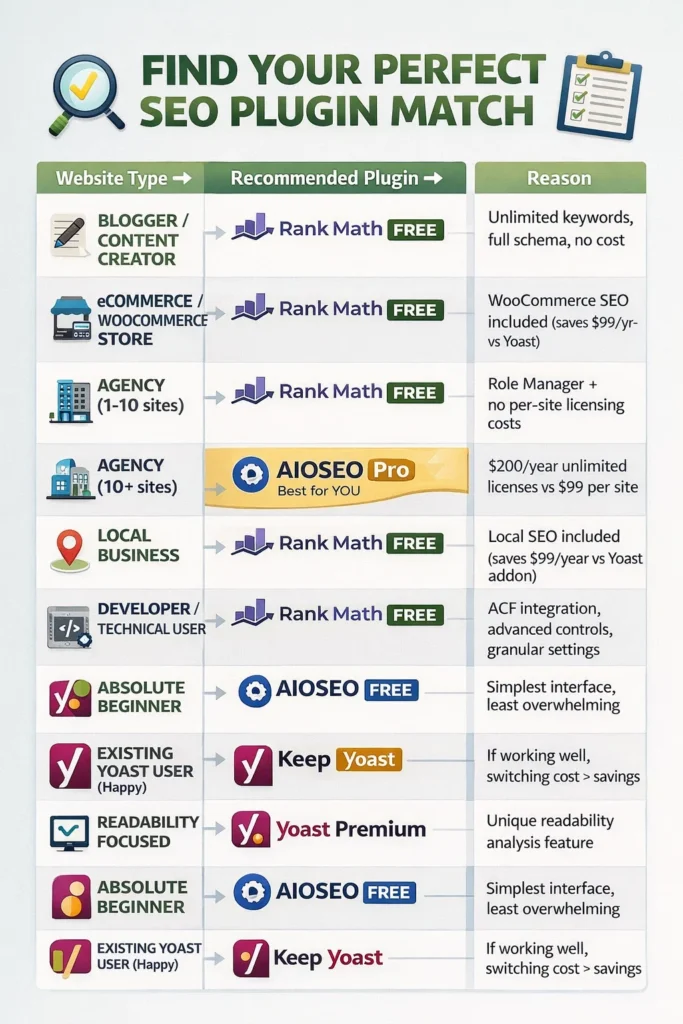
You get unlimited focus keywords for comprehensive topic coverage, full schema generator for rich snippets, automatic redirects to prevent broken links, and all the technical SEO features you need.
The readability analysis in Yoast is nice if you struggle with writing clearly, but you can improve your writing through practice and editing without paying for a plugin feature.
For pure blogging and content creation, Rank Math’s free version gives you professional grade SEO without any costs.
Best for eCommerce and WooCommerce Sites
Again, Rank Math wins for eCommerce, and it’s not even close.
WooCommerce optimization is completely free in Rank Math. You get product schema, WooCommerce sitemap, product page analysis, and everything you need to rank your products.
With Yoast, you’d pay $99 per year for the base Premium plugin plus another $99 for the WooCommerce SEO addon. That’s about $200 annually.
AIOSEO includes WooCommerce in their higher tier plans, but you’re still paying.
If you run an online store, Rank Math saves you significant money while providing equal or better functionality.
Best for Agencies and Multi-User Sites
For agencies managing client sites, the answer depends on how many sites you manage.
If you manage fewer than ten sites, Rank Math free is probably your best option. The Role Manager lets you control client access, and the comprehensive free features mean you don’t have per-site licensing costs.
If you manage more than ten sites, AIOSEO Pro with unlimited site licenses becomes cost competitive at about $200 per year.
Yoast Premium would cost $99 per site, which gets extremely expensive for agencies.
But beyond cost, consider your team’s familiarity. If your agency has standardized on Yoast and your team knows it well, the switching cost might outweigh the savings.
Evaluate both the financial cost and the training and workflow costs of changing tools.
Best for Local Businesses
Local businesses need specific features like NAP information, local schema markup, opening hours, and Google Maps integration.
Rank Math includes all local SEO features completely free.
Yoast requires their separate Local SEO plugin at $99 per year.
AIOSEO includes local features in higher tier pricing plans.
For local businesses, especially small local businesses on tight budgets, Rank Math is the obvious choice.
Best for Developers and Technical Users
Developers and technically advanced users will appreciate Rank Math’s depth and flexibility.
The Advanced Custom Fields integration is seamless. The comprehensive Role Manager is perfect for complex multi-user setups. The detailed control over sitemaps, schema, and technical SEO gives you fine-tuned control.
The caveat is that Rank Math’s extensive options can be overwhelming at first. There’s more to learn compared to simpler plugins.
But if you enjoy having granular control and you’re comfortable with technical configurations, Rank Math is the most powerful option.
Best for Absolute Beginners
For someone installing their first WordPress site who knows nothing about SEO, I’d recommend All in One SEO’s free version despite its limitations.
The SEO plugin interface is the cleanest and least intimidating. The TruSEO score is motivating and easy to understand. The setup wizard is simple and quick.
Yes, you’re missing features like schema markup. But if you’re just starting out and the priority is learning SEO basics without getting overwhelmed, AIOSEO’s simplicity has value.
Once you get comfortable with basic SEO concepts, you can always switch to Rank Math to access more advanced features.
Yoast would be my second choice for beginners because of the excellent documentation and educational content. The readability analysis also helps new bloggers improve their writing.
But for absolute simplicity? AIOSEO wins for the cleanest beginner experience.
The Honest Verdict: Rank Math Beats Both (Here’s Why)
I’ve been as objective as possible throughout this comparison. I’ve highlighted situations where Yoast or AIOSEO might be the right choice.
But if I’m being completely honest based on plugin features, value, and performance, Rank Math is the superior plugin for most WordPress users in 2025.
The free version of Rank Math includes features that Yoast and AIOSEO charge hundreds of dollars per year for.
Unlimited focus keywords instead of one. Full schema generator instead of none or basic. Automatic redirects instead of manual or none. WooCommerce optimization included instead of separate paid plugin. Local SEO included instead of separate paid plugin.
The list goes on.
I’m recommending it because after extensive testing, it delivers the best value and the most comprehensive feature set.
That said, let me acknowledge when the other plugins still make sense.
When Yoast Still Makes Sense
Yoast remains the market leader for good reasons.
If you value readability analysis and writing improvement features, Yoast’s content quality checks are genuinely useful and unique. Neither AIOSEO nor Rank Math offer comparable writing assistance.
If you prioritize extensive documentation and learning resources, Yoast’s blog and knowledge base are the most comprehensive in the industry. Their SEO training and educational content are excellent.
If you need phone support or premium customer service, Yoast Premium includes quality support that’s responsive and helpful.
If your business or agency has already standardized on Yoast across all sites and you have established workflows and training, the migration cost might outweigh the financial savings of switching.
These are all legitimate reasons to choose Yoast even when alternatives offer better features or value.
When All in One SEO Still Makes Sense
AIOSEO makes sense for users who prioritize interface simplicity above feature depth.
If you prefer a cleaner, less cluttered dashboard and you’re willing to pay for features like schema markup, AIOSEO’s user experience is arguably the best of the three.
If you manage many sites and need unlimited licenses, AIOSEO Pro at about $200 per year for unlimited sites is competitive with buying individual licenses elsewhere.
If you’re already using AIOSEO and you’re happy with it, there’s no compelling reason to switch just because another plugin exists. “Good enough” is actually good enough if you’re getting the results you want.
I’m not saying you should switch if you’re satisfied with your current plugin. I’m saying that if you’re choosing for the first time or if you’re unhappy with what you have, Rank Math offers the best combination of features and value.
Why Rank Math Is the Smart Choice for Most Users
Rank Math disrupted the WordPress SEO plugin market by offering premium features for free.
That strategy worked. The plugin grew from zero to over one million users faster than any SEO plugin in WordPress history.
The free version gives you everything you need for professional SEO. You’re not missing critical features or hitting arbitrary limitations designed to force you to upgrade.
The Pro version exists for advanced users who want extras like rank tracking and video schema, but it’s genuinely optional for most users.
I run multiple successful blogs on Rank Math free. I rank for competitive keywords. I get rich snippets. My traffic grows consistently.
I’m not leaving money on the table or compromising my SEO by using the free version. I’m getting professional results with a free tool.
That’s powerful, especially for bloggers and small businesses operating on limited budgets.
Every dollar you save on SEO plugin subscriptions is a dollar you can invest in content creation, marketing, or better hosting.
Customer Support and Documentation: Who Helps When You’re Stuck?
Even the best SEO plugins occasionally confuse users or create situations where you need help.
The quality of customer support and documentation matters, especially if you’re not technically experienced.
I evaluated the support resources available for each plugin, both for free users and premium customers.
Yoast Support and Documentation
Yoast offers the most extensive documentation and learning resources of any WordPress SEO plugin.
Their blog is essentially a free SEO university. They publish detailed guides on every aspect of SEO, from beginner concepts to advanced technical topics.
The Yoast SEO academy offers paid courses on SEO fundamentals, keyword research, and content optimization. The courses are well produced and genuinely educational.
For free users, support is limited to community forums. You post your question, and other users or Yoast team members might respond. Response times vary from a few hours to a few days.
The community forum is active and helpful, but you’re not guaranteed fast or personalized support.
Yoast Premium includes email support with faster response times, typically within 24 hours. Based on my experience and client feedback, Yoast’s premium support is professional and knowledgeable.
The documentation is excellent. Most questions I’ve had while using Yoast were answered by searching their knowledge base.
AIOSEO Support and Documentation
AIOSEO offers solid documentation covering most features and common questions. It’s not as extensive as Yoast’s, but it’s adequate for most users.
Their blog includes SEO tutorials and guides, though it’s more focused on selling the plugin than education compared to Yoast.
Free users get support through community forums and the WordPress support forums. Response times are reasonable, usually within a day or two.
AIOSEO’s paid plans include priority email support. I haven’t personally used their paid support, but reviews suggest it’s responsive and helpful.
One advantage AIOSEO has is video tutorials embedded within the plugin interface. When you’re configuring a feature, relevant tutorial videos appear to explain what you’re doing.
This contextual help is useful for visual learners who prefer watching explanations over reading documentation.
Rank Math Support and Documentation
Rank Math’s documentation is comprehensive and well organized. They have detailed guides for every feature, with screenshots and step-by-step instructions.
The documentation improved significantly since the plugin’s launch. Early on, it was less complete, but they’ve invested heavily in creating better resources.
Their knowledge base answers most common questions clearly.
Free users get support through the WordPress support forums, where Rank Math team members respond regularly. From my observation, they’re quite active in helping free users.
Rank Math Pro includes priority support through a dedicated ticket system. I haven’t needed to use it extensively, but the few interactions I’ve had were positive and resolved my questions quickly.
One unique feature Rank Math offers is the Instant Indexing integration with Google IndexNow protocol. While not technically “support,” it’s a helpful feature that gets your content indexed faster.
The onboarding setup wizard in Rank Math is also more detailed than competitors, which reduces the need for support because it explains options during setup.
Quick Action Plan: What to Do Right Now
You’ve read thousands of words comparing these plugins. You understand the features, the costs, and the trade-offs.
Now you need to make a decision and take action.
Here’s your step-by-step action plan based on your situation.
If You’re Starting a New WordPress Site
Install Rank Math and choose Advanced Setup during the wizard.
Follow the setup wizard carefully, reading each option and enabling features you think you’ll need. Don’t worry about getting everything perfect; you can change plugin settings later.
After setup, optimize your first few posts using Rank Math’s meta box. Add focus keywords, write compelling meta descriptions, and aim for a score above 80.
As you create content, you’ll naturally learn how to use the plugin’s features.
Cost: Zero. Time investment: About 30 minutes for initial setup and learning.
If You’re Currently Using Yoast or AIOSEO and Happy
Don’t switch just because I said Rank Math is better. If your current plugin works for you and you’re getting good results, “if it ain’t broke, don’t fix it” applies.
But I’d recommend checking which features you’re missing in your current free version and whether they’re available free in Rank Math.
If you’re considering upgrading to premium for features like schema markup, redirects, or multiple keywords, test Rank Math first on a staging site to see if it gives you those features free.
You might save the upgrade cost by switching instead.
If You’re Currently Using Yoast or AIOSEO and Frustrated
Create a backup of your site, then follow the site migration process I outlined earlier.
Install Rank Math but don’t activate it yet. Run the import wizard to pull in your existing meta data. Then activate Rank Math and deactivate your old plugin.
Test thoroughly to ensure everything transferred correctly, then delete the old plugin.
Budget 1 to 2 hours for the migration and verification process.
If You Run a WooCommerce Store
Install Rank Math free and enable the WooCommerce module during setup.
Configure product schema for your main product types. Add schema for products, reviews, and pricing.
Test by searching for your products on Google and checking if rich snippets appear within a few weeks.
You’ll save at least $99 per year compared to Yoast’s WooCommerce addon while getting the same functionality.
If You’re a Local Business
Install Rank Math free and enable local SEO features during setup.
Add your business name, address, phone number, opening hours, and geographic coordinates.
Configure local business schema for your business type (restaurant, medical practice, retail store, etc.).
Submit your enhanced sitemap to Google Search Console and monitor for local pack appearances in search results.
If You Value Readability Analysis
Stick with Yoast or consider using Yoast specifically for the readability features while using a separate tool for technical SEO.
Alternatively, use free tools like Hemingway App or Grammarly for readability checking instead of relying on your SEO plugin.
But if Yoast’s readability analysis genuinely helps you write better content and you value that feature, it’s worth keeping or paying for.
If You Manage Multiple Client Sites
Evaluate whether Rank Math free or AIOSEO Pro unlimited licenses make more financial sense for your agency.
For fewer than 10 sites, Rank Math free saves you the most money.
For 10 or more sites, calculate the total cost of individual licenses versus one unlimited AIOSEO Pro license.
Factor in training time for your team. If everyone already knows Yoast, retraining them on a new plugin costs time and money.
Make a business decision balancing cost savings against operational efficiency.
Frequently Asked Questions
Let me answer the most common questions I get about choosing between these SEO plugins.
Can I use both Yoast and All in One SEO on the same website?
No, absolutely not. Running multiple SEO plugins simultaneously causes serious problems.
Both plugins will try to add meta tags to your pages, resulting in duplicate meta descriptions and title tags. Google won’t know which tags to use and might ignore both.
They’ll both generate sitemaps, confusing search engines about which sitemap is authoritative.
They’ll both run content analysis, slowing down your admin panel and potentially causing conflicts.
And you’ll have two meta boxes below every post and page, cluttering your interface and making content creation confusing.
I tested this accidentally when I forgot to deactivate Yoast before installing AIOSEO. My site became noticeably slower, and I found duplicate meta tags in my source code.
Always use only one SEO plugin at a time. If you want to test a different plugin, deactivate your current one first.
Is the free version of Yoast SEO good enough, or do I need Premium?
For basic blogging and content creation, Yoast free is adequate. You get on-page optimization, sitemaps, social tags, and basic Schema.
But you’re limited to one focus keyword per post, which restricts your ability to optimize comprehensively for topics.
You don’t get redirect management, so you’ll need a separate plugin or manual redirects when you change URLs.
You don’t get internal linking suggestions, which are helpful but not essential.
And you don’t get advanced schema beyond basic Article markup.
If you’re serious about content marketing and SEO, the free version’s limitations become frustrating quickly.
Before paying $99 per year for Yoast Premium, test Rank Math’s free version. It includes the features you’d be paying for in Yoast Premium, completely free.
If you specifically want Yoast’s readability analysis or you prefer their interface, then Premium might be worth it. But purely for SEO features, Rank Math free offers better value.
Does All in One SEO slow down my WordPress site?
All SEO plugins add some performance overhead because they run code on every page to analyze content and add meta tags.
In my testing, AIOSEO actually had a slightly lighter footprint than Rank Math or Yoast because the free version includes fewer features.
But we’re talking about differences of 50-100 milliseconds in page load time, which is imperceptible to visitors.
The bigger performance issue is having multiple plugins active simultaneously or enabling SEO on post types that don’t need it (like media attachments).
Disable SEO for post types you don’t want to rank, keep only one SEO plugin active, and use good hosting. That matters far more than which specific plugin you choose.
For most sites, the performance difference between Yoast, AIOSEO, and Rank Math is negligible and not a deciding factor.
Which is easier for beginners: Yoast or All in One SEO?
All in One SEO has the cleaner, simpler interface. When you open the WordPress dashboard after installing it, everything feels organized and uncluttered.
The setup wizard is quick and asks basic questions without overwhelming you with options.
The TruSEO score is easy to understand and motivating.
Yoast’s interface is busier with more tabs and options, which can feel overwhelming when you’re new.
But Yoast has much more extensive documentation and tutorials. If you like learning by reading guides, Yoast’s educational resources are better.
I’d say AIOSEO is easier for absolute beginners who want simplicity. Yoast is better for beginners who want to learn SEO properly through documentation.
Rank Math offers the most features but has the steepest learning curve due to the sheer number of options available.
Will I lose my SEO if I switch from Yoast to All in One SEO?
No, you won’t lose your SEO if you migrate correctly.
Both plugins store meta titles and descriptions as post meta data in your WordPress database. Migration tools can read this data and transfer it.
When you switch plugins using the import wizard, your meta data transfers automatically. Google sees the same meta titles and descriptions, so your rankings stay stable.
You might need to reconfigure schema markup and some advanced plugin settings, but your core SEO elements (titles, descriptions, content) remain unchanged.
I’ve switched plugins on multiple sites without ranking drops. The key is using the import wizard and verifying everything transferred correctly before deleting your old plugin.
Create a backup before migrating, use the import tool, test thoroughly, and you’ll be fine.
Which has better schema markup: Yoast or All in One SEO?
In the free versions, Yoast wins because it includes basic automatic schema. AIOSEO includes no schema at all in the free version.
In the premium versions, both offer comprehensive schema generators with similar capabilities.
But Rank Math offers the best schema implementation completely free. You get a full featured schema generator with all schema types, multiple schema per page, and visual schema editing.
If schema markup and rich snippets matter to you, which they absolutely should, Rank Math free beats both Yoast and AIOSEO premium in terms of value.
Do I need separate plugins for WooCommerce SEO?
It depends which SEO plugin you use.
With Yoast, yes. You need the separate WooCommerce SEO plugin at $99 per year in addition to base Yoast Premium.
With AIOSEO, WooCommerce features are included in higher tier pricing plans (Plus or Pro), so you don’t need a separate plugin but you do need to upgrade.
With Rank Math, WooCommerce optimization is included completely free. No separate plugin, no upgrade required.
If you run a WooCommerce store, this cost difference is significant. Rank Math saves you at least $99 per year compared to Yoast.
What’s the difference between Yoast SEO and Yoast SEO Premium?
Yoast Premium adds several features that the free version doesn’t include.
You get a redirect manager for handling URL changes, though it’s manual rather than automatic.
You get multiple focus keywords instead of being limited to one.
You get internal linking suggestions that recommend related posts to link to.
You get advanced schema customization beyond basic Article markup.
You get content insights that show related keywords to include in your content.
You get 24/7 email support and no ads in the admin interface.
Premium costs $99 per year per site.
Before paying for Premium, compare those features to what Rank Math offers free. Many of the Premium features are available in Rank Math without any cost.
Final Thoughts
I started this comparison thinking I’d validate my existing choice of Yoast or discover that All in One SEO was better.
What I found instead was that Rank Math has fundamentally changed the value proposition in the WordPress SEO plugin market.
Features that cost hundreds of dollars per year in premium versions of established plugins are completely free in Rank Math.
That’s not marketing hype. That’s objective comparison of feature lists and pricing plans.
Does this mean everyone should immediately switch to Rank Math? Not necessarily.
If you’re happy with your current plugin and it’s delivering the results you want, stick with it. Switching costs time and effort, and “good enough” is actually good enough.
If you heavily value specific features unique to other plugins, like Yoast’s readability analysis, those features might justify the cost for you.
But if you’re choosing an SEO plugin for the first time, or if you’re frustrated with limitations in your current free version, or if you’re considering paying for premium features, I strongly recommend testing Rank Math first.
Install it on a staging site or test environment. Run through the setup wizard. Optimize a few posts. See if it gives you what you need.
You might discover that you don’t need to pay for SEO plugin features at all.
That’s been my experience. I’ve moved all my sites to Rank Math free and saved hundreds of dollars per year. I’m actually getting better SEO functionality than I had with premium plugins.
The money I saved goes toward better hosting, content creation, and marketing instead of plugin subscriptions.
That’s a better allocation of resources for growing a website.
Whatever you choose, choose deliberately based on your actual needs, not based on brand recognition or what everyone else uses.
The right SEO plugin is the one that gives you the plugin features you need at a price you can afford while fitting your workflow and skill level.
For most WordPress users in 2025, that’s Rank Math free.
But you know your situation better than I do. Make the choice that makes sense for your WordPress website, your budget, and your goals.
Just make sure you’re making an informed choice based on complete information, not marketing copy and incomplete comparisons.
That’s what I tried to give you in this guide. Complete, honest information based on real testing and real experience.
Full transparency: I currently use Rank Math free on all five of my WordPress sites. I have no financial relationship with Rank Math, Yoast, or AIOSEO. These recommendations are based purely on my testing and daily usage experience.
Now you’re equipped to make the right decision for your site.
Important Notice
All pricing information, features, and plugin capabilities mentioned in this article are based on data collected in April 2026.
Plugin developers may change pricing, features, or policies at any time. Always check official plugin websites for the most current information.
This comparison is based on independent testing. I do not receive compensation, commissions, or payments from any SEO plugin company mentioned. This website does not participate in affiliate marketing programs.