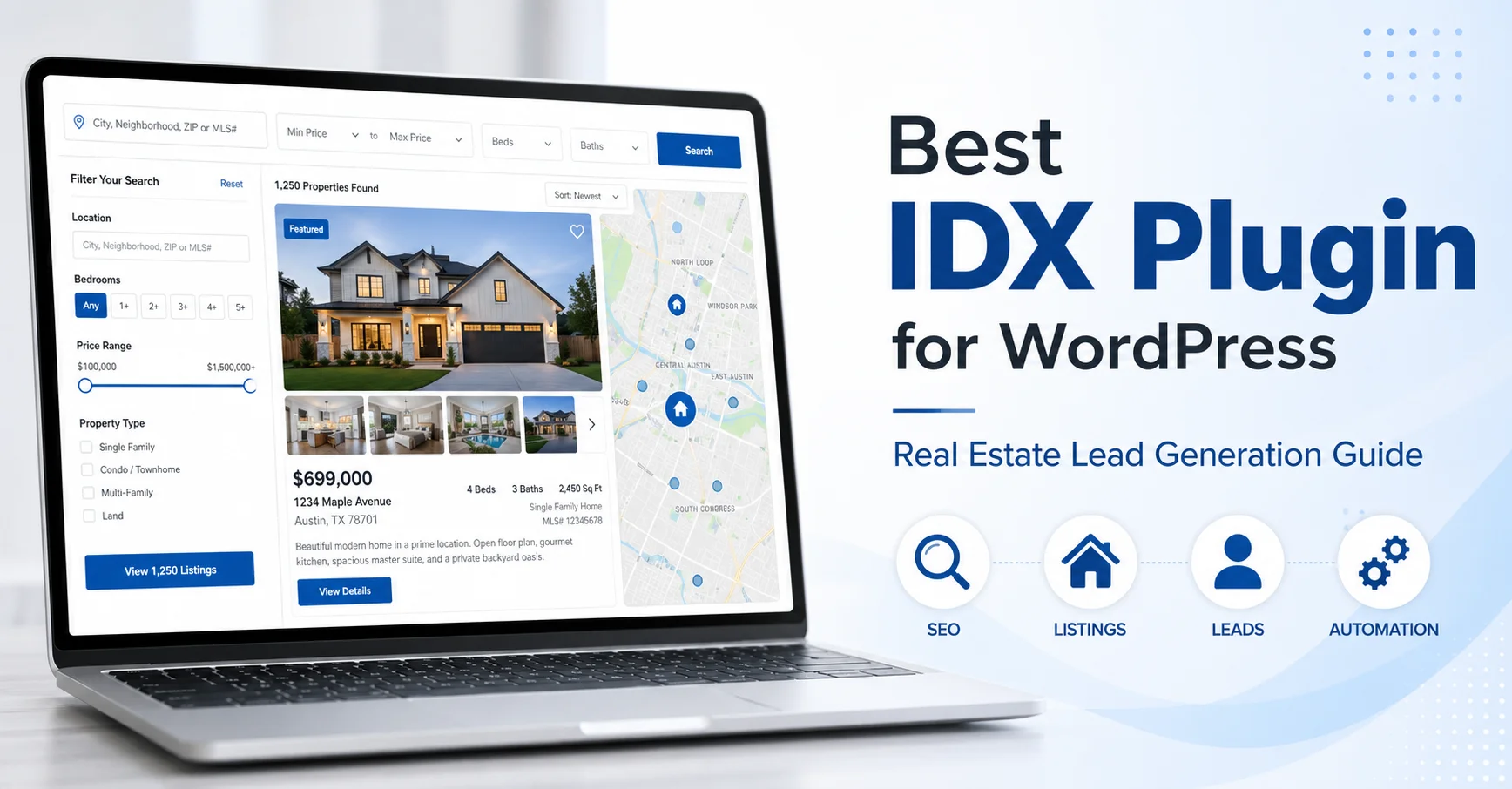
When I started researching the best IDX plugin for WordPress, I quickly realized that IDX Internet Data Exchange is the technology that connects my WordPress website directly to my local MLS database, pulling live property listings in automatically.
Instead of manually entering every property with photos, descriptions, and price details, the right IDX plugin for WordPress handles that entire process without me lifting a finger. This is similar to how choosing the right platform matters for any website feature the platform you select shapes what’s possible.
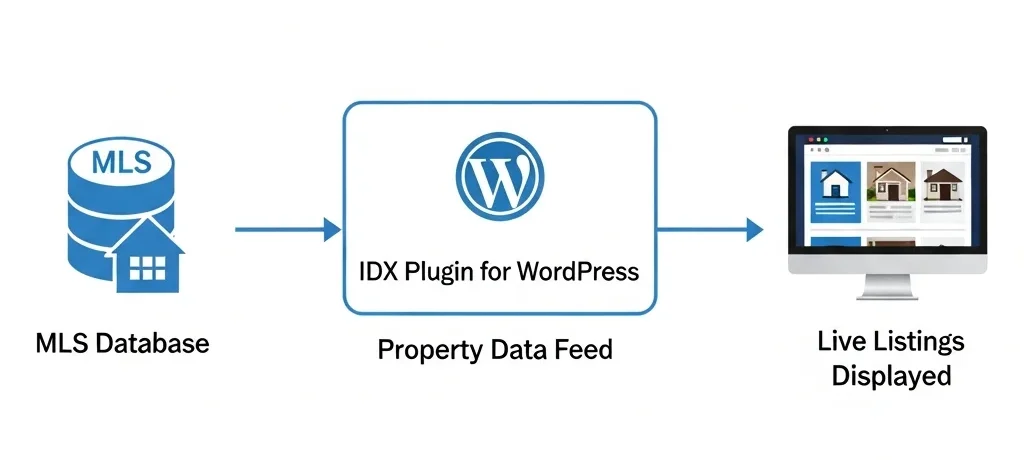
Think of it this way. My local MLS has thousands of active listings that change every single day. Without IDX, I’d spend hours copying and pasting property information, uploading photos, and updating sold listings. With a quality IDX plugin for WordPress, all that data flows to my website automatically through a licensed real estate data feed.
Here’s how IDX actually works. The MLS (Multiple Listing Service) makes property data available through that licensed data feed. An IDX plugin taps into that feed and displays listings on my site with images, maps, neighborhood details, and search filters.
Most newer platforms now use RESO Web API standards rather than the older RETS protocol this matters because RESO is faster, more standardized, and increasingly required by MLS boards that have updated their data delivery systems. Understanding RESO compliance helps you evaluate whether your chosen plugin will work long-term with your MLS board.
Now, I’ll be honest with you about something important. Most homebuyers aren’t going to skip Zillow and come straight to my website to search for homes. They just aren’t. Zillow and Realtor.com have massive brand recognition and marketing budgets I can’t compete with.
So why bother with IDX at all?
The real value is in SEO-driven lead generation. When I build properly optimized IDX pages on my WordPress site, Google begins indexing and ranking those pages for specific local searches things like “4-bedroom homes under $400K in Summerlin” or a buyer searching an exact property address. Those are searches I can actually compete for, and that’s how I capture leads my competitors miss entirely.
Property data displayed through quality IDX integration also establishes my website as a legitimate real estate resource. Visitors can see I have access to the full MLS not just my own handful of active listings and that credibility matters when someone is making a six-figure decision. According to NAR research, nearly 95% of home buyers use online search during their process. Not all of them start on Zillow. Long-tail Google searches for specific property types in specific neighborhoods are exactly where independent agents can compete and win.
An IDX plugin won’t replace Zillow in your real estate marketing strategy, but it fills a gap that Zillow can’t fill for you compounding SEO opportunities on your own domain, plus automated real estate listings management that would be impossible to maintain manually. For me, that combination makes it one of the most valuable investments I’ve made in my real estate business.
How to Choose the Best IDX Plugin for WordPress: 12 Essential Features
I’ve sat through a lot of IDX plugin demos that looked incredible on a Zoom call and fell apart the moment I tried to configure them on an actual WordPress site. Here’s what I actually check before making any decision based on real testing, not vendor marketing pages.
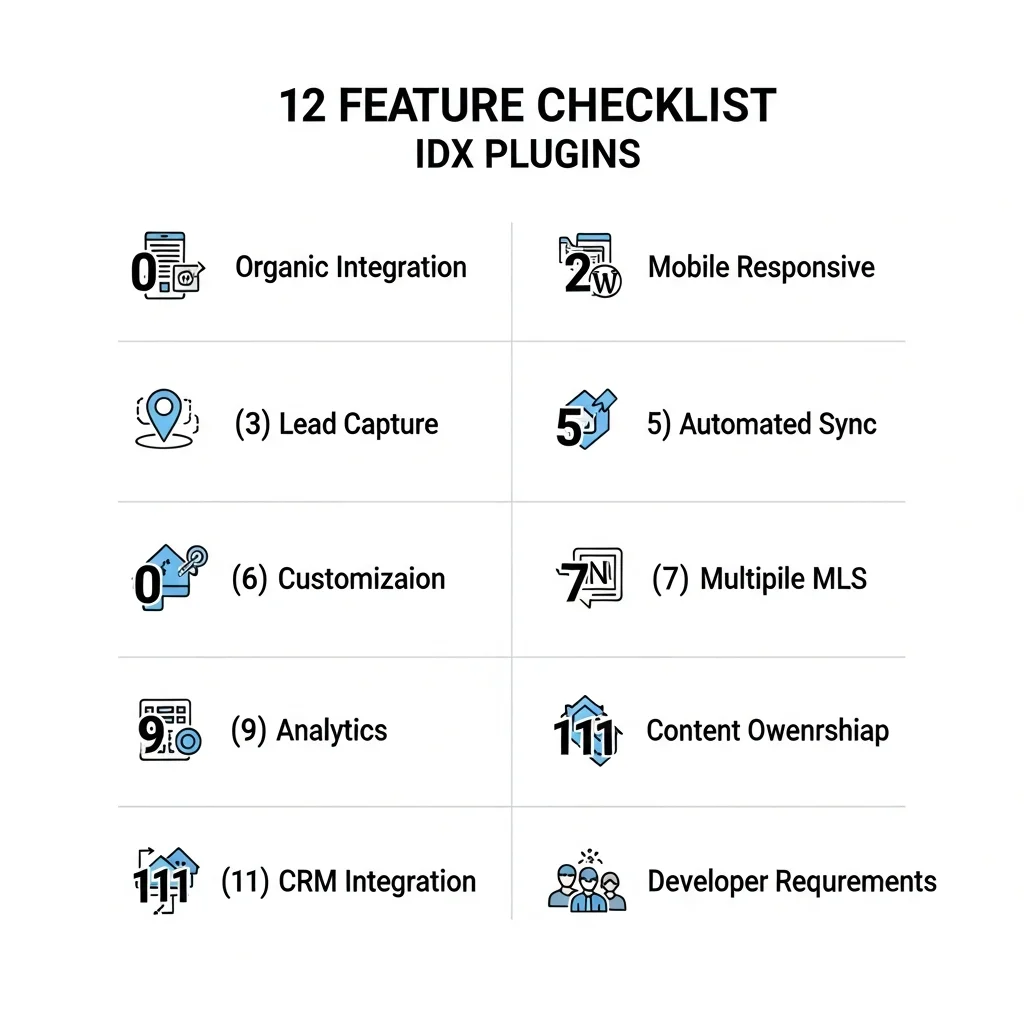
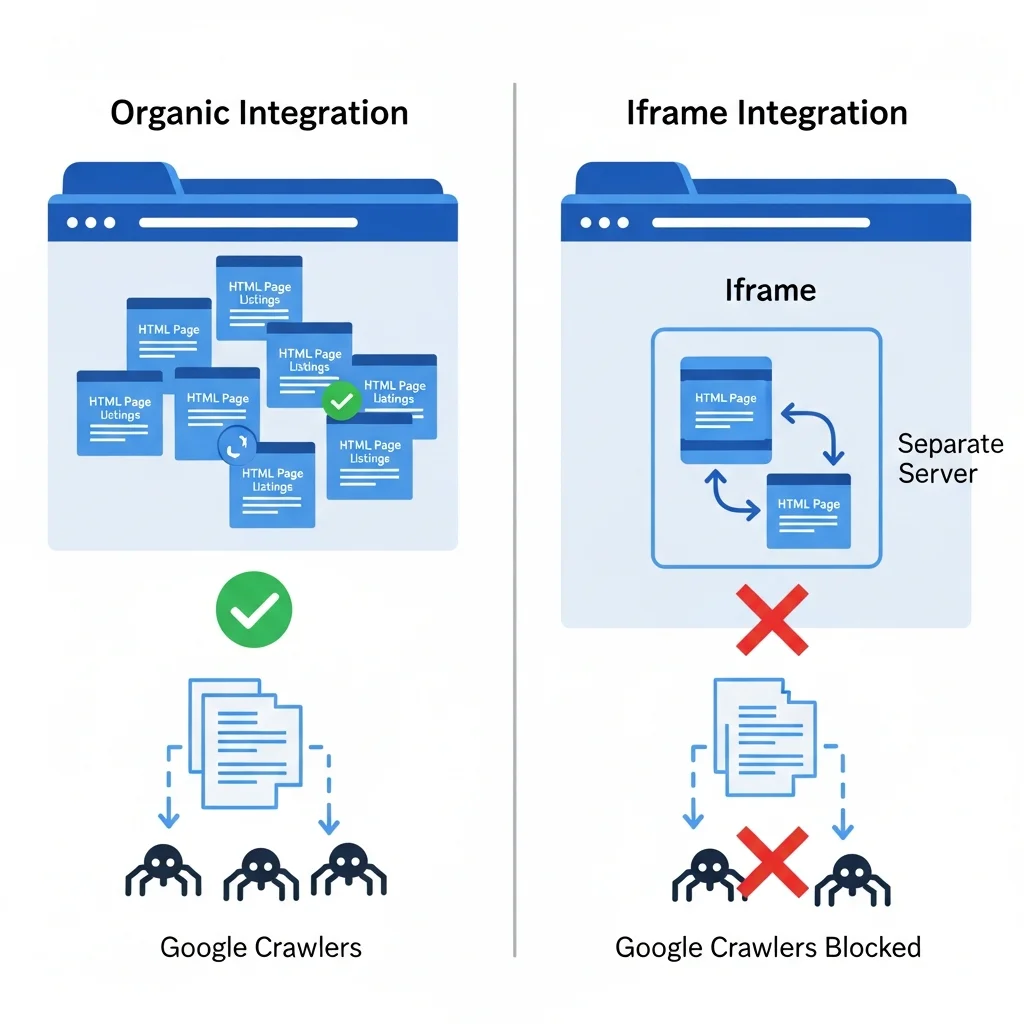
1. Organic MLS Data Integration : The most critical technical feature I check, and I’ll explain exactly why below. Some plugins use iframes or subdomains that search engines can’t properly index. Others render listings directly on your WordPress domain as actual HTML pages where Google can find and rank them. That distinction defines your entire SEO strategy.
2. Mobile Responsiveness : Google completed its switch to mobile-first indexing in 2019, which means the search engine evaluates the mobile version of your site first when determining rankings. If your IDX pages don’t work properly on phones, your SEO suffers regardless of how polished the desktop experience looks.
3. Lead Capture Tools : I need registration prompts, saved search functionality, and contact collection built into the plugin itself. The best solutions let me control exactly when and how registration prompts appear, rather than forcing every visitor to create an account before they see a single listing.
4. Map Search : Buyers think geographically. I want my visitors to draw custom boundaries on a map, search by school district, or find homes within a specific radius. Polygon map search is particularly valuable for neighborhoods with irregular boundaries or waterfront markets.
5. Automated Property Listing Sync : Automated data synchronization is the core value proposition of any IDX plugin. The platform should connect with your MLS multiple times daily, pushing status changes, price reductions, and new listings to your site without any manual work from me.
6. Customization Options : I need control over colours, layouts, fonts, search fields, and result displays. A good plugin extends my brand naturally. A poor one makes my site look identical to every other generic real estate page in my market.
7. Multiple MLS Support : Essential if I work across regions or on a team covering multiple markets. Some plugins charge extra per MLS board. Others include several at the base price.
8. Performance and Page Speed : IDX plugins are performance risks they pull significant volumes of data and high-resolution images. If the plugin isn’t optimized properly, it will slow your entire site and hurt your Core Web Vitals scores. I specifically check for CDN image delivery, built-in caching, and sensible pagination limits before shortlisting any plugin.
9. Analytics and Tracking : Understanding which searches my visitors perform, which listings get the most views, and where my traffic originates shapes my content strategy. When I see that my “4-bedroom homes in Henderson” page gets three times the traffic of any other showcase page, that tells me something real about buyer demand in that submarket.
10. CRM Integration : Leads should flow directly into my follow-up system the moment someone registers. Manual export and copy-pasting between platforms wastes time and creates gaps in follow-up.
11. Content Ownership : I always verify that I own the pages, blog posts, and content I create on any platform. Some providers claim content ownership, which means you lose everything if you ever switch. That’s a deal breaker, and I’ll explain exactly why this matters more than most agents realize.
12. Developer Requirements : Some tools are built for DIY setup by non-technical agents. Others require a developer to configure and maintain properly. Knowing your technical skill level before you buy eliminates a lot of frustration and wasted money.
Organic MLS Integration vs. Iframes: Why This Matters for Your SEO
Organic integration means property listings render as actual HTML pages on your WordPress domain. When Google crawls your site, it sees complete listing pages with addresses, descriptions, photos, and details pages that can rank in search results.
Iframe-based solutions load listings from a separate domain inside a frame on your page. Search engines see the frame but can’t index the actual listing content inside it. From an SEO perspective, those pages are almost worthless for generating organic traffic.
Subdomain setups are slightly better than iframes but still problematic. Your listings might appear on listings.yourdomain.com instead of yourdomain.com/listings. Search engines treat subdomains as separate websites, so you don’t build domain authority where it counts.
Server-side rendering is the technical term for proper organic integration. This approach renders listings as real HTML content on your domain, making each property page discoverable and rankable in Google search results which is the entire reason to invest in an SEO-focused IDX setup in the first place.
It’s also worth noting that each MLS board has its own IDX display rules requirements around how listings must be attributed, what disclaimers must appear, and how quickly sold data must be removed. The best IDX plugins handle these compliance requirements automatically. If you’re evaluating a plugin, confirm it’s compliant with your specific MLS board’s rules before signing up.
When I evaluate any plugin, I ask directly whether it uses server-side rendering or client-side iframes. If the sales team can’t answer that question clearly, I move on.
Mobile Responsiveness: The Standard Every IDX Plugin Must Meet
Google’s mobile-first indexing means your IDX pages are judged on their phone experience first. If listings look broken or load slowly on a smartphone, your rankings suffer regardless of how good the desktop version looks.
Mobile responsiveness means more than just shrinking your desktop layout to fit a smaller screen. Your search filters need to be easily tappable. Photo galleries should swipe smoothly. Maps must be zoomable without accidentally triggering other page elements.
I’ve reviewed IDX implementations across dozens of real estate websites. A recurring problem I see is search forms with dropdown menus that are impossible to use on a phone, or listing grids showing three columns where each photo thumbnail is too small to see. Bad mobile UX has a direct SEO cost. When someone clicks your listing page on their phone, struggles for ten seconds, and hits the back button, Google registers that as a failed search result. Do that enough times and your rankings reflect it.
Modern IDX plugins adjust layouts automatically based on screen size. A three-column listing grid on desktop becomes a single column on mobile. Search filters collapse into an expandable menu. Photo galleries use touch-friendly controls.
When I test mobile responsiveness, I don’t just resize my browser window. I pull up the pages on my actual phone and navigate through property searches the way a real buyer would. That shows me exactly what visitors will experience.
Content Ownership: The Critical Question Most Agents Forget to Ask
I learned this lesson the hard way when I considered switching website providers a few years ago. I discovered that hundreds of blog posts I thought I owned were actually “shared content” that belonged to the platform. If I left, I’d lose all that SEO work every article, every page, every ranking I’d built.
Content ownership determines what happens when you switch IDX providers, change brokerages, or move to a different website platform. Do you get to take your listing pages, blog posts, and custom content with you? Or does it all disappear?
Some IDX providers offer “express content” or “blog assist” features that sound helpful. They automatically populate your blog with real estate articles. But this content isn’t unique to your site it’s distributed identically across hundreds of agent websites simultaneously. Google treats it as duplicate content, which means it won’t rank, and you lose access to every piece of it the moment you switch providers.
Before purchasing any IDX plugin, ask directly: “Do I own the content I create on your platform? Can I export my pages and take them with me if I switch providers?” Get the answer in writing before paying anything. This 30-second question protects years of work.
The best approach is creating your own original content built around the IDX functionality. Write neighborhood guides, market updates, and buyer resources that belong entirely to you. Use the IDX plugin for automated listing display, but build unique value around those listings that no platform can ever take from you.
Also review the terms of service specifically for language around content licensing, data ownership, and portability before signing anything. If those terms aren’t clear, ask for written clarification. It takes ten minutes and protects your entire content investment.
8 Best IDX Plugins for WordPress Compared (2026 Reviews)
I’ve personally tested or researched each of these WordPress real estate plugins across different client websites and market types. These ratings reflect real-world results, not vendor claims. My goal is giving you honest assessments real pricing, genuine pros and cons, and who each solution actually works best for not marketing hype recycled from vendor pages. Beyond features and cost, I also verify that plugins follow plugin security best practices before recommending them.
1. Realty NA WPL Pro : Best Overall for SEO and Value
Realty NA WPL Pro stands out in the IDX plugin WordPress market primarily because of its pricing model. Unlike most IDX solutions that charge ongoing monthly subscriptions, WPL Pro uses a one-time fee of $199 for full IDX integration. Note that your MLS board may also charge a separate IDX licensing fee to approve your data feed access this is standard across all IDX providers and is charged by your board, not by Realty NA.
The plugin uses organic MLS data integration, which means property listings render as actual indexable HTML pages on your WordPress domain something that’s critical for ranking in Google search results. This is where many cheaper alternatives fall flat, and WPL Pro gets it right.
WPL Pro works well with popular page builders including Divi Builder. I can customize listing layouts, search forms, and result pages without writing any code. The visual editing makes it accessible even though the plugin has genuinely advanced capabilities underneath.
The search functionality is impressive. Radius map searches let buyers draw a circle around a specific location. Location auto-suggest helps visitors find specific neighborhoods or streets quickly. Multiple advanced filters let buyers narrow results by price, bedrooms, property type, and dozens of other criteria. Dynamic metadata and XML sitemap integration ensure each listing page gets properly formatted title tags and descriptions and that search engines can discover and index all your property pages.
There’s a basic free version available if you want to test the interface. The free version lets you manually add listings, which works for featuring your own properties. For actual automated MLS data integration, you need WPL Pro.
My main concern is the learning curve. The plugin includes an extensive range of settings and configuration options, which means you’ll invest several hours upfront getting everything configured the way you want. The documentation is thorough, but plan for a real setup period before everything is dialed in.
For solo agents or small teams who want powerful SEO features without ongoing monthly costs, WPL Pro offers exceptional value. That $199 one-time investment pays for itself within a few months compared to subscription alternatives.
Best for: Value-focused agents who want strong organic SEO capability without monthly overhead Starting price: $199 one-time Free version: Yes (no MLS integration) Developer required: No My rating: 9/10
2. Showcase IDX : Best for Lead Generation and Modern UX
Showcase IDX starts at $74.95 per month, positioning it at the higher end of the IDX plugin market. At roughly $900 per year, it’s a meaningful investment but what you get is one of the most polished, conversion-focused platforms available.
I’ve reviewed IDX implementations across dozens of real estate websites, and the majority look and feel like they were built before smartphones existed. Showcase IDX is the exception. It looks current, with clean layouts, smooth animations, and a user experience that actually matches what today’s buyers expect from a property search tool.
Lead generation is where Showcase IDX really distinguishes itself. The plugin functions as both an IDX display system and a CRM, capturing leads through strategically timed registration prompts. I can collect contact information at the right point in the search process without forcing registration before someone even sees a listing.
The polygon map search feature lets buyers draw irregular shapes on the map to define exactly the area they’re interested in useful for neighborhoods with odd boundaries or waterfront properties that don’t fit a standard rectangular search.
One feature I haven’t seen elsewhere is the Friends and Family collaborative search. Buyers can share their saved searches and favorite properties with family members involved in the decision. This keeps everyone engaged on my website instead of texting Zillow links back and forth.
Showcase IDX uses server-side rendering, which means listings appear directly in Google search results. The SEO architecture is solid, and I can convert any listing or search into a standalone landing page in just a few clicks. The mobile experience is particularly well-designed, which matters since most of my property search traffic now comes from phones.
For agents consistently closing deals who can justify the monthly cost through lead capture ROI, Showcase IDX delivers a premium product that genuinely feels and functions like one.
Best for: Lead generation, modern user experience, and agents who want a ready-to-use professional solution Starting price: $74.95/month Free version: No Developer required: No My rating: 9/10
3. IDX Broker : Best for Teams With Developer Support (Important 2026 Update)
I want to be direct about IDX Broker because the landscape has changed significantly in 2026, and what I tell you here could save you real money and frustration.
With a developer partner, IDX Broker is an 8–10 out of 10 platform. The customization possibilities are nearly unlimited. A skilled developer can build custom search interfaces, unique listing displays, advanced lead flow automation, and deep CRM integrations. The platform was designed for this level of professional implementation, and at that level, it delivers.
Without a developer, that same platform drops to a 3–5 out of 10 experience for solo users. The default templates are basic and dated. The out-of-box setup lacks modern features and delivers little SEO value without significant customization. For non-technical agents trying to set this up themselves, it’s a genuinely frustrating experience.
Here’s the 2026 update that matters. IDX Broker was recently acquired by Elm Street, and this acquisition has already begun changing partner agreements and pricing. The platform is moving away from its developer-partner ecosystem toward a more direct retail model. Long-time developer partners are seeing changes in pricing, support access, and program structure.
If you’re already working with an established IDX Broker developer who’s staying in the ecosystem, you may be fine. If you’re considering IDX Broker as a new customer without developer resources, look at iHomefinder or Showcase IDX instead.
The platform still has genuine strengths. The API is robust, enabling custom integrations with virtually any CRM or marketing automation system. The performance infrastructure handles high-traffic websites without slowdowns. For teams with both the technical resources and the budget, those enterprise-level capabilities remain valuable.
My recommendation comes down to one question: Do you have an established developer who specializes in IDX Broker and plans to stay active in the ecosystem? If yes, it can be excellent. For everyone else, there are better options that don’t require professional development resources to function properly.
Best for: Teams with dedicated developer support Starting price: Custom quote Free version: No Developer required: Yes (for meaningful results) My rating: 8/10 with developer / 3/10 without
4. iHomefinder Optima Express : Best for Solo Agents Without Developers
After the honest assessment I just gave about IDX Broker, this is the plugin I recommend instead for solo agents who don’t have developer support. iHomefinder Optima Express is specifically built for non-technical users who need a professional IDX solution that works out of the box.
The platform integrates naturally with WordPress. The Eureka Search interface is intuitive and modern, giving visitors a clean property search experience without you needing to configure anything complicated. The setup process is genuinely point-and-click — non-technical agents can get it running without hiring anyone.
Lead aggregation is one of the standout features. iHomefinder pulls leads from more than 30 third-party systems, centralizing your lead sources in one place. If you advertise on Zillow, Realtor.com, Facebook, and your own website, you can track all those inquiries from a single dashboard.
The built-in CRM includes marketing automation, so you can set up drip email campaigns, automated follow-up sequences, and lead nurturing without paying for a separate email platform. For solo agents who aren’t ready to invest in dedicated CRM software, this integrated approach makes practical sense.
One significant limitation to understand before purchasing: iHomefinder’s “Express Content” blog feature provides pre-written real estate articles that automatically populate your blog. The convenience sounds appealing until you realize this content is distributed identically across hundreds of other agent websites simultaneously, meaning Google treats it as duplicate content. It won’t rank, and you lose access to all of it the moment you switch providers.
My recommendation is to use iHomefinder for IDX functionality and lead capture while creating all your own original blog content separately. That original content is yours it moves with you if you change brokers, switch platforms, or rebuild your website.
The pricing is competitive with other subscription-based IDX plugins, though you’ll need to contact iHomefinder for specific quotes based on your MLS boards. The value proposition is strong for its intended user: solo agents who want professional results without hiring a web developer.
Best for: Solo agents without developer support who need everything working immediately Starting price: Contact for quote Free version: No Developer required: No My rating: 8/10
5. Simply RETS : Best for Developers and Custom Builds
SimplyRETS is the developer-friendly option that connects to your MLS via RETS API. If that sentence made perfect sense to you, this plugin might be exactly what you need. If you’re not sure what a RETS API is, you probably want one of the more user-friendly options above.
The plugin starts at $49 per month and functions as a highly flexible property database plugin — the customization possibilities for how listing data displays are nearly unlimited. SimplyRETS displays real-time listings using custom shortcodes or widgets, giving developers complete control over where and how properties appear on the page.
A skilled developer can style the search interface, customize filtering options, modify result layouts, and integrate listing data into completely custom page designs. The code is lightweight, and performance optimization is straightforward for developers who know what they’re doing. If you have a specific vision for how your property listings should look and function, SimplyRETS provides the architecture to build it without fighting against an opinionated plugin.
SimplyRETS requires genuine development knowledge to implement effectively. You’re not installing it, clicking a few buttons, and watching a polished property search appear on your site. If you’ve never worked with an API or written custom shortcode implementations, budget for developer time before you budget for the plugin itself.
If you’re a developer building real estate websites for clients, or an agent with a developer on your team, SimplyRETS offers excellent value at $49 per month. For solo agents without technical skills, skip this one. The money you save on monthly fees will get consumed quickly when you need to hire someone to configure everything properly.
Best for: Developers building custom real estate websites Starting price: $49/month Free version: No Developer required: Yes My rating: 8/10 for developers / not recommended for solo agents
6. Estatik Real Estate : Best Budget Option With a Clear Upgrade Path
Estatik is known for its intuitive property editor and flexibility for both manual listing management and MLS integration. There is a free version available, which makes it popular for agents who want to test real estate plugins without financial commitment.
The free version offers more than 50 unique shortcodes to display listings and create image slideshows. The property editor is easy to use, with custom fields for all the details buyers care about. Photo galleries look professional, and the plugin supports multilingual websites if you serve communities where English isn’t the primary language a genuine differentiator for agents working diverse markets.
The free version does not include IDX capability it’s a manual property listing system, which works for agents who only want to showcase their own active listings. For automated MLS data integration, the premium version is required, starting at $89 for six months.
That pricing stands out because it’s among the most affordable true IDX options on the market. At roughly $15 per month, it costs less than a third of what Showcase IDX charges. For budget-conscious agents who still need legitimate MLS integration, Estatik Premium deserves serious consideration.
The main limitation is that Estatik doesn’t match the polish and advanced features of premium options. The search interface is functional but not particularly modern. Lead capture is basic compared to platforms with built-in CRM functionality. For straightforward listing display on a budget, it works well. For sophisticated real estate lead generation, you’ll want something more robust.
Estatik makes sense for newer agents building their first website and wanting to minimize monthly overhead, or for experienced agents who need solid IDX functionality without paying premium prices.
Best for: Budget-conscious agents who want genuine IDX at the lowest cost Starting price: $89 per 6 months (~$15/month) Free version: Yes (no MLS integration) Developer required: No My rating: 7/10
7. MLS Import : Best for Performance and High-Traffic Sites
MLS Import starts at $49 per month and is specifically designed for batch imports of large listing inventories. The standout technical feature is a custom Content Delivery Network (CDN) for serving property images.
Most IDX plugins pull property photos directly from the MLS and serve them from your WordPress hosting. This can eat up server storage and slow down your site when you’re dealing with hundreds or thousands of high-resolution images. MLS Import’s CDN stores optimized versions of property photos on distributed servers built for fast delivery. Your WordPress hosting doesn’t get bogged down, and page load times improve meaningfully.
This CDN architecture directly impacts your Core Web Vitals scores, particularly Largest Contentful Paint (LCP) one of Google’s key ranking metrics. Property listing pages are especially vulnerable to poor LCP scores because the hero image on a listing page is typically a large, high-resolution photo. Plugins that serve optimized images through a CDN make a measurable difference in those scores.
The automatic syncing imports new properties throughout the day. The batch import capabilities make initial setup faster when working with a large MLS that has thousands of active listings. The listing management system includes solid filtering and search capabilities, and the interface is clean and functional not as visually polished as Showcase IDX, but everything works reliably.
MLS Import works particularly well for high-traffic real estate websites or agents covering multiple markets with large listing inventories. For agents prioritizing site speed and performance optimization, the $49/month price point represents strong value.
Best for: High-traffic sites and agents covering large markets with heavy listing volumes Starting price: $49/month Free version: No Developer required: No My rating: 8/10
8. Rover IDX : Best for Speed and Template Variety
Rover IDX is specifically optimized for page speed and offers a wide selection of professional templates, positioned at approximately $65 per month in the mid-range tier.
The platform focuses on performance optimization, which matters for both user experience and SEO. Fast-loading property pages keep visitors engaged and satisfy Google’s Core Web Vitals requirements. Rover’s infrastructure treats performance as a core priority rather than an afterthought.
Rover’s IDX plugin WordPress theme compatibility extends to popular page builders including Elementor, Divi, and Beaver Builder, which means you can customize listing layouts without writing code. Whether you want a modern minimalist layout or a more traditional real estate website aesthetic, Rover provides professionally designed starting points that don’t require heavy customization to look good.
The search functionality covers standard features solidly: price range, bedrooms, bathrooms, property type, and location filtering. Map integration works well, and mobile responsiveness is well-executed. Nothing groundbreaking, but everything functions smoothly.
Rover IDX doesn’t match the standout features of Showcase IDX’s collaborative search or MLS Import’s CDN architecture. It’s a well-rounded, professionally executed solution that prioritizes reliability and performance over cutting-edge innovation and for many agents, that’s exactly what they need.
For agents who want a dependable, fast-loading IDX plugin with good template options and don’t need the latest features, Rover delivers solid value.
Best for: Agents who prioritize speed and want professional templates without heavy customization Starting price: ~$65/month Free version: No Developer required: No My rating: 7/10
WordPress IDX Plugin Comparison: Features, Pricing, and Performance
| Plugin | Starting Price | Best For | Key Features | SEO Capability | Developer Required? | Free Version? | Rating |
|---|---|---|---|---|---|---|---|
| RealtyNA WPL Pro | $199 one-time | Value-focused agents | Organic integration, radius search, dynamic metadata, Divi compatible | Excellent | No | Yes (no IDX) | 9/10 |
| Showcase IDX | $74.95/month | Lead generation, modern UX | CRM integration, polygon search, Friends & Family feature | Excellent | No | No | 9/10 |
| IDX Broker | Custom quote | Teams with developer support | Unlimited customization, robust API, enterprise performance | Excellent (with dev) | Yes | No | 8/10 with dev, 3/10 without |
| iHomefinder Optima | Contact for price | Solo agents, non-technical | Eureka Search, 30+ source lead aggregation, built-in CRM | Good | No | No | 8/10 |
| SimplyRETS | $49/month | Developers, custom builds | RETS API, shortcode-based, full customization | Excellent (if implemented well) | Yes | No | 8/10 for devs |
| Estatik Premium | $89/6 months | Budget-conscious agents | 50+ shortcodes, multilingual, easy property editor | Good | No | Yes (no IDX) | 7/10 |
| MLS Import | $49/month | Performance-focused sites | Custom CDN, batch imports, automatic syncing | Good | No | No | 8/10 |
| Rover IDX | ~$65/month | Speed and template variety | Performance optimized, page builder compatible, professional templates | Good | No | No | 7/10 |
The pricing structure tells you something important about the IDX plugin WordPress cost landscape. There are essentially three tiers.
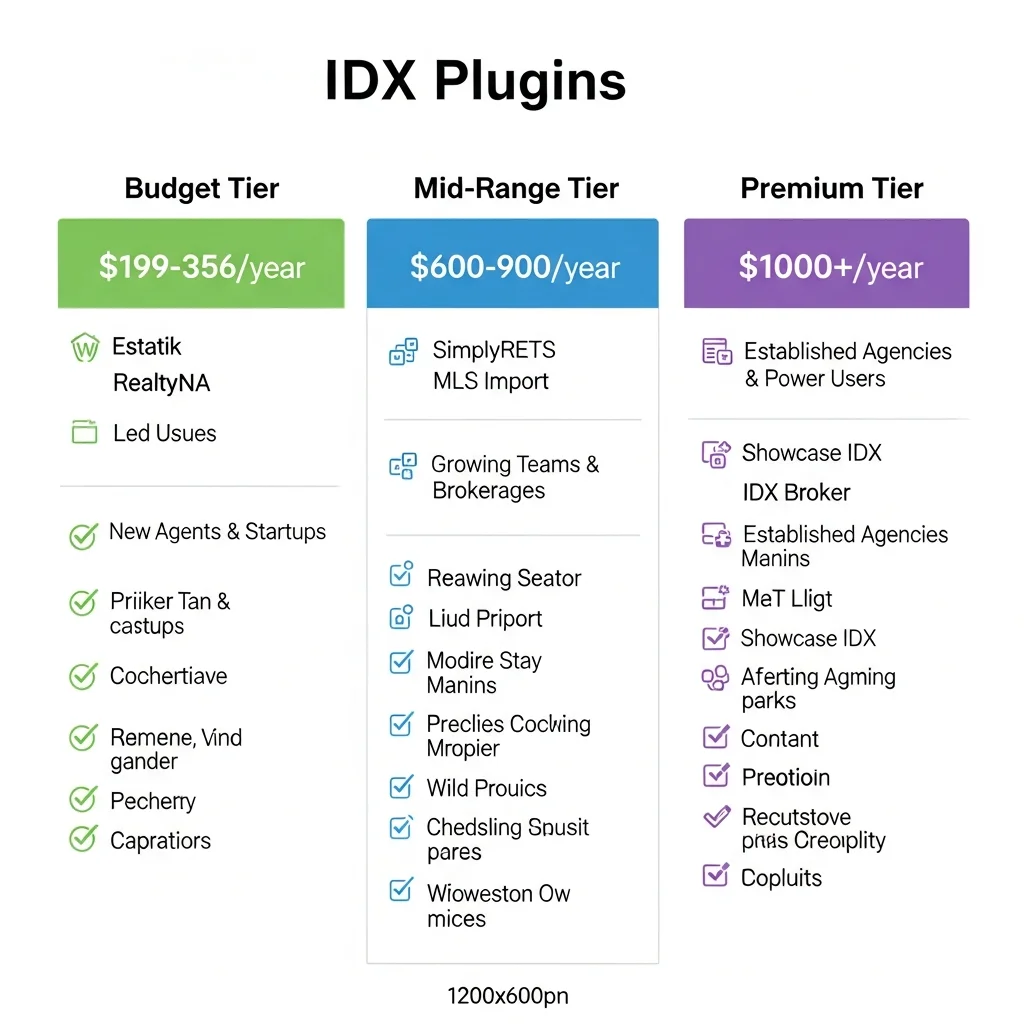
Budget tier includes Estatik at $89 per six months and RealtyNA WPL Pro at a one-time $199 fee. These provide legitimate IDX functionality at the lowest long-term cost. Over two years, RealtyNA costs $199 total while Estatik runs about $356. A $49/month plugin costs $1,176 over that same period.
Mid-range tier includes SimplyRETS and MLS Import at $49 per month and Rover IDX at $65 per month. These balance affordability with solid feature sets. At around $600–$800 per year, they’re accessible to most working agents.
Premium tier is led by Showcase IDX at $74.95 per month (about $900 annually) and IDX Broker, which requires custom quotes typically exceeding $1,000 per year. These command higher prices because they offer either exceptional lead generation and UX (Showcase) or unlimited customization with developer support (IDX Broker).
My take is that pricing should match your business stage. New agents building their first website should start with RealtyNA WPL Pro or Estatik to minimize overhead. Established agents closing deals consistently can justify Showcase IDX’s lead capture capabilities. Teams with a developer on staff should evaluate IDX Broker’s customization depth.
The most expensive decision in this space isn’t choosing the priciest plugin it’s paying premium rates for a platform you never fully configure or use. A $75/month plugin you set up incorrectly wastes more money than a $49/month plugin you configure properly.
Free vs. Paid IDX Plugins: What You Actually Get
I see this question constantly in real estate agent groups, and the responses show widespread confusion about what “free” actually means in this context.
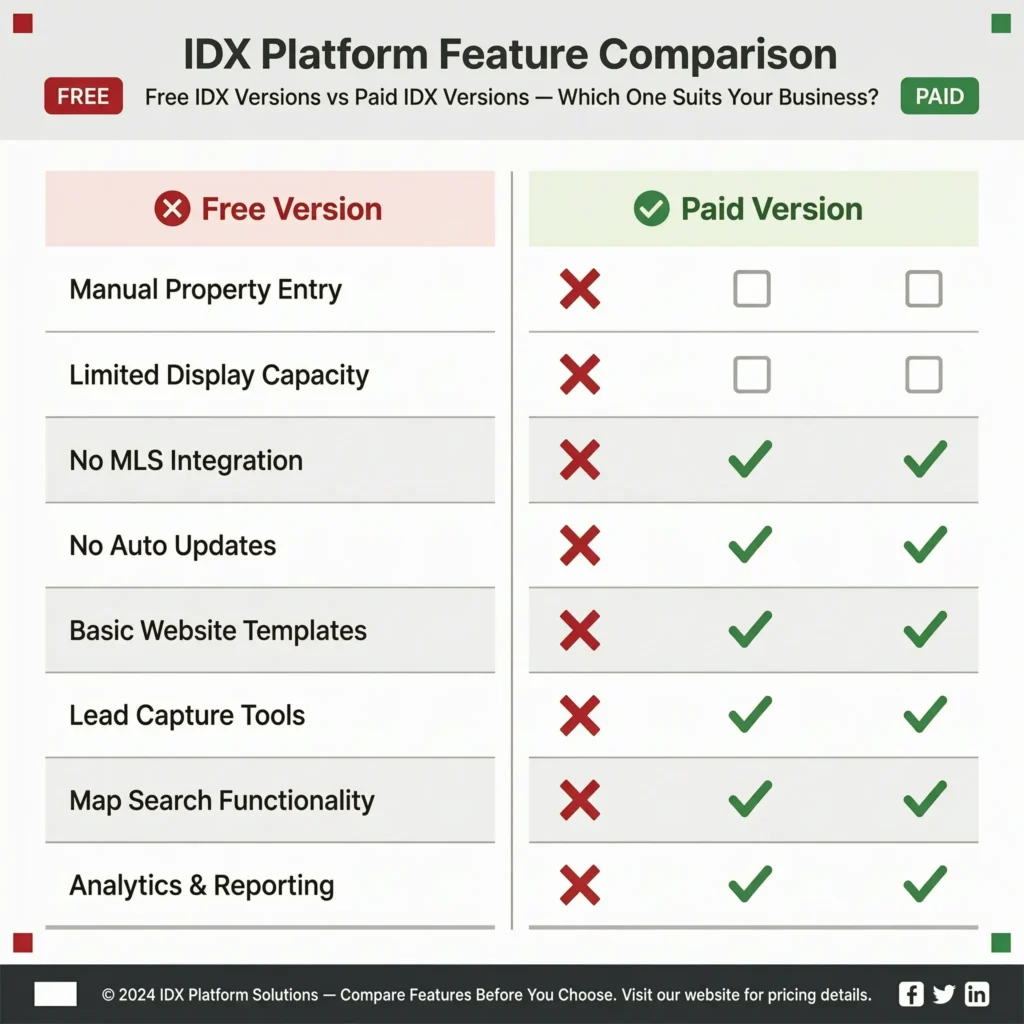
Free versions of IDX plugins do not include MLS integration. That distinction matters enormously a free plugin gives you a manual property directory, not an Internet Data Exchange connection.
What free versions actually do is let you manually enter property listings one at a time. You type in the address, upload photos, write the description, enter the price, bedrooms, and bathrooms. It’s a structured way to create property pages on WordPress without IDX automation.
This works perfectly fine for featuring your own active listings. If you’re a listing agent with five properties on the market, manually creating showcase pages for those five homes makes total sense. The free plugin gives you professional templates and property-specific features without monthly costs.
What free versions cannot do is automatically pull thousands of listings from your MLS database, sync price changes, update statuses, or provide the comprehensive property search functionality that lets visitors browse your entire market. That’s what you’re paying for in premium versions.
Realty NA WPL’s basic free version includes the property management system and manual listing entry. The WPL Pro version which includes automated MLS connection requires the one-time $199 fee. Estatik follows the same model: free gives you the property editor, premium starting at $89 for six months adds actual IDX capability.
The feature gap between free and paid is significant. Paid versions include automated MLS data synchronization, advanced property search widgets, map-based search interfaces, automatic listing updates, lead capture integration, and substantially better support.
I’ve seen agents try to cut costs by manually entering dozens of listings using free plugins. The math never works. Your hourly value as a real estate agent far exceeds the $15–75 per month you’d pay for automated IDX integration. Spend your time on income-producing activities and let automation handle listing data.
The best approach for budget-conscious agents: use the free version to test the interface and confirm the plugin works well with your WordPress theme, then upgrade to paid IDX once you’re confident in the choice. That way you’re not paying monthly fees for something you end up replacing after six weeks.
Choosing Based on Your Technical Skills: Developer vs. DIY Setup
One of the biggest mistakes I see agents make is choosing an IDX plugin based on features without honestly considering whether they have the technical skills to implement it properly. A powerful developer-focused tool you can’t properly configure delivers almost no real-world value — regardless of what it’s theoretically capable of.
I’m breaking this down into three categories based on honest self-assessment.
For Solo Agents Without Technical Help
If you’re not comfortable editing WordPress theme files, you’ve never touched CSS, and the thought of API credentials makes you uncomfortable, you need a plug-and-play solution. Most of the agents I know who run successful real estate businesses built on WordPress have never written a line of code. The key is choosing a plugin designed for that reality rather than fighting one that assumes you have a developer on speed-dial.
iHomefinder Optima Express is my top recommendation for this group. The platform is built specifically for non-technical users. The setup wizard walks you through configuration step by step. The templates are professionally designed and work right out of the box. Support is geared toward explaining things in plain English.
Showcase IDX also works well here. The interface is intuitive, the documentation is clear, and the default setup looks modern and professional without customization. You’re paying more per month, but you’re getting a user experience that doesn’t require technical expertise to maintain.
The honest time assessment matters here. As a solo agent, your time is valuable for lead generation, client service, and closing deals. If a cheaper plugin requires 20 hours of trial-and-error configuration, you’re not actually saving money. A more expensive plugin that works immediately might be the smarter business decision.
Without a developer, avoid IDX Broker. In my experience and based on what I’ve consistently seen from agents who attempted solo implementation the platform delivers a 3–5 out of 10 experience for non-technical users. The default templates are dated, customization requires coding knowledge, and you won’t extract the SEO value the platform is theoretically capable of delivering. For solo agents in this situation, iHomefinder is a much better fit.
For Agents Comfortable With WordPress (But Not Developers)
If you’ve installed WordPress plugins before, you understand how widgets work, you’re comfortable with page builders like Elementor or Divi, and you can follow technical documentation, you have more options available.
RealtyNA WPL Pro fits this skill level well. The plugin has an extensive feature set, which means a real learning curve but the documentation is thorough, and WordPress-comfortable users can configure everything without hiring anyone. The visual page builder integration means you’re working through interfaces you already understand.
Estatik Real Estate also works well here. The shortcode system gives you control over where and how listings display. You can customize templates through built-in settings and your theme’s options without touching code.
Rover IDX is designed for this skill level. Page builder compatibility means you’re using familiar tools like Elementor or Divi to achieve professional results. You’re not editing PHP files or writing custom functions.
The key distinction at this level is that you can handle configuration and customization through the plugin’s provided interfaces, but you’re not writing custom code. That’s sufficient for most real estate websites.
For Real Estate Teams With Developer Resources
If you have a web developer on your team or contract with a WordPress development agency, the more technical solutions become viable options.
IDX Broker is a strong choice for teams that need deep SEO customization and complex lead flow automation but only with professional developer support in place. With a capable developer, it’s an 8–10 out of 10 platform. The API enables deep integrations with your CRM and marketing automation systems, and the customization possibilities let you build virtually any experience you envision.
SimplyRETS is the developer-friendly IDX option that connects to MLS data via RETS API. Developers appreciate the clean codebase, the flexibility of shortcode and widget implementation, and the ability to customize absolutely everything. This isn’t a tool for DIY agents, but for development teams building sophisticated real estate websites, it’s excellent.
The critical insight here is that the same tool delivers dramatically different results based on who’s implementing it. IDX Broker rates 8–10 out of 10 with a developer partner but only 3–5 out of 10 without one. That gap shows how much technical expertise matters and why platform selection and technical resources need to be evaluated together, not separately.
Step-by-Step IDX WordPress Integration Guide (Using IDX Broker as Example)
Getting your IDX WordPress setup right makes the difference between a listing tool that generates leads and one that frustrates visitors, ranks nowhere in Google, and wastes your monthly investment. I’m walking through the complete process using IDX Broker as the example since it’s one of the more complex setups. The same general principles apply to most IDX plugins, though specific menu locations and terminology vary between platforms.
Installing and Configuring Your IDX Plugin
Before diving into configuration, verify your WordPress CMS installation is running the latest stable version some IDX plugins have minimum WordPress version requirements that can cause installation failures.
The setup process begins when you receive your welcome email from your IDX provider. This email typically contains your login credentials, API keys, and account-specific information you’ll need for the WordPress integration.
Log into your WordPress dashboard and navigate to Settings → General to verify your site title and URL are correctly configured. This matters because some IDX plugins pull this information for display on listing pages and in automated emails.
Install the IDX plugin through your WordPress Plugins menu. Search for the specific plugin name, click Install, then Activate. Some IDX providers offer a custom plugin download rather than using the WordPress repository. If that’s the case, download the plugin file and upload it through the Add New Plugin interface.
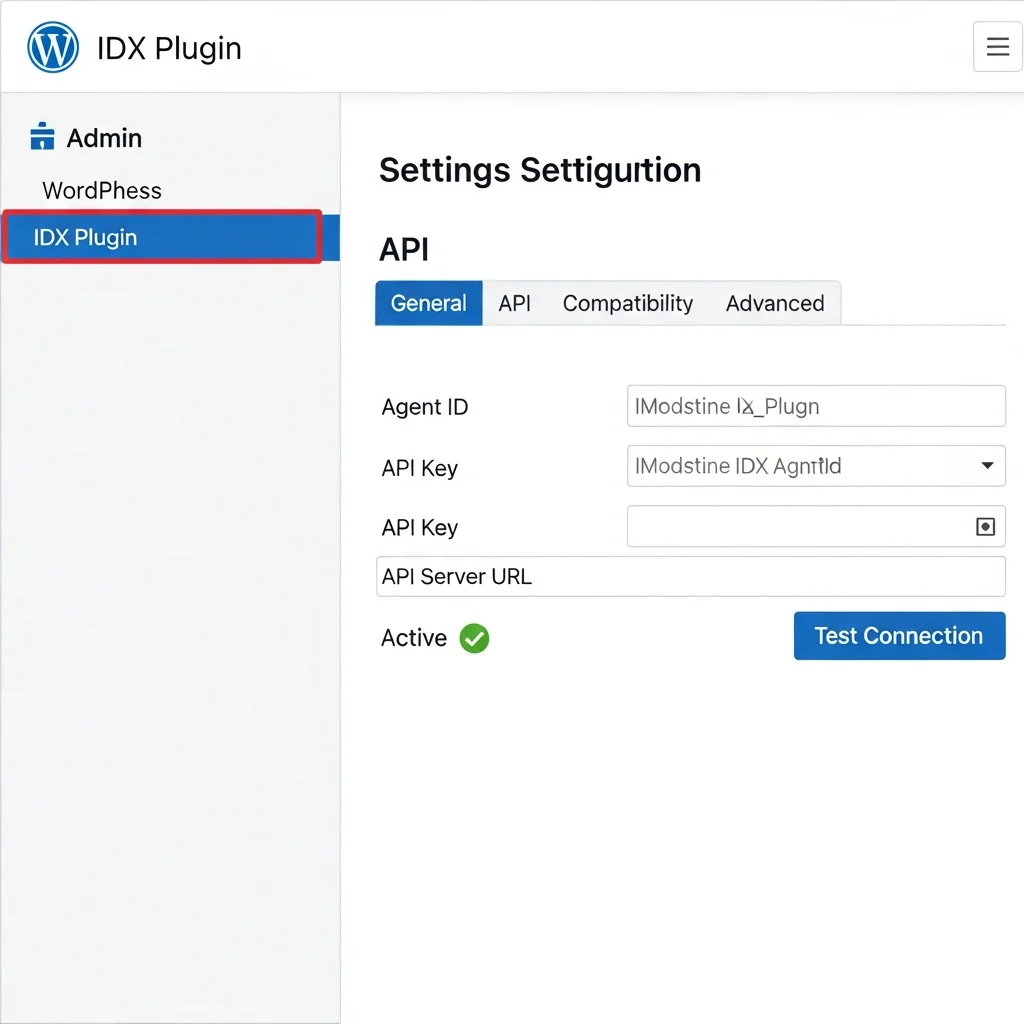
The critical configuration step is connecting your WordPress site to your IDX account through API credentials. Navigate to the plugin settings page, which is usually under a dedicated menu item or within your WordPress Settings menu.
Enter your Agent ID, API Key, and API Server URL exactly as shown in your welcome email. A single typo breaks the entire connection. After entering credentials, save the settings and verify that the API status shows as Active or Connected.
If the connection fails, double-check your credentials character by character. Make sure there are no extra spaces before or after the copied text. Verify your IDX account is fully activated on the provider’s end some platforms require manual approval before API access becomes available.
Once the API connection shows active, update your IDX plugin and all other WordPress plugins to their latest versions through your Dashboard → Updates page. Version conflicts between plugins are a common source of unexpected display issues.
Creating Your First Property Search Widget
The home search widget you build here determines what property searches appear on your site and how visitors interact with them. I’m using IDX Broker terminology, but similar concepts apply to other plugins under different names shortcodes, showcases, or search modules.
Log into your IDX Broker account dashboard this is separate from your WordPress admin panel. Navigate to Design → Widgets → Legacy Widgets and click Create New.
Choose the widget type based on what you want to display. Showcase widgets show a grid of property results. Custom Search widgets provide search forms. Hot Sheet widgets display your newest listings. Featured Listings show hand-picked properties.
For this example, I’m creating a Showcase widget using a Custom Search. Select the Advanced Search form to give visitors full filtering capabilities.
Configure your search criteria: set property type to Residential, status to Active, location to your target city or neighborhood, price range filters, and any specific features you’re targeting. Click View Results to preview exactly what visitors will see before you publish anything.
Configure the display settings. Give your widget a descriptive name like “Five Bedroom Homes Under 500K Las Vegas.” Set sort order to Newest Listings, responsive width to 100%, and choose 3 columns for desktop display.
I recommend limiting pages to 12 or 15 listings maximum. Loading more than that increases page weight significantly, which hurts Core Web Vitals scores and slows the experience for visitors on slower connections. If you use a three-column layout, stick to multiples of three (12, 15, 18) so your grid displays evenly.
Once your widget is configured, copy the embed code or shortcode provided. In your WordPress dashboard, create a new Page with a clear title matching your widget purpose “5 Bedroom Homes Under $500K Las Vegas” for example. Paste the embed code into the page content area. Publish and verify on your live site that listings appear, images load, search filters work, and the layout looks correct on both desktop and mobile.
Organizing IDX Pages for SEO and User Experience
I organize showcase pages using parent-child page hierarchies and categories to maximize both WordPress real estate SEO performance and intuitive user navigation.
My parent pages cover broad topics: City, Price, Features, Neighborhoods, and Property Types. Individual showcase pages become children of these parent pages.
For example, under my City parent page, I have child pages for North Las Vegas, Summerlin, Henderson, Mountains Edge, and every other distinct area I serve. Under my Price parent page, I have pages for Homes Under 300K, Under 400K, Under 500K, and so on.
This hierarchy creates clean URLs like yoursite.com/city/summerlin/ and yoursite.com/price/under-400k/. Search engines understand the topical relationship, and visitors can navigate logically through your property categories.
I use WordPress categories to tag pages by type even when they’re in different hierarchies. My Features category includes pages about homes with pools, homes with basements, homes with RV parking, and waterfront properties. These pages live under different parent pages in the hierarchy, but the category tag connects them semantically.
Building this structure systematically takes time upfront but creates enormous SEO value. I currently have 186 showcase pages built across different cities, price points, features, and neighborhoods each one targeting a specific property search that potential buyers perform.
Building an IDX Content Strategy: How Many Pages Should You Create?
Most agents dramatically underestimate how many IDX pages to create. I’ve reviewed countless real estate websites with a single “Search Properties” page and no other targeted content. That’s leaving entire pages of Google search results entirely to competitors.
Category-Based Page Structure (Cities, Price Points, Features)
I organize my IDX page creation around five main category types and build each one out comprehensively rather than creating random pages.
City and neighborhood pages cover every distinct area in my market. North Las Vegas gets its own page. So does Summerlin, Henderson, Mountains Edge, Southwest Las Vegas, and every other area with its own identity. Buyers search geographically, so I need dedicated pages for every location they might target.
Price point pages capture the specific budget ranges buyers search for. I have pages for homes under 200K, under 250K, under 300K, under 350K, under 400K, and under 500K. Yes, there’s overlap in the listings that appear on these pages. That’s fine. Different buyers search different price thresholds, and I want to capture all of them.
Feature-based pages target specific property characteristics: homes with pools, homes with RV parking, homes with basements, waterfront properties, homes with casitas, properties with mountain views. Each feature represents a specific buyer preference worth targeting.
Bedroom count pages are surprisingly effective. Five-bedroom homes, four-bedroom homes, six-plus bedroom homes families with specific size requirements search this way.
Property type pages separate single-family homes, townhomes, condos, high-rise condos, and luxury estates. Different buyer segments focus on different property types, and separate pages let me optimize content and messaging for each.
The systematic approach means I’m comprehensively covering my market from multiple angles so that however a buyer might search, I have a relevant page ready.
Why 100+ IDX Pages Isn’t Overkill : It’s Strategic SEO
When I mention having 186 showcase pages, some agents think that sounds excessive. From an SEO perspective, it’s exactly the right approach for building topical authority and capturing long-tail searches.
Building out these IDX pages is one of my primary strategies for driving organic traffic and earning topical authority with Google in my local market. Yes, most buyers go directly to Zillow or Realtor.com for general property searching. I’m not trying to replace those platforms.
What I’m doing is capturing specific long-tail searches where I can actually rank. I’m never going to outrank Zillow for “Las Vegas homes for sale.” But “5-bedroom homes under 500K in Summerlin with pools”? I absolutely can rank for that because it’s specific, localized, and most of my competitors haven’t created optimized pages targeting it.
Each IDX showcase page is an opportunity for Google to send me free traffic. The pages are indexable because I use organic MLS integration instead of iframes. They have unique URLs, titles, and on-page content. They target specific search intent with relevant property results.
The compound effect of hundreds of these pages builds topical authority in Google’s eyes. My website becomes recognized as a comprehensive resource for real estate listings in my market. That authority helps all my pages rank better not just the IDX showcases.
From a real estate listings management perspective, these pages require almost zero maintenance once created. The IDX integration updates listings automatically. I built the structure once, and it continues generating SEO value month after month.
Performance and Speed: Why Your IDX Plugin Might Be Slowing Down Your Site
A broken or misconfigured IDX plugin is a direct performance liability. Property listings include lots of high-resolution images, detailed data fields, and complex search queries. All of that impacts page speed, user experience, and search rankings.
Visitors bounce from slow websites. If your property search pages take five seconds to load, potential leads leave before seeing a single listing. And Google’s Core Web Vitals ranking factor directly measures loading performance, interactivity, and visual stability. Slow pages rank lower.
The most common performance issue is loading too many listings on a single page. I’ve seen agents configure showcase pages to display 50 or 100 properties at once. Every listing includes multiple images, detailed data, and map information. Loading that much content tanks your page speed.
I recommend limiting pages to 12–15 listings maximum. Use pagination or a “Load More” button so visitors can access additional results without crushing initial page load time.
Image optimization is critical for IDX WordPress performance. Property pages are particularly susceptible to poor Largest Contentful Paint (LCP) scores one of Google’s Core Web Vitals metrics — because the hero image on a listing page is typically a large, high-resolution property photo. Plugins that lazy-load images and serve compressed versions through a CDN make a measurable difference in those scores.
Caching dramatically improves search query performance. Some IDX plugins include built-in caching that stores search results temporarily instead of querying the MLS database on every single page load. Enable caching unless you have a specific technical reason not to.
Your WordPress hosting quality matters more with IDX plugins than with simple websites. Basic shared hosting struggles when serving database-driven property searches to multiple simultaneous visitors. Upgrading to managed WordPress hosting or WP Engine often solves performance problems that seem like plugin issues.
Optimal Settings to Prevent IDX Performance Issues
Limit listings per page to 12–15 maximum and use pagination for additional results rather than infinite scrolling. Enable caching in your IDX plugin settings to reduce server load. Use a CDN for property images MLS Import includes this natively, while other plugins may work with CloudFlare or BunnyCDN. Optimize your WordPress database regularly using a plugin like WP-Optimize. Choose hosting appropriate for database-driven applications.
Test your site speed regularly using Google PageSpeed Insights or GTmetrix. Pay particular attention to your IDX showcase pages, not just your homepage. If property search pages score poorly, adjust your listing counts and image settings first.
Your WordPress property database performance directly impacts user experience and search rankings. Every hour you invest in optimization pays back through lower bounce rates, better Core Web Vitals scores, and stronger search visibility over time.
Lead Capture Without Annoying Your Visitors: Finding the Right Balance
Lead capture on a real estate website is a balance most agents get wrong in one direction or the other. I’ve seen agents push registration so aggressively that visitors leave before seeing a single listing. I’ve seen others who never ask at all and wonder why their website generates zero leads. The right approach sits between those extremes and the agents who get it right understand one thing: every visitor has a different mindset.
Not every visitor who hits your property search pages is ready to hand over their email address — and that’s completely normal. Some people are three weeks from submitting an offer. Others are eighteen months out and still figuring out what they want. The trick is designing your lead capture around that reality instead of forcing everyone through the same registration gate.
The 3-Listing Rule: When to Prompt for Registration
The three-listing threshold consistently outperforms immediate forced registration. Instead of demanding an account the moment someone lands on your site, let visitors browse freely through three listings first. After that point, gently prompt them to create an account to continue searching.
Why does three work? By the time someone has viewed three different properties, they’ve shown genuine interest. They’re actively evaluating homes, not casually clicking around. That’s when they’re most likely to exchange contact information for the convenience of saving searches and getting alerts.
This approach feels reasonable because you’ve already given value before asking for anything. Many visitors willingly register because they understand the trade: access to more listings and useful search features in exchange for their contact information.
You can configure this directly in most IDX plugins through a simple setting that controls how many listings appear before the registration prompt triggers.
CRM Integration: Turning Website Visitors Into Clients
Once someone registers, your IDX plugin should connect seamlessly with your customer relationship management system. Plugins like Showcase IDX work as dual systems they display listings and capture leads simultaneously. When someone registers, that information flows directly into your CRM with their browsing history already attached: which neighborhoods they explored, what price ranges interested them most, which properties they saved.
Some tools like iHomefinder aggregate lead data from more than 30 different sources, giving you a complete picture of each lead across channels not just your website visitors but inquiries from other platforms too.
The automation piece transforms your follow-up. Your CRM can automatically send new listing alerts to anyone who showed interest in a specific neighborhood or price range. Someone who viewed three homes in the $450K–$550K range starts receiving updates whenever new properties hit that market. You’re staying top-of-mind without lifting a finger for each individual lead.
Providing Value in Exchange for Information
I’ve tested registration prompts extensively, and the agents who get the best opt-in rates aren’t just asking for email addresses they’re offering something specific in return.
“Get notified when a new listing hits this neighborhood at this price” is a trade a motivated buyer will happily make. “Create an account to continue browsing” gives them nothing and they leave.
The difference between registration prompts that work and those that frustrate comes down to this: does your visitor get something genuinely useful in exchange for their information? Saved searches, new listing alerts, price drop notifications, property expiration alerts these are valuable features that make registration worth it.
Frame your prompts around the benefit, not the requirement. “Save your search and get new listing alerts delivered to your inbox” consistently outperforms “Register to continue searching.”
Troubleshooting: What to Do When Your IDX Plugin Isn’t Working
A broken IDX plugin is a direct revenue problem. Your listings aren’t showing, buyers can’t search, and every day the issue persists is a day you’re not capturing leads. I’ve worked through most of these problems myself at some point, and they almost always trace back to one of a few predictable root causes.
API Connection Issues (Most Common Problem)
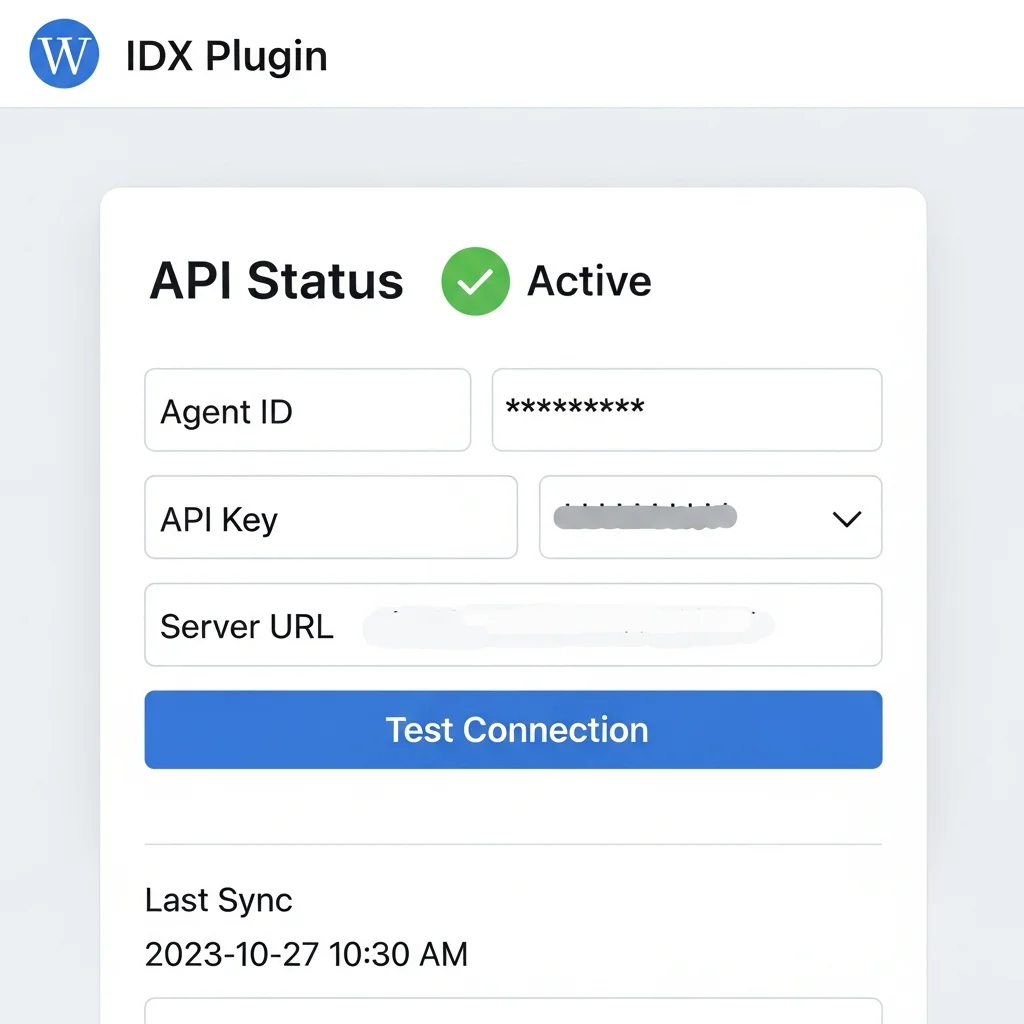
The API is the bridge between your WordPress site and the MLS data system when it fails, your listings stop syncing, your search returns no results, and the entire integration breaks down.
Start by checking your API status directly in your IDX plugin’s settings. Most quality plugins have a compatibility or settings tab showing whether your API connection is Active or returning an error. Check this first.
If the status shows inactive or an error, verify your login credentials character by character. One wrong character and the connection fails silently. Next, confirm your API credentials haven’t expired — some MLS systems require periodic renewal. Contact your MLS board if you’re unsure; they can confirm whether credentials are valid and regenerate them if needed.
If everything appears correct but the connection still fails, temporarily disable other plugins to check for conflicts, then re-enable them one by one to isolate the problem.
Listings Not Syncing or Displaying
When the API connection is fine but listings aren’t appearing on your website, your data synchronization isn’t working properly.
Check your plugin’s sync settings to see when the last successful sync occurred. If it hasn’t synced recently, trigger a manual sync through your plugin’s dashboard. After triggering a sync, clear your WordPress site’s cache sometimes cached pages prevent updated listings from appearing even though the sync completed successfully.
Verify that your MLS board hasn’t changed their data structure or access permissions. Boards occasionally update their systems, and plugins sometimes need adjustment to stay compatible. Check your plugin’s settings or changelog for notes related to your specific MLS.
If listings display but appear incomplete or with missing photos, the issue is usually a photo syncing problem rather than a data problem. Most plugins handle photos separately from listing data, so photos may lag behind property information.
Theme and Plugin Conflicts
Before assuming your IDX plugin is broken, check its plugin compatibility settings. Most quality plugins include a dedicated compatibility tab that identifies conflicts with your theme or other installed plugins.
If conflicts appear, try disabling non-essential plugins one at a time to see if that resolves the issue. If the conflict is with your theme itself, check whether your theme developer offers compatibility settings for IDX plugins — many modern real estate themes include built-in compatibility for popular IDX solutions.
As a diagnostic step, temporarily switch to a default WordPress theme to confirm whether the issue is theme-related. If listings work perfectly with a default theme, your current theme needs adjustment or replacement.
5 Expensive Mistakes to Avoid When Choosing Your IDX Plugin
Choosing the wrong IDX plugin can cost you far more than the plugin’s purchase price. I’ve watched agents lose months of SEO work, content they created, and money spent on setup because they picked the wrong solution. These mistakes are entirely preventable.
Mistake #1: Not Verifying Content Ownership Before Purchasing
This is the issue I’ve seen damage real estate businesses most severely, because it’s preventable and the cost is enormous. Some IDX platforms don’t let you own the content you create on their system. If you build blog posts, create property descriptions, or develop landing pages through their system, you lose everything if you switch providers.
I’ve seen agents pour months into content, only to discover they have zero ownership rights when they tried to move to a different platform. Always ask your vendor directly before paying anything: “Do I own this content? Can I export it and take it with me if I switch providers?” Get the answer in writing.
Mistake #2: Choosing Developer-Focused Tools Without Developer Resources
Some IDX plugins are designed for developers. They’re powerful and flexible, but they’re not designed for solo agents without coding knowledge. IDX Broker is the perfect example. With a developer, it delivers an 8–10 out of 10 experience. Without one, you’re stuck with dated templates and unable to modify anything dropping to a 3–5 out of 10.
Be honest about your technical resources before selecting a platform. If you’re a solo agent without a development budget, choose a solution designed for that reality.
Mistake #3: Ignoring SEO Architecture When Selecting Your Plugin
Some IDX plugins use iframes to display listings. Google can’t index content inside iframes, which means your beautiful listing pages are invisible to organic search. Other plugins integrate organically, rendering listings as indexable content directly on your domain.
Don’t pick a plugin just because it’s popular or affordable. Ask specifically: “Are listings rendered organically on my domain or loaded in an iframe?” If it’s iframe-based and you care about organic search traffic, keep looking.
Mistake #4: Using Shared Blog Content Instead of Creating Unique Content
Some platforms offer pre-written blog content to save time. Every other agent using that platform has identical blog posts. Google penalizes duplicate content, which means your blog won’t rank, you won’t get organic traffic, and you don’t own any of it if you leave. Invest in creating unique content specific to your market. It takes more work, but it generates real traffic.
Mistake #5: Not Checking for Recent Company Changes
IDX platforms get acquired, restructured, or change their business model regularly. IDX Broker’s acquisition by Elm Street is a current example already changing partner agreements and pricing in ways that affect existing customers. Before purchasing, research recent news about the company. Check their changelog. Ask existing users about changes they’ve experienced. A 30-minute research session can save you from costly surprises after you’re locked in.
Frequently Asked Questions About IDX Plugins for WordPress
Do I Need a Developer to Set Up an IDX Plugin on WordPress?
This depends entirely on which plugin you choose and that’s where most agents make the wrong decision.
User-friendly options like Showcase IDX and iHomefinder Optima Express are designed for solo agents without coding experience. These use point-and-click interfaces where you configure listings, search filters, and lead capture through your browser. No coding required.
Developer-focused plugins like SimplyRETS and IDX Broker require professional customization to perform properly. Without developer support, IDX Broker delivers a fraction of its potential a 3–5 out of 10 experience for non-technical users versus 8–10 out of 10 with a skilled developer implementing it properly.
Evaluate your situation honestly. If you don’t have a development budget or developer on your team, choose a solution built for non-technical users. You’ll have better results, faster implementation, and far less frustration.
How Much Does an IDX Plugin for WordPress Cost?
Pricing varies significantly depending on the plugin and the features you actually need.
Free versions exist, but they don’t include MLS data integration. You’d manually enter each listing yourself, which defeats the purpose of an IDX plugin entirely.
For actual MLS integration, expect these price points: RealtyNA WPL Pro costs $199 as a one-time fee. Showcase IDX starts at $74.95 monthly. MLS Import and SimplyRETS start at $49 monthly. Estatik Premium runs $89 every six months.
If you’re on a tight budget, the RealtyNA WPL Pro one-time fee often delivers better long-term value than monthly subscriptions, especially if you plan to use it for several years. Over two years, $199 one-time beats $49/month by nearly $1,000.
Will IDX Pages Actually Rank on Google or Will Zillow Always Dominate?
You won’t outrank Zillow for broad searches like “homes for sale in Dallas.” But that’s not the real opportunity anyway.
With proper organic IDX integration listings rendering directly on your WordPress domain as indexable HTML content, not in iframes you can absolutely rank for specific, high-intent searches. Think “5-bedroom homes under $500K in Summerlin Las Vegas” or “lakefront properties under $750K near Paradise Valley.”
I’ve built 186 IDX showcase pages specifically targeting these long-tail searches. Even though most buyers start on major portals for general searching, my IDX pages capture the specific, high-intent searches where I can actually compete and win.
What Happens to My Listings and Content If I Switch IDX Providers?
This is where content ownership becomes critically important, and it’s a question you must ask before purchasing not after.
Some platforms take everything with them when you leave. iHomefinder’s “Express Content” system provides pre-written blog posts, but you don’t own them. If you move to a different provider, that content stays behind. Other platforms allow full export and migration.
I’ve emphasized this throughout this guide because I’ve seen it damage real estate businesses firsthand: always confirm you own your content and can take it with you before signing up for anything. Ask every vendor directly, in writing, what happens to your content if you cancel. It’s a 30-second question that protects years of work.
How Many Property Listings Should I Display Per Page for Best Performance?
Display 12–15 listings per page maximum. Anything beyond that hurts your site speed and search engine performance.
When you load 40+ listings per page, the page takes longer to load, visitors leave faster, and Google ranks you lower because of poor Core Web Vitals scores. Keep each page lightweight and fast.
Use pagination so visitors can access your full inventory without requiring everything to load simultaneously. If you use a three-column layout, stick to multiples of three 12, 15, or 18 listings for visual consistency.
Should I Use Forced Registration or Will That Drive Visitors Away?
Immediate forced registration before showing any listings drives visitors away. But strategic prompting at the right moment converts leads without frustrating people.
The proven approach is setting a threshold typically three listings viewed before prompting registration. By that point, someone has shown genuine interest. They’re actively evaluating homes, not casually browsing.
When you do prompt, offer real value: saved searches, new listing alerts, property price drop notifications. Frame it as “Get new listing alerts for homes matching your criteria” rather than a generic “Create an account.”
Most quality IDX plugins let you configure this in settings how many listings appear before the prompt triggers and exactly what message displays.
What’s the Difference Between Organic IDX Integration and Iframe-Based Solutions?
Organic integration renders property listings directly on your WordPress domain as actual HTML content that Google can crawl and index. Each listing becomes a real page with a real URL. Google finds it, indexes it, and can rank it in search results.
Iframe solutions keep listings separate. They may display on your website visually, but they’re accessed from a different domain or system. Google can’t index iframe content, so your listings remain invisible in organic search. You lose all SEO value.
This matters enormously for long-term organic traffic. Choose plugins with organic integration RealtyNA WPL Pro, Showcase IDX, and similar tools handle this correctly.
Is There a Good Free IDX Plugin for WordPress?
Free versions exist for RealtyNA WPL and Estatik, but they don’t include MLS data integration. You’d manually add each listing yourself, one at a time. That’s not actually an IDX plugin it’s a property directory system.
For automated MLS integration, you need paid versions. RealtyNA WPL Pro costs $199 one-time, which beats monthly subscriptions if you’ll use it for more than four months. Estatik Premium runs $89 every six months. SimplyRETS and Showcase IDX start around $49 monthly.
Calculate the real cost before deciding. A one-time $199 investment beats $49 monthly if you’ll use it for more than four months and most agents use their IDX plugin for years. When you’re looking for the best IDX plugin for WordPress that fits a tight budget, that one-time fee structure makes RealtyNA WPL Pro the smartest long-term value in the market.
All pricing and platform information reflects research conducted in early 2026. IDX platform pricing, ownership, and features change regularly always verify current terms directly with each vendor before purchasing.