
If you are dealing with a WordPress homepage blog title settings conflict, you are not alone. I have run into this problem more than once, and it usually shows up in a few common ways. Sometimes the homepage title will not update. Sometimes the blog page title looks wrong. In other cases, the homepage displays the same title as a post, which makes the setup feel confusing fast.
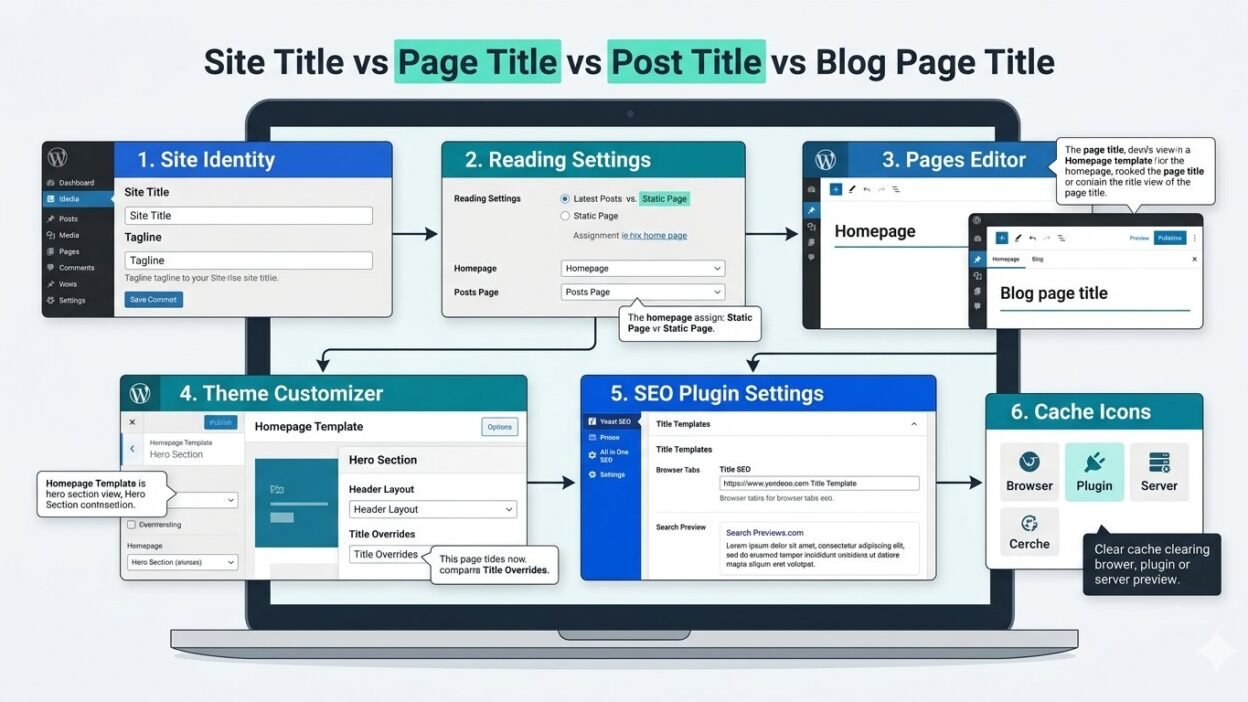
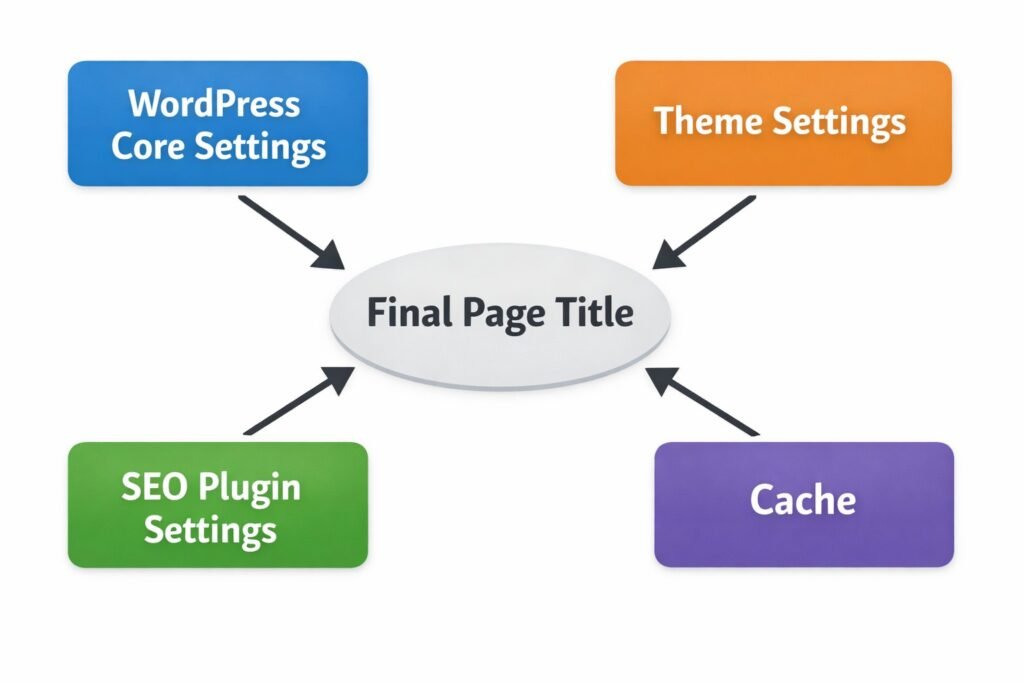
What makes this frustrating is that WordPress can pull titles from several places at once. The site title, page title, post title, theme settings, and SEO plugin title settings can all affect what appears on screen or in the browser tab. If one of those settings overrides another, you end up with a title conflict.
In my experience, the fastest fix is to check each title source in the right order. That simple process helps me spot whether the problem comes from Reading Settings, Site Identity, the theme, or an SEO plugin.
What Causes a WordPress Homepage Blog Title Settings Conflict?
A title conflict usually happens when one part of WordPress controls the visible title while another part controls the browser tab title or SEO title tag. That is why the homepage title may look one way on the page and another way in the tab or search preview.
I have also noticed that many users change the title of a page and expect that change to update everywhere. WordPress does not always work that way. A blog page title can come from the assigned posts page. A homepage title can also be affected by the site title. On top of that, a theme or plugin may override the default output.
Here are the most common causes I see:
- The wrong page is being edited
- The homepage is set to latest posts instead of a static homepage
- The posts page is assigned in Reading Settings
- The theme controls title display
- An SEO plugin changes the title tag
- Cache shows an older version of the title
Why this issue confuses so many WordPress users
The confusion starts because WordPress uses similar terms for different parts of the site. A homepage title is not always the same as a site title. A blog page title is not always handled like a normal page title. A post title can also appear in unexpected places if the theme template pulls it in automatically.
I ran into this myself when I changed a page title and nothing happened on the front end. At first, I thought WordPress had ignored the change. The real problem was much simpler. I was editing the page title, but my theme settings were controlling the visible heading.
That is why this issue feels harder than it should. In many cases, you are changing the right title in the wrong place.
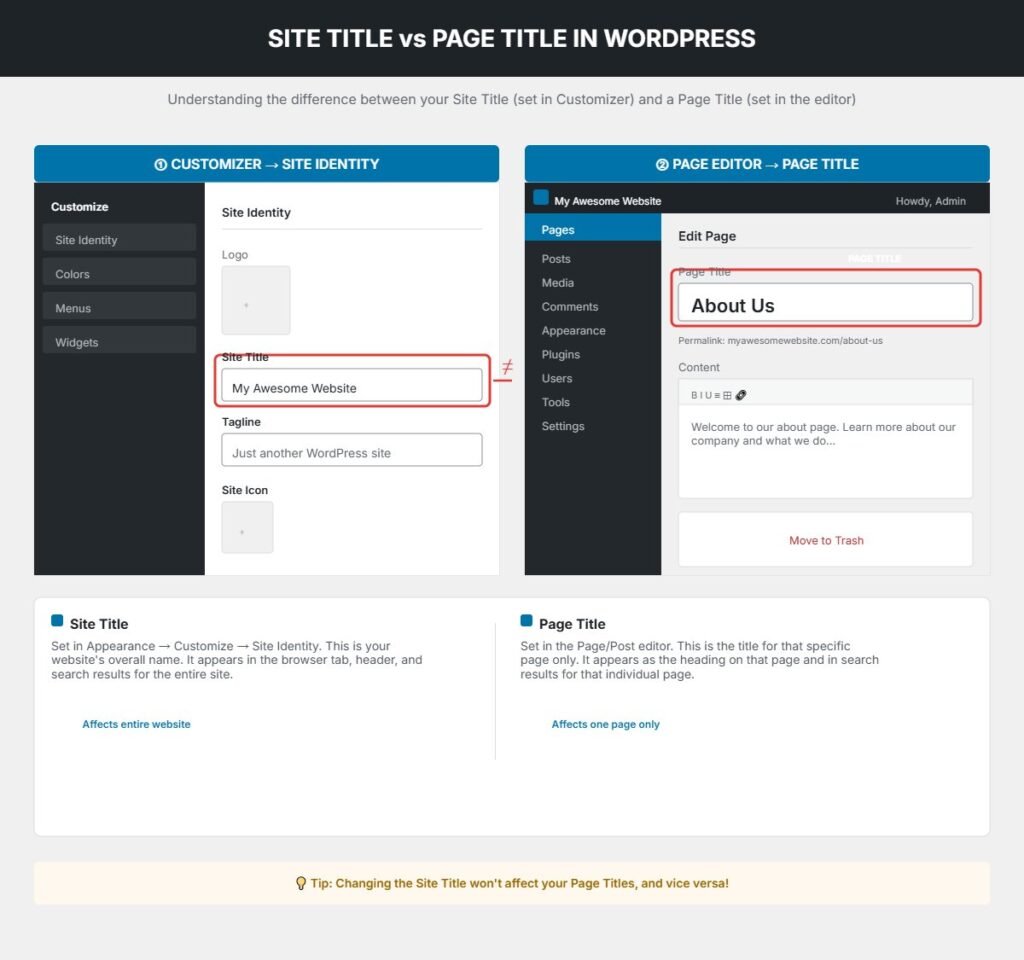
WordPress Site Title vs Page Title What Each One Actually Does
Before you try to fix anything, it helps to understand the difference between the site title, page title, homepage title, blog page title, and post title. This is where most mistakes begin.
The WordPress site title is usually your website name. It often appears in Site Identity and can show in the browser tab, header area, or search title depending on your setup.
A page title belongs to an individual page. If your homepage uses a static page, that page has its own title. A post title belongs to a blog post. The blog page title can come from the page assigned as your posts page.
When I troubleshoot title conflicts, I always separate these first:
- Site title equals overall website name
- Page title equals title of a specific page
- Post title equals title of a specific blog post
- Blog page title equals title of the page assigned to show posts
- SEO title tag equals title shown in browser tabs and often in search results
Once I sort these out, the problem usually becomes much easier to spot.
Where the site title appears
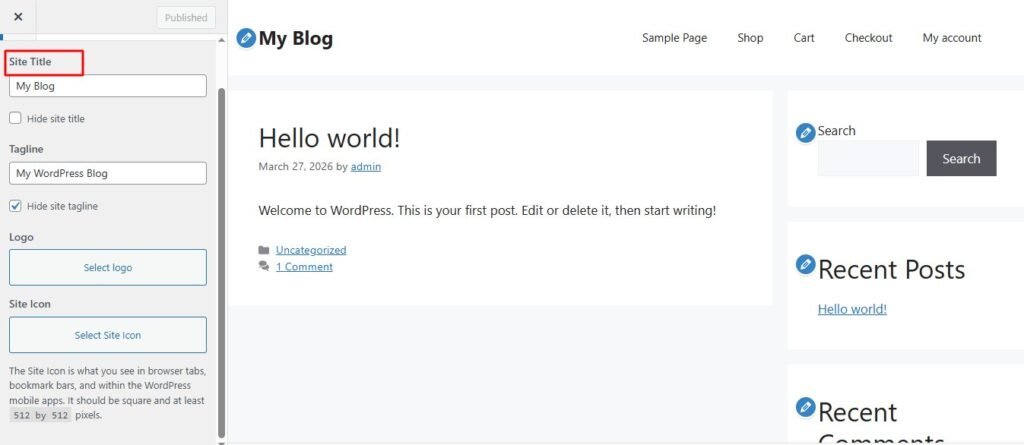
The site title usually lives under Site Identity in WordPress. In many themes, this acts like your brand name. It may show in the header, browser tab, or homepage metadata.
Some themes display the site title prominently. Others hide it visually but still use it in the title tag. That means you may update the site title and see a change in the tab, but not in the visible homepage heading.
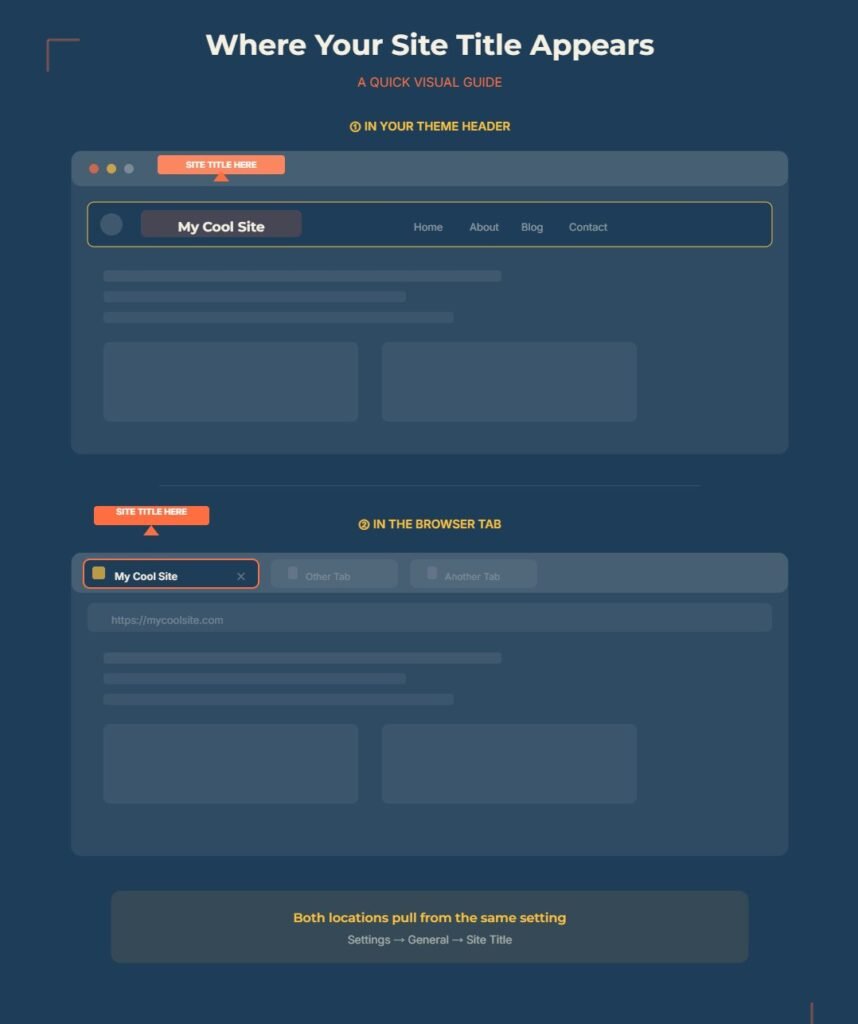
This is why I never assume the site title controls the whole homepage. It only controls the parts your theme or plugin allows it to control.
Where the page and post titles appear
The page title usually appears as the main heading on a page unless your theme hides it or replaces it. The post title works the same way for blog posts.
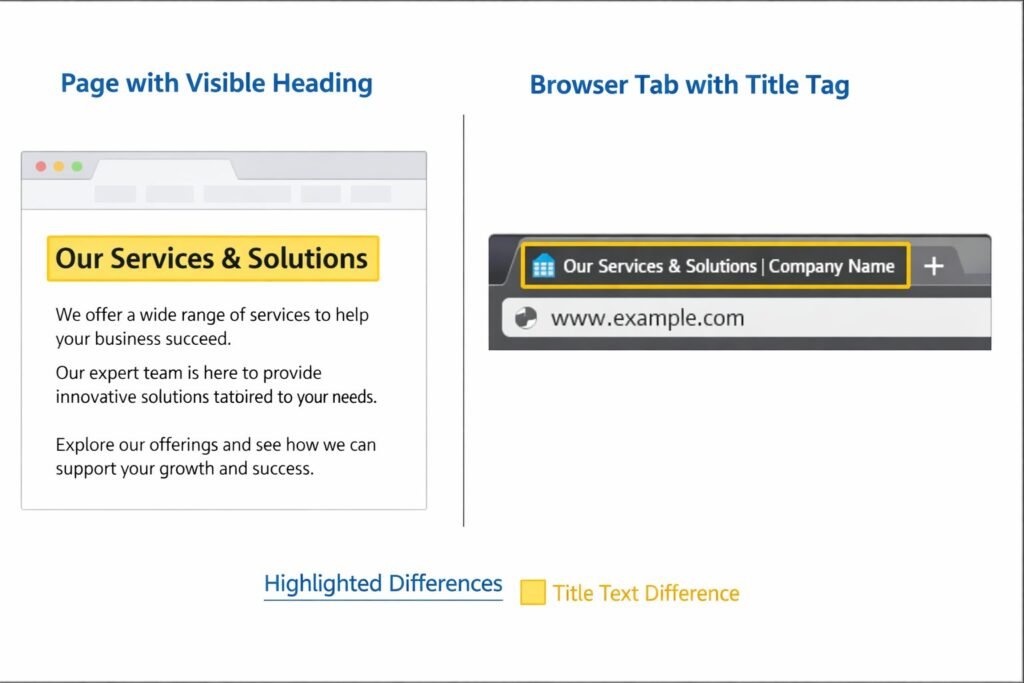
The tricky part is that visible titles and title tags are not always the same thing. Your page title may look correct on screen while the browser tab still shows something different. In that case, the issue is often related to theme settings or an SEO title template.
I always check both:
- The title shown on the page itself
- The title shown in the browser tab
If those do not match, I know I am dealing with more than a simple page title issue.
Check These Settings First Before You Change Anything Else
When I troubleshoot a homepage title or blog page title problem, I start with a short checklist. This saves time and prevents random edits.
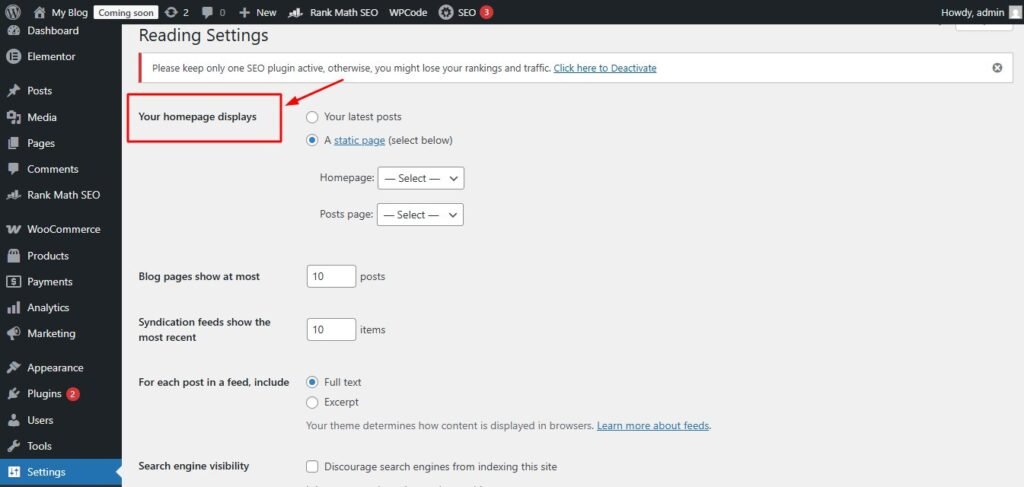
Here is the first pass I recommend:
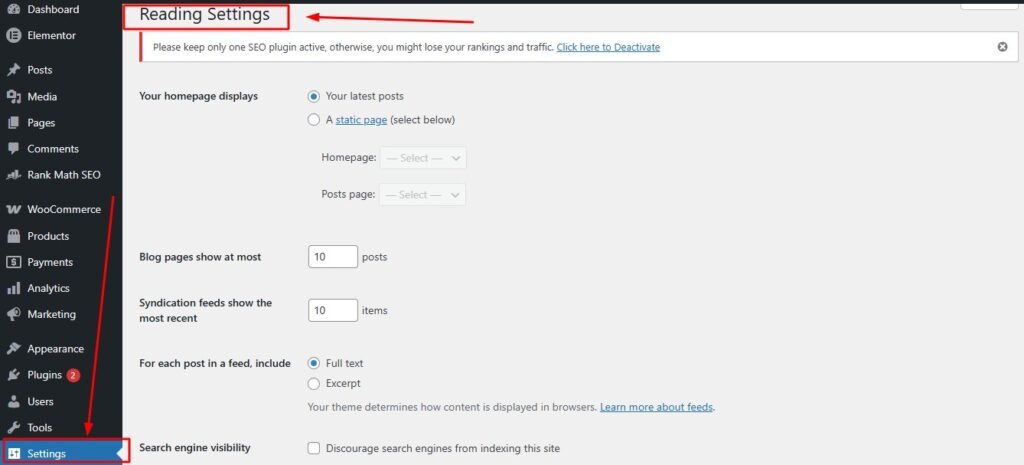
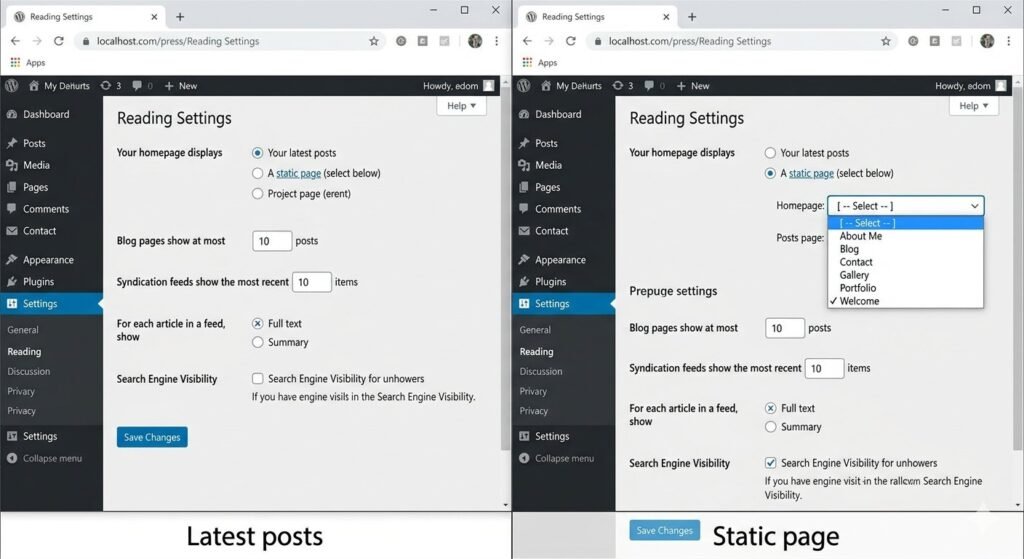
- Go to Settings then Reading
- Check whether your homepage displays latest posts or a static page
- If using a static page, note which page is assigned as Homepage
- Check which page is assigned as Posts page
- Open those exact pages and review their titles
- Then check Site Identity and your SEO plugin settings
This step matters because the posts page title and homepage title depend on how your site is set up.
Static homepage vs latest posts
If your homepage shows latest posts, WordPress handles the front page differently than it does for a static page. In that case, the homepage title may rely more on your site title, theme layout, or SEO template.
If your homepage uses a static page, that page has its own page title. That title may be what appears on the page, unless the theme overrides it.
I always check this setting first because it changes the whole troubleshooting path.
How to change homepage and posts page title in WordPress
If you want to change homepage and posts page title in WordPress, you need to edit the correct page based on your Reading Settings.
Here is the process I use:
- Go to Settings then Reading
- Find the page assigned as Homepage
- Find the page assigned as Posts page
- Go to Pages and open those pages directly
- Update their titles if needed
- Save changes and review the front end
If the title still looks wrong after that, the next likely source is your theme or SEO plugin.
How to Fix a WordPress Blog Page Title Conflict
A lot of confusion happens on the blog page because the posts page does not always behave like a normal page. You can assign a page as the posts page, but WordPress may use it in a special way.
That is why I treat the blog page as its own case when I troubleshoot. If the blog page title looks wrong, I check Reading Settings first, then I check the title of the assigned posts page, and after that I review theme and plugin settings.
Why the posts page does not behave like a normal page
The posts page title can be confusing because once a page is assigned as the posts page, WordPress uses it as the blog index. That can affect how content and titles appear.
For example, the page may have a title like Blog, but your theme may display something else based on an archive template. In some setups, the visible heading, browser tab title, and SEO title may all come from different places.
This is why a posts page title issue can feel inconsistent. The page exists, but WordPress treats it differently behind the scenes.
The fastest fix for most blog title conflicts
When I need a quick fix, I follow this order:
- Confirm the correct posts page is assigned
- Edit the title of that page
- Check whether the theme replaces archive or page headings
- Review the SEO plugin title template
- Clear cache and reload the page
In my experience, one of those five checks usually reveals the problem. Most blog page title conflict issues are not random. They are just hidden behind multiple title layers.
Why Your WordPress Homepage Title Is Not Changing
If your WordPress homepage title is not changing, the issue usually comes down to one of four things. You are editing the wrong page, the homepage setup is different than you think, the theme overrides the title, or cache is showing an old version.
I have seen all four happen, and cache is often the one people forget. After editing the homepage title, they refresh the page and assume the fix failed. In reality, the old version is still being served.
Check for theme or customizer overrides
Some themes manage the homepage title in their own settings. Others let you hide the page title or replace it with a custom heading. That can make it seem like the homepage title is not changing, even though the WordPress page title has updated correctly.
I usually check these areas:
- Appearance then Customize
- Theme options panel
- Homepage template settings
- Header layout or hero section settings
If a theme is pulling a custom heading, your WordPress homepage title may not show on the front end at all.
Clear cache before you assume the fix failed
If the title is not changing, always clear cache before doing anything drastic. I check three levels:
- Browser cache
- WordPress caching plugin
- Server or hosting cache
This step has saved me a lot of time. A title can be updated correctly in the dashboard but still appear unchanged on the live page until cache is cleared.
Why Does My WordPress Homepage Have the Same Title as My Post?
If your homepage has the same title as your post, the issue usually points to a template problem, a homepage assignment mistake, or a mix up between visible titles and title tags.
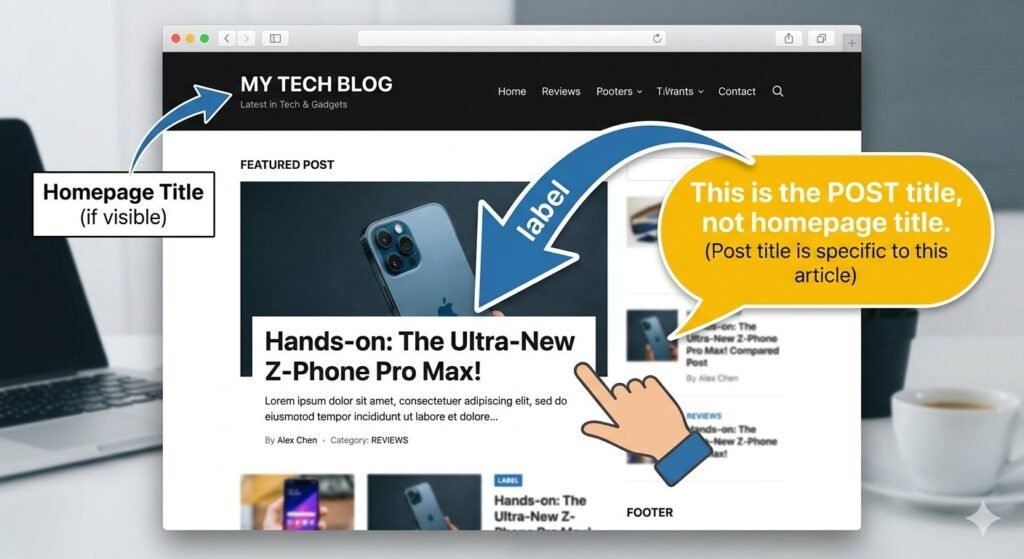
I have seen this happen when a theme pulls the latest post title into a homepage section, and the user thinks the homepage title itself has changed. I have also seen cases where the browser tab title matched a post title because of an SEO setting, while the visible homepage heading was actually correct.
When the issue is a template problem
Some homepage templates pull dynamic content from posts. If the layout is designed to feature the latest article, it may display the post title prominently. That can make it look like the homepage title and post title are the same.
When I suspect this, I inspect the homepage layout rather than the page title alone. If the post title is coming from a featured post block or custom section, the issue is not the homepage title itself. It is the template content.
When the issue is actually an SEO title tag
Sometimes the visible homepage heading is fine, but the browser tab or search preview shows the same title as a post. That usually points to the title tag, not the on page heading.
In that case, I check the SEO plugin settings and homepage title template. If the wrong variable or template has been applied, WordPress may output a misleading title tag even though the page title is correct.
The 5 Step Fix for a WordPress Homepage Blog Title Settings Conflict
If you want one simple workflow, this is the process I use when I need to solve a WordPress homepage blog title settings conflict quickly.
Step 1 Confirm your homepage setup
Go to Settings then Reading and confirm whether your site uses latest posts or a static homepage. Also confirm whether a posts page is assigned.
This tells you which page controls the homepage and which one controls the blog index.
Step 2 Check the actual page title
Open the page assigned as the homepage and the page assigned as the posts page. Check their titles directly inside Pages.
This makes sure you are editing the right content.
Step 3 Review Site Identity settings
Go to Appearance, then Customize, and look at Site Identity. Review the site title and tagline.
If the homepage or browser tab is pulling the site title, this is where you may need to update it.
Step 4 Check theme and plugin overrides
Look through theme settings, homepage templates, and your SEO plugin title settings. This is where many hidden conflicts start.
If you are trying to figure out how to fix a WordPress blog page title conflict, this step often uncovers the real cause.
Step 5 Clear cache and test again
Clear browser cache, plugin cache, and server cache. Then check the homepage, blog page, and browser tab again.
Many title problems look unresolved until every cache layer has been cleared.
A Quick Checklist to Make Sure the Fix Worked
Before you move on, take one final look at everything. I always do this because a title issue can appear fixed in one place and still be wrong somewhere else.
Use this checklist:
- Homepage title looks correct on the page
- Blog page title looks correct on the page
- Browser tab title is correct
- Site title matches your branding
- Posts page title reflects the page you assigned
- No old title appears after refresh
- SEO plugin title template is correct
If all of those checks pass, your setup is probably clean.
What to recheck if the title still looks wrong
If the title still looks wrong, go back through these areas one more time:
- Reading Settings
- Page titles for homepage and posts page
- Site Identity
- Theme customizer settings
- SEO plugin templates
- Cache layers
When I troubleshoot WordPress site title vs page title problems, one of those areas almost always explains the issue. The key is to check them in order instead of changing everything at once.
Frequently Asked Questions
Why is my WordPress homepage title not changing after I edit it?
The most common causes are editing the wrong page, a theme override, an SEO plugin template, or cache. I would check Reading Settings first, then confirm the correct page title, then review theme and plugin settings.
What is the difference between a site title and a page title in WordPress?
The site title is your overall website name and usually lives in Site Identity. A page title belongs to one specific page. Depending on your theme, those two titles may appear in different places.
Why does my homepage have the same title as one of my blog posts?
This usually happens because of a template issue, a homepage assignment mistake, or a title tag setting. The visible page heading and the browser tab title may also be pulling from different sources.
How do I change the title of my posts page in WordPress?
Go to Settings then Reading and see which page is assigned as the posts page. Then go to Pages and edit that page title directly. After that, check theme and SEO settings if the visible result still looks wrong.
Can a WordPress theme override my homepage title?
Yes, it can. Some themes use custom homepage layouts, hero sections, or template settings that replace the default page title display.
Can Yoast or Rank Math cause a title conflict in WordPress?
Yes. Both plugins can control title tags and templates. That means the title shown in the browser tab or search preview may differ from the visible heading on the page.